Big data processing tools are becoming essential solutions for businesses that need to manage and analyze massive volumes of information generated from ERP systems, SaaS applications, IoT devices, customer platforms, and cloud services. These data processing tools help organizations collect, transform, integrate, and analyze complex datasets that traditional databases may struggle to handle efficiently. In this article, DIGI-TEXX explores the top 15 big data processing tools for businesses in 2026, including their key features, benefits, pricing, and how to choose the right solution based on specific data requirements.
What Are Big Data Processing Tools?
Big data tools are software platforms designed to collect, process, integrate, store, and analyze datasets that exceed the capabilities of traditional databases or business applications. These platforms support high-volume, high-velocity, and high-variety data generated from enterprise systems, cloud applications, IoT devices, customer interactions, and digital services.
Unlike conventional databases that primarily store information, modern big data tools manage the entire data lifecycle – from ingestion and transformation to analytics and visualization. They enable organizations to combine data from multiple sources, create reliable processed data, and deliver insights for business intelligence, machine learning, and operational decision-making.
Today, organizations rarely rely on a single platform. Instead, they combine multiple technologies – including big data integration tools, processing engines, cloud data warehouses, and analytics platforms – to build scalable data ecosystems that support both batch and real-time workloads.
Core capabilities of modern big data tools
Most enterprise big data platforms provide capabilities across several stages of the data pipeline:
- Data ingestion to collect information from databases, APIs, applications, sensors, and streaming platforms.
- Data integration to combine information from multiple systems into a unified dataset.
- Data processing to clean, transform, and prepare raw information for analytics.
- Data storage using data lakes, cloud warehouses, or distributed databases.
- Analytics and visualization for reporting, dashboards, predictive analytics, and AI applications.
Rather than focusing on a single function, modern organizations typically build a technology stack where each platform performs a specialized role while working seamlessly with the others.
=> See more: How Data Processing Services Can Improve Accuracy and Efficiency
Why Use Big Data Processing Tools in Your Business?
Implementing big data processing tools in your business offers several advantages:
- Improved decision making: By analyzing massive amounts of data, businesses can uncover insights that were previously hidden, helping leaders make better decisions.
- Enhanced operational efficiency: Big data tools can automate many processes, reducing human error and increasing productivity.
- Competitive advantage: With real-time data analysis, businesses can respond quicker to market trends, giving them an edge over competitors.
- Customer insights: Analyzing customer behavior data enables businesses to tailor their products and services to customer preferences, enhancing customer satisfaction.
=> See more: Outsource Data Processing Services – Transforming Business Operations With BPO Solutions
How Modern Big Data Architecture Works
A modern data platform is no longer built around a single database. Instead, organizations connect multiple specialized technologies that move data through a continuous pipeline—from collection to business insights.
The typical architecture consists of five stages.
Step 1. Data Colletion
The process begins by collecting data from business applications, ERP and CRM systems, cloud services, websites, mobile apps, IoT devices, APIs, and databases. These sources continuously generate structured, semi-structured, and unstructured information that needs to be consolidated before analysis.
Step 2. Data Preparation (Cleaning)
Once collected, data is transferred between systems using big data integration tools. These platforms automate extraction, synchronization, and data movement while preserving consistency across cloud and on-premises environments. Organizations may use batch pipelines for scheduled workloads or streaming technologies when near real-time delivery is required.
Step 3. Data Input
After ingestion, organizations begin processing big data by validating, cleansing, enriching, and transforming raw datasets into standardized formats. Automated data processing tools help remove duplicates, resolve inconsistencies, and prepare information for downstream analytics or AI models.
Step 4. Data Processing
The transformed processed data is then stored in cloud data warehouses, data lakes, or distributed databases such as Snowflake, BigQuery, or Cassandra. Centralizing data enables consistent reporting while supporting large-scale analytical workloads.
Step 5. Data Output (Storage/Interpretation)
Finally, business intelligence platforms and AI tools transform processed data into dashboards, reports, forecasts, and predictive insights. Decision-makers can monitor performance, identify trends, and respond to operational changes with greater confidence.
Modern enterprises rarely depend on one platform. Instead, they combine processing engines, integration platforms, cloud warehouses, and analytics tools into a unified big data ecosystem.

Big Data Tools Comparison Table
Choosing the right big data tools depends on your business goals, data volume, and processing requirements. Some platforms are built for high-speed stream processing, while others specialize in large-scale batch analytics, cloud-native data warehousing, or machine learning workloads. The comparison below highlights the most important differences between the leading solutions, helping you quickly identify which tool best fits your data architecture and use case.
| Tool | Category | Best For | Deployment | Pricing |
| Apache Spark | Processing Engine | Distributed analytics & AI | Cloud / On-prem | Free |
| Apache Hadoop | Processing Engine | Batch processing | On-prem / Cloud | Free |
| Apache Flink | Streaming Engine | Real-time analytics | Cloud / On-prem | Free |
| Databricks | Lakehouse Platform | AI & data engineering | Cloud | Usage-based |
| Snowflake | Cloud Data Warehouse | Enterprise analytics | Cloud | Usage-based |
| Google BigQuery | Cloud Data Warehouse | Serverless analytics | Cloud | Pay-as-you-go |
| Azure Synapse Analytics | Data Warehouse | Microsoft ecosystem | Cloud | Usage-based |
| Apache Cassandra | NoSQL Database | High-volume operational data | Cloud / On-prem | Free |
| Apache Kafka | Streaming Platform | Event streaming | Cloud / On-prem | Free |
| Apache NiFi | Data Integration | Automated data movement | Cloud / On-prem | Free |
| Airbyte | ELT Platform | Open-source integration | Cloud / Self-hosted | Free / Paid |
| Fivetran | Managed ELT | Automated pipelines | Cloud | Subscription |
| Tableau | Business Intelligence | Interactive dashboards | Cloud / Desktop | Subscription |
| Microsoft Power BI | Business Intelligence | Self-service reporting | Cloud | Subscription |
| Looker | Analytics Platform | Semantic modeling | Cloud | Custom pricing |
Top 15 Big Data Tools for Modern Data Platforms (2026)
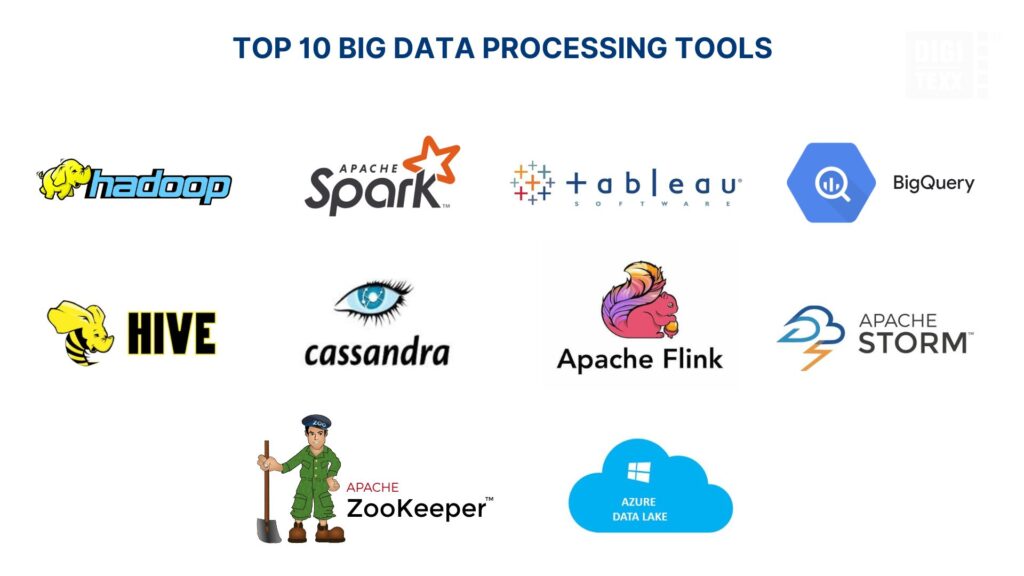
Modern big data platforms are no longer built around a single technology. Most organizations combine processing engines, cloud data warehouses, integration platforms, and business intelligence tools to create scalable analytics pipelines. The following big data tools represent the most widely adopted solutions across modern data architectures in 2026, covering data ingestion, processing, storage, analytics, and visualization.
Big Data Processing Engines
1. Apache Spark
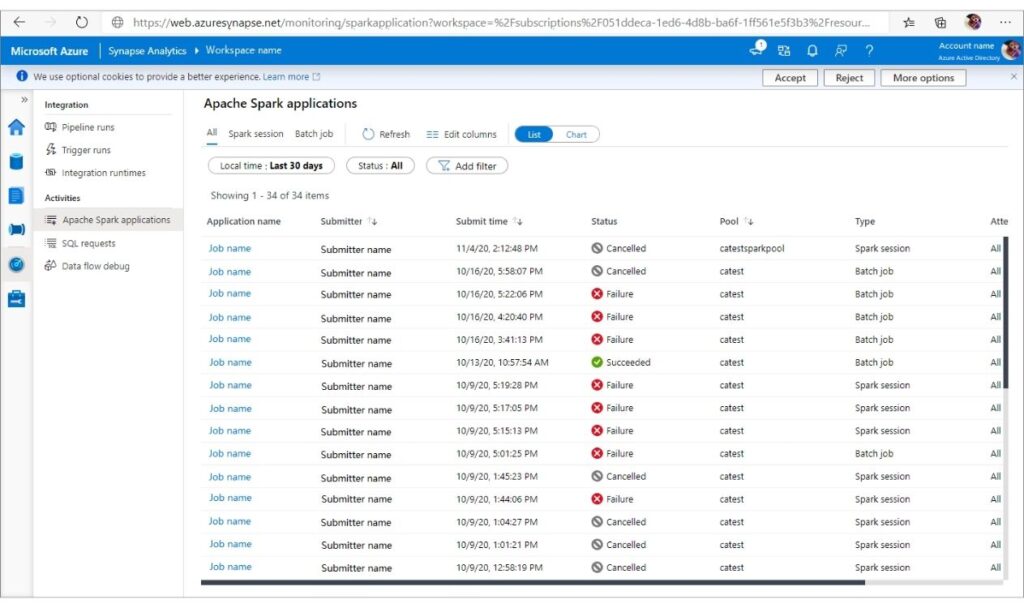
Apache Spark is one of the most popular big data processing tools for organizations that need to process big data quickly and efficiently. Unlike traditional data processing software that relies heavily on disk operations, Spark performs in-memory computing, delivering significantly faster performance for analytics, ETL, machine learning, and streaming workloads. It supports both batch and real-time processing, making it a versatile big data integration tool for modern data platforms. With broad compatibility across Hadoop, Kubernetes, Delta Lake, Apache Kafka, and major cloud providers, Spark has become a core engine for building scalable big data software and enterprise data processing programs.
- Key Features: In-memory distributed processing for high-speed analytics; Spark SQL for structured data; Structured Streaming for real-time pipelines; MLlib for machine learning; GraphX for graph analytics; multi-language support (Python, Scala, Java, and R); seamless integration with Hadoop, Kafka, Delta Lake, Snowflake, and Kubernetes.
- Pros: Exceptional processing speed; highly scalable for petabyte-scale workloads; supports both batch and streaming data processing; rich open-source ecosystem; excellent for AI, machine learning, and advanced analytics.
- Cons: Requires substantial memory resources; deployment and performance tuning can be complex; may be excessive for small-scale data projects.
- Best for: Large enterprises, data engineering teams, AI and machine learning projects, financial analytics, and organizations building top tools for streaming data processing 2025–2026.
- Rating: 4.7/5 (G2)
- Pricing: Free and open source under the Apache License 2.0. Managed cloud services are available through Databricks, AWS EMR, Google Cloud Dataproc, and Azure HDInsight with usage-based pricing.
2. Apache Hadoop
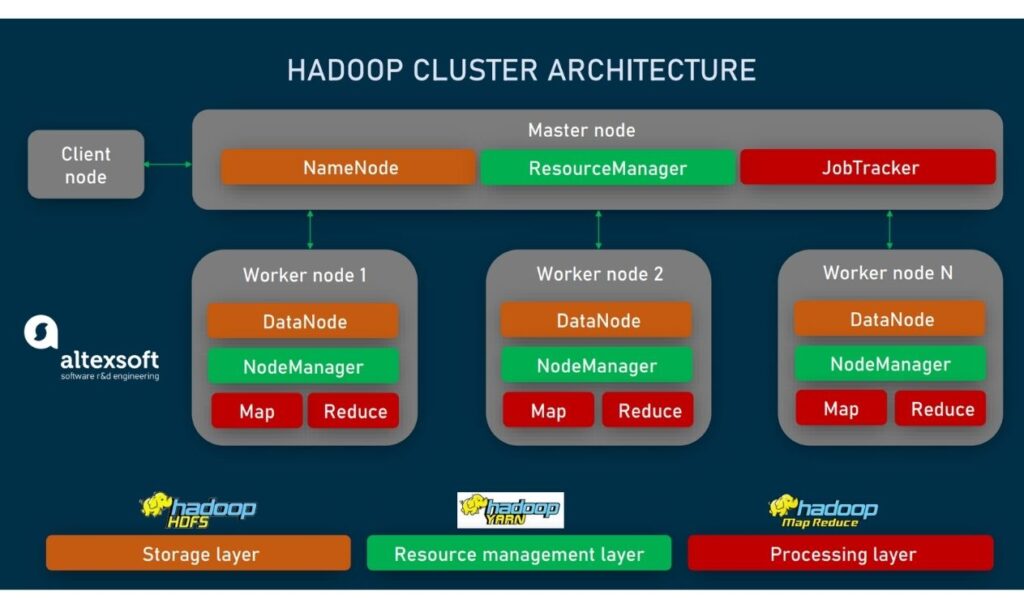
Apache Hadoop is one of the foundational big data processing tools that made large-scale distributed computing practical for enterprises. The framework combines the Hadoop Distributed File System (HDFS) with the MapReduce processing model to store and process big data across clusters of commodity servers. Although many organizations now use newer data processing software such as Apache Spark for high-speed analytics, Hadoop remains a reliable platform for batch processing, long-term data storage, and building enterprise big data integration tools. Its scalability and fault-tolerant architecture make it a popular choice for organizations managing petabytes of structured and unstructured data.
- Key Features: Distributed storage with HDFS; MapReduce framework for batch processing; automatic data replication for high availability; horizontal scalability across thousands of nodes; YARN resource management; integration with Hive, HBase, Spark, Kafka, and other Hadoop ecosystem components.
- Pros: Highly scalable for massive datasets; reliable fault tolerance through data replication; cost-effective because it runs on commodity hardware; extensive open-source ecosystem; suitable for long-term storage and large-scale processing big data workloads.
- Cons: Batch processing is slower than modern in-memory engines; deployment and cluster management require experienced administrators; less suitable for low-latency analytics and real-time applications.
- Best for: Enterprises handling large-scale batch processing, data lakes, archival storage, log analytics, and organizations building scalable data processing programs on distributed infrastructure.
- Rating: 4.3/5 (G2)
- Pricing: Free and open source under the Apache License 2.0. Commercial distributions and managed services are available through vendors such as Cloudera and Amazon EMR with subscription or usage-based pricing.
3. Apache Flink
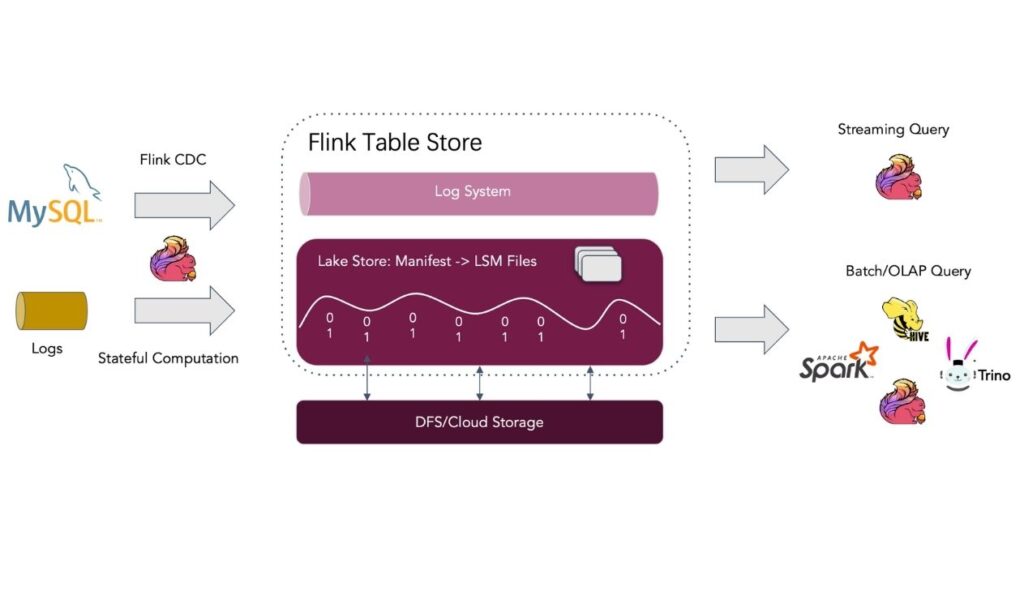
When low-latency processing is a priority, Apache Flink is one of the strongest big data processing tools available. Unlike traditional batch-focused engines, Flink was built around stream-first architecture, allowing organizations to process events continuously while still supporting batch workloads through a unified engine. Today, it is widely adopted for fraud detection, IoT analytics, real-time monitoring, and event-driven applications where milliseconds matter. Flink also provides advanced state management and fault tolerance, making it a reliable choice for businesses that need continuous data processing at scale.
- Key Features: Real-time stream processing with event-time semantics; unified batch and stream processing engine; stateful computation with checkpointing; exactly-once processing guarantees; scalable distributed architecture; integration with Kafka, Hadoop, Kubernetes, and major cloud platforms.
- Pros: Extremely low latency; excellent reliability for streaming workloads; scalable for large production environments; strong fault tolerance.
- Cons: More difficult to learn than Spark; smaller ecosystem and community compared to Hadoop or Spark.
- Best for: Organizations building IoT platforms, fraud detection systems, financial transaction monitoring, or other real-time analytics applications.
- Rating: 4.6/5 (Gartner Peer Insights)
- Pricing: Free and open source (Apache License 2.0). Managed services are available through cloud providers such as Amazon Managed Service for Apache Flink and Confluent Cloud.
4. Databricks
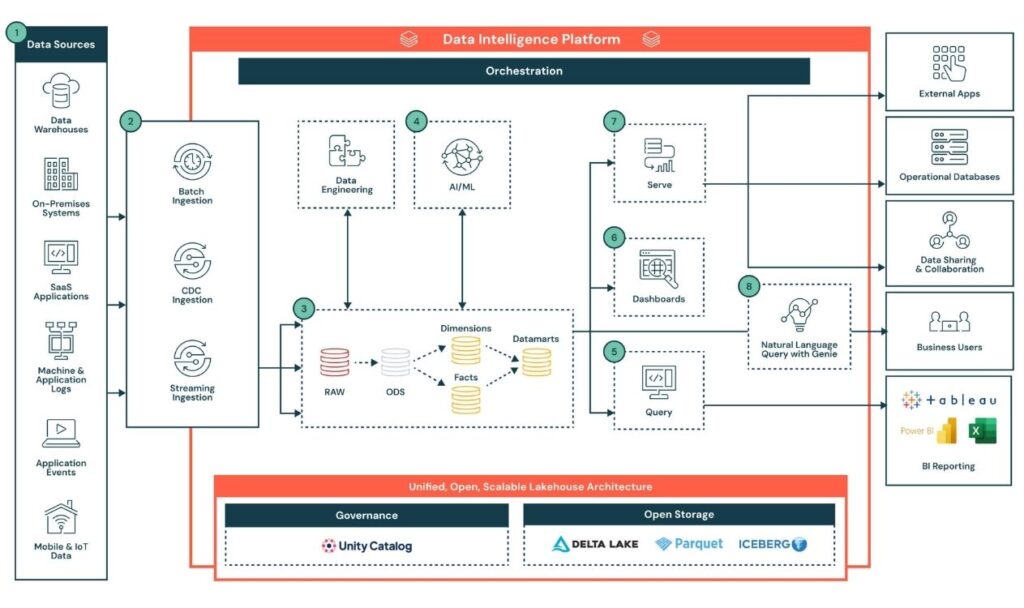
Databricks is a cloud-based big data processing platform built on Apache Spark that combines data engineering, analytics, machine learning, and AI development within a single Lakehouse architecture. By unifying data lakes and data warehouses, it enables organizations to manage, process big data, and build AI models without moving data across multiple systems. Databricks is widely adopted by enterprises that need scalable data processing software for modern analytics and collaborative data projects.
- Key Features: Lakehouse architecture combining data lakes and warehouses; native Apache Spark engine; Delta Lake for reliable data storage; collaborative notebooks; built-in machine learning and AI tools; workflow orchestration; integrations with AWS, Azure, Google Cloud, Power BI, Tableau, and Apache Kafka.
- Pros: Unified platform for analytics and AI; excellent scalability for enterprise workloads; collaborative development environment; optimized Spark performance; strong support for machine learning and data engineering.
- Cons: Premium features can become expensive as workloads grow; requires cloud infrastructure knowledge to maximize its capabilities; may be more powerful than necessary for small businesses.
- Best for: Medium to large enterprises building modern data platforms, AI applications, advanced analytics, and cloud-native processing big data pipelines.
- Rating: 4.5/5 (Gartner Peer Insights)
- Pricing: Community Edition is free for learning and development. Paid plans use consumption-based pricing on AWS, Azure, and Google Cloud, with enterprise pricing available upon request.
Big Data Storage & Data Warehouse
5. Snowflake
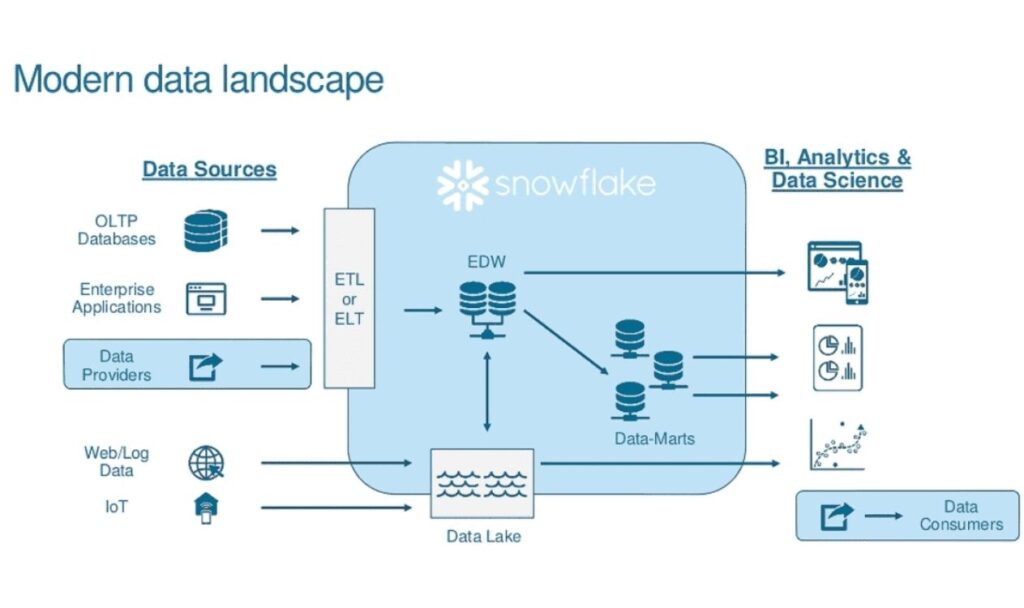
Snowflake is a cloud-native big data software platform that combines data warehousing, data sharing, and analytics in a single service. Unlike traditional databases, it separates storage and compute resources, allowing organizations to scale each independently based on workload. This architecture makes Snowflake a popular choice for processing big data, running high-performance SQL queries, and supporting AI, machine learning, and business intelligence workloads. It integrates with leading cloud providers, including AWS, Microsoft Azure, and Google Cloud.
- Key Features: Cloud-native architecture with separate storage and compute; automatic scaling and workload isolation; secure data sharing across organizations; native support for structured, semi-structured, and unstructured data; integration with Spark, dbt, Tableau, Power BI, and major ETL/ELT tools.
- Pros: Excellent scalability for enterprise workloads; high query performance; minimal infrastructure management; strong ecosystem and security features.
- Cons: Usage-based pricing can become expensive for large or continuous workloads; best performance often requires query optimization.
- Best for:
Medium to large enterprises building modern cloud data warehouses and analytics platforms. - Rating: 4.5/5 (Gartner Peer Insights)
- Pricing: Snowflake offers a 30-day free trial with complimentary credits. Paid plans use consumption-based pricing, where storage and compute are billed separately depending on cloud provider, region, and warehouse size.
6. Google BigQuery
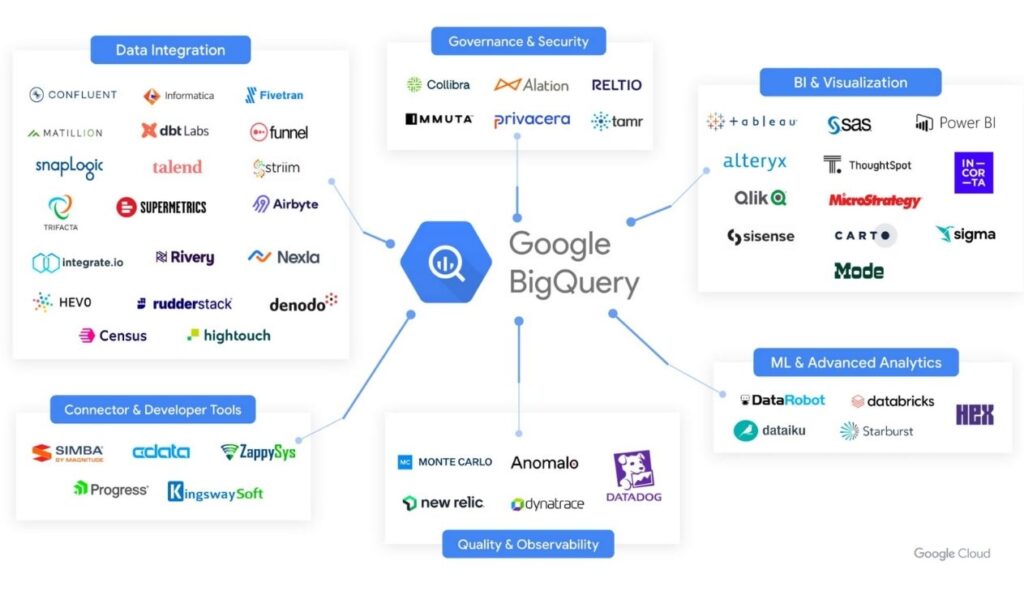
Google BigQuery is Google’s fully managed, serverless data warehouse designed to process massive datasets using standard SQL. It enables businesses to analyze terabytes or even petabytes of processed data without managing infrastructure. Thanks to its serverless architecture and native integration with the Google Cloud ecosystem, BigQuery has become one of the most widely adopted data processing tools for analytics, reporting, AI, and machine learning.
- Key Features: Serverless architecture with automatic scaling; ANSI SQL support; built-in BigQuery ML for machine learning; seamless integration with Google Cloud services; real-time analytics; native support for structured and semi-structured data.
- Pros: No infrastructure management; fast analytical queries; excellent scalability; flexible pay-as-you-go pricing.
- Cons: Frequent or complex queries may increase costs; best suited for organizations already using Google Cloud.
- Best for: Organizations building cloud-based analytics platforms and processing large-scale business data.
- Rating: 4.6/5 (Gartner Peer Insights)
- Pricing: BigQuery includes a free usage tier every month. Beyond that, customers pay based on data storage and query processing, with on-demand and capacity-based pricing models available.
7. Azure Synapse Analytics
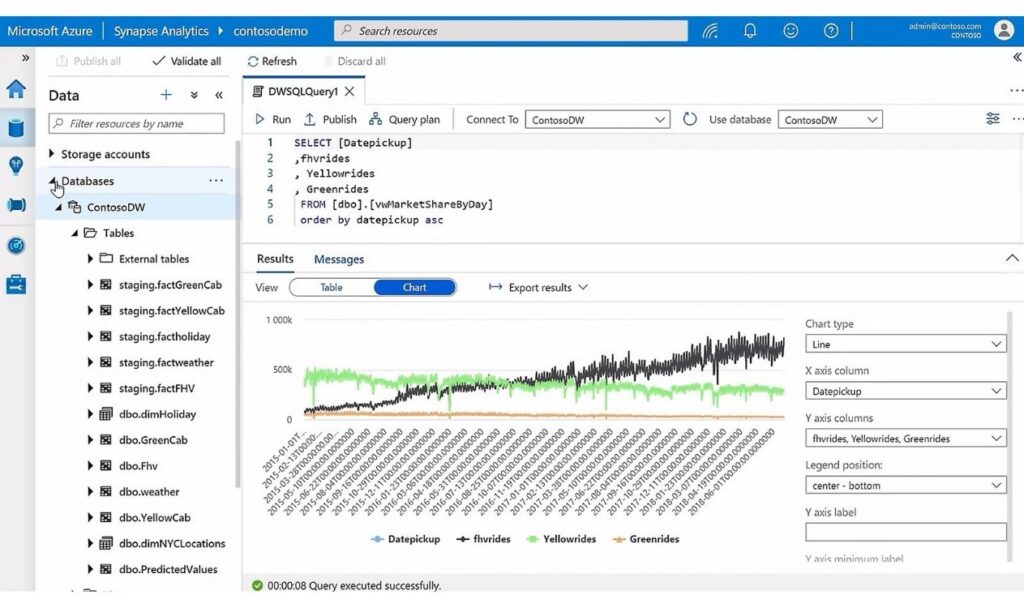
Microsoft Azure Synapse Analytics combines enterprise data warehousing, big data analytics, and data integration into a unified cloud platform. It allows organizations to process big data from data lakes and traditional warehouses while connecting seamlessly with Power BI, Azure Machine Learning, and Microsoft Fabric. The platform supports both SQL-based analytics and Apache Spark, making it suitable for modern hybrid data environments.
- Key Features: Unified analytics workspace; integrated Apache Spark engine; SQL data warehouse capabilities; native Azure ecosystem integration; built-in security and governance; support for real-time and batch analytics.
- Pros: Excellent integration with Microsoft products; supports both structured and unstructured data; scalable cloud architecture; enterprise-grade security.
- Cons: Learning curve for new Azure users; pricing can become complex when multiple Azure services are combined.
- Best for: Organizations using Microsoft Azure that need an integrated platform for analytics and processing big data.
- Rating: 4.4/5 (Gartner Peer Insights)
- Pricing: Azure Synapse Analytics uses pay-as-you-go pricing based on compute, storage, and workload type. Azure also offers free credits for new customers, while enterprise deployments are billed according to resource consumption.
8. Apache Cassandra
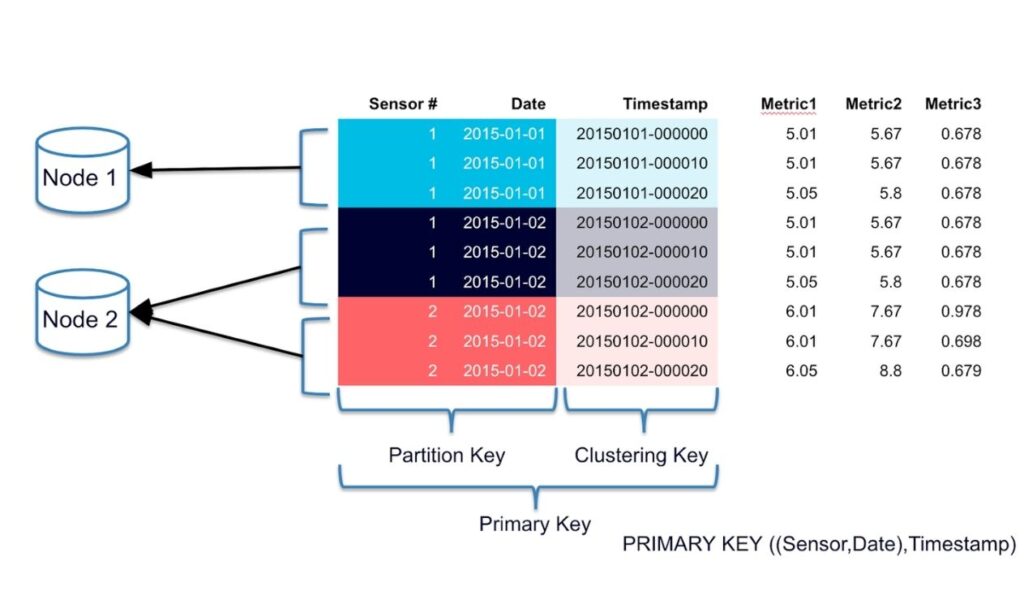
Apache Cassandra is a distributed NoSQL database built for applications that require high availability, fault tolerance, and the ability to handle enormous amounts of data across multiple servers. Rather than functioning as a traditional relational database, Cassandra is optimized for write-heavy workloads, making it a popular component in big data integration tools, IoT platforms, recommendation systems, and real-time applications where continuous data ingestion is critical.
- Key Features: Peer-to-peer distributed architecture; automatic data replication; linear horizontal scalability; no single point of failure; high write throughput; support for multi-region deployments.
- Pros: Outstanding reliability and fault tolerance; scales easily across data centers; excellent performance for write-intensive workloads.
- Cons: Limited support for complex joins and SQL queries; data modeling requires careful planning compared with relational databases.
- Best for: Large-scale applications requiring continuous data ingestion, IoT platforms, and mission-critical distributed systems.
- Rating: 4.5/5 (Gartner Peer Insights)
- Pricing: Apache Cassandra is free and open-source software released under the Apache License 2.0. Businesses only pay for the infrastructure used to deploy Cassandra or for commercial managed services such as DataStax Astra DB.
Big Data Integration & Streaming
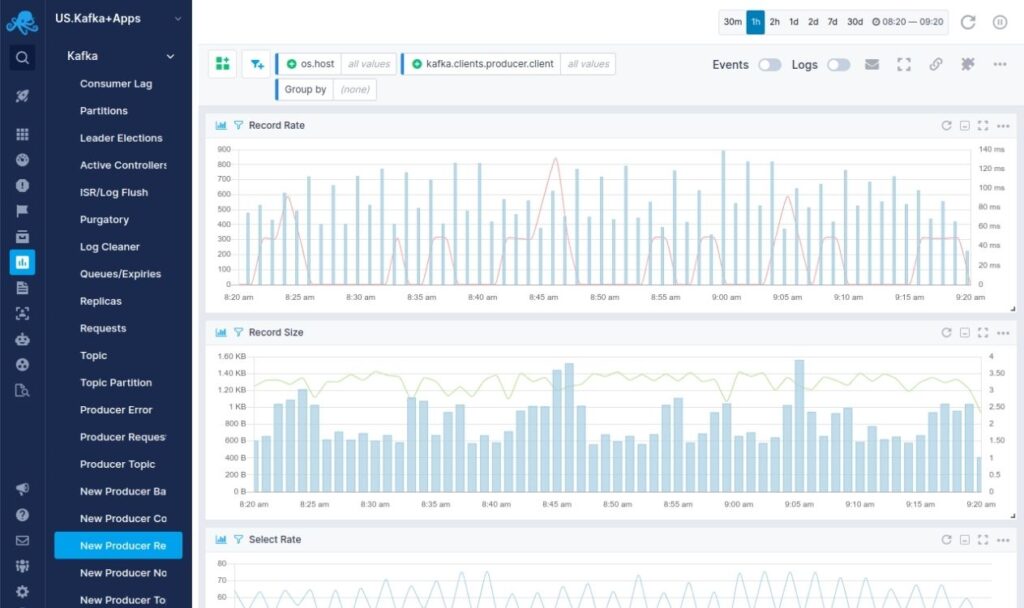
9. Apache Kafka
Apache Kafka is an open-source big data integration tool designed for real-time data streaming and high-volume event processing. It enables organizations to collect, store, and distribute continuous streams of data between applications, databases, and analytics platforms. Built around a distributed event streaming architecture, Kafka helps businesses process big data with low latency while maintaining reliability, scalability, and fault tolerance. It is widely used in modern data architectures for applications such as real-time analytics, IoT data processing, fraud detection, and automated data pipelines.
- Key Features: Distributed event streaming platform for high-volume data exchange; publish-subscribe messaging architecture; fault-tolerant data replication; real-time data ingestion and processing; Kafka Streams for stream processing applications; Kafka Connect for integrating external systems; scalable architecture supporting millions of events per second.
- Pros: Excellent scalability for large data workloads; reliable real-time data movement; strong fault tolerance and durability; extensive ecosystem for data integration; widely adopted by enterprises for streaming architectures.
- Cons: Requires technical expertise for deployment and management; complex configuration for large-scale environments; monitoring and maintenance can require dedicated engineering resources.
- Best for: Enterprises that need top tools for streaming data processing 2025 2026, real-time analytics, IoT data pipelines, event-driven applications, and highly scalable data integration workflows.
- Rating: 4.7/5 (G2)
- Pricing: Apache Kafka is free and open-source under the Apache License 2.0. Businesses using managed Kafka services such as Confluent Cloud, Amazon MSK, or Azure Event Hubs may incur usage-based costs depending on data volume, storage, and infrastructure requirements.
10. Apache NiFi
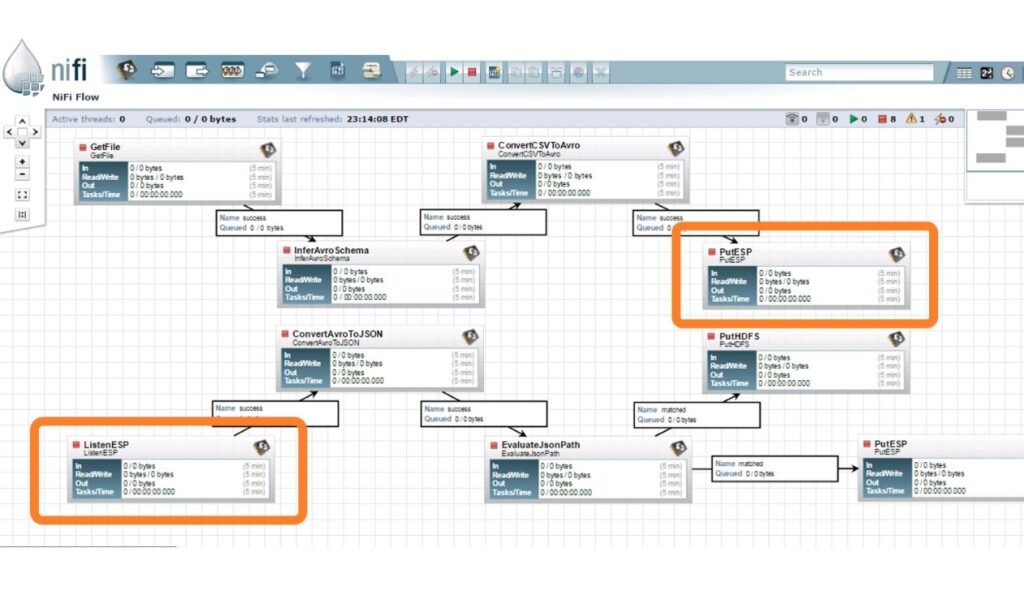
Apache NiFi is an open-source data processing software platform designed to automate the movement, transformation, and management of data between different systems. It provides a visual interface that allows users to build data flows without extensive coding, making it easier to connect databases, applications, cloud services, and IoT devices. With strong data routing, transformation, and monitoring capabilities, Apache NiFi is commonly used as one of the big data integration tools for organizations that need flexible and reliable data pipelines.
- Key Features: Drag-and-drop interface for designing data flows; more than 300 built-in processors for data routing and transformation; support for batch and real-time data movement; data provenance tracking for monitoring data history; secure data transfer with encryption; integration with databases, APIs, cloud platforms, and streaming systems.
- Pros: Easy visual workflow design compared with traditional coding-based solutions; strong support for real-time data movement; flexible integration capabilities; detailed data tracking and monitoring; suitable for complex data flow automation.
- Cons: Performance tuning may require technical expertise for large workloads; user interface can become complex when managing many data flows; not designed primarily for advanced analytics or machine learning workloads.
- Best for: Businesses that need automated data processing tools for real-time data integration, IoT data processing, system connectivity, and reliable data movement across multiple platforms.
- Rating: 4.2/5 (G2)
- Pricing: Apache NiFi is free and open-source under the Apache License 2.0. Organizations may spend additional costs on infrastructure, deployment, and enterprise support services from third-party providers.
11. Airbyte
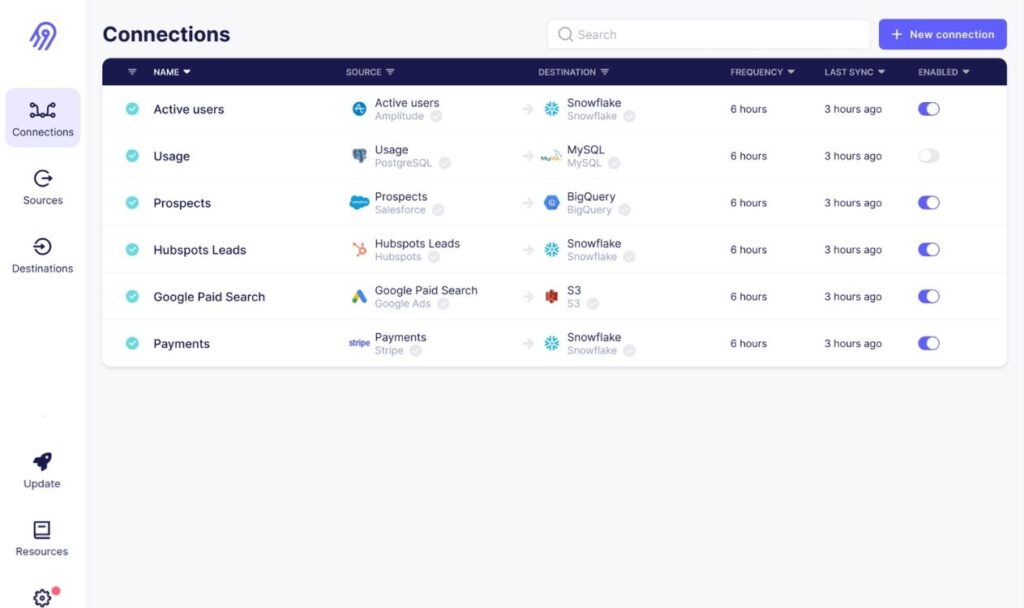
Airbyte is an open-source big data integration tool that helps organizations move data from various applications, databases, and APIs into data warehouses, data lakes, and analytics platforms. It focuses on simplifying ELT workflows by providing pre-built connectors and allowing teams to create custom integrations when needed. Airbyte enables businesses to collect raw data from multiple sources and transform it into processed data for analytics, reporting, and machine learning applications.
- Key Features: More than 400 pre-built connectors for databases, SaaS applications, and APIs; open-source connector framework; support for cloud and self-hosted deployment; automated data synchronization; integration with modern warehouses such as Snowflake, BigQuery, and Databricks; support for custom connectors and data replication workflows.
- Pros: Flexible open-source architecture; highly customizable connector ecosystem; supports both cloud and self-hosted environments; suitable for modern ELT pipelines; reduces dependency on manual data integration processes.
- Cons: Requires technical knowledge for advanced customization; connector quality may vary depending on community support; large-scale deployments may require additional infrastructure management.
- Best for: Data teams, startups, and enterprises looking for flexible big data integration tools to connect multiple data sources and build scalable ELT pipelines.
- Rating: 4.6/5 (Gartner Peer Insights)
- Pricing: Airbyte offers a free open-source edition for self-hosted deployments. Airbyte Cloud provides usage-based pricing depending on data volume and connectors, while enterprise plans are available with custom pricing.
12. Fivetran
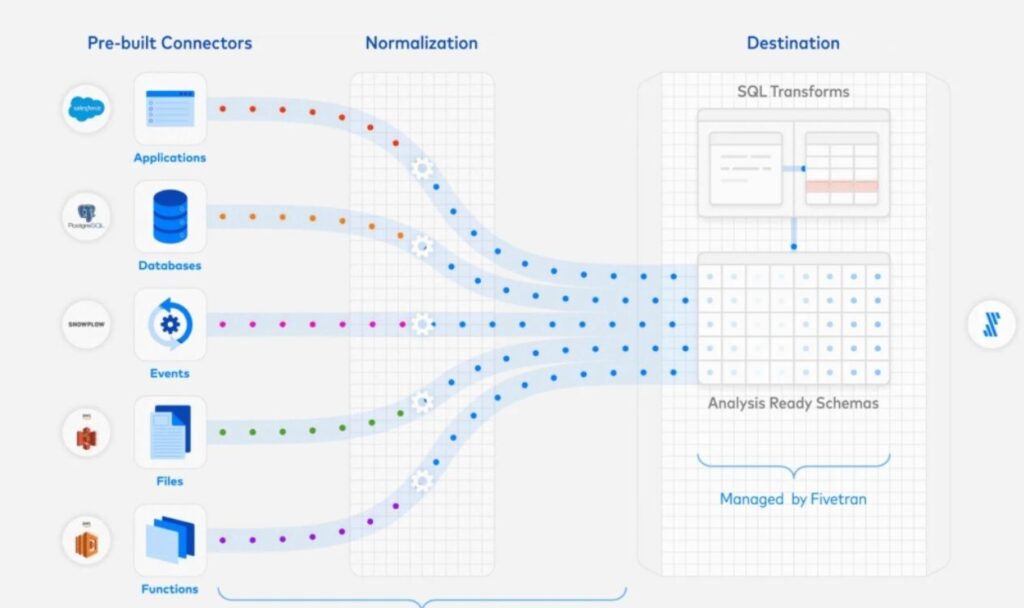
Fivetran is a cloud-based data processing software platform that automates data extraction, loading, and synchronization from multiple sources into cloud warehouses. Designed for modern ELT workflows, Fivetran reduces the need for manual pipeline maintenance by automatically managing schema changes, data replication, and connector updates. It is widely used by analytics teams that need reliable data processing tools to prepare clean and consistent datasets for reporting, business intelligence, and machine learning.
- Key Features: Hundreds of fully managed data connectors; automated schema migration; incremental data synchronization; real-time and scheduled data replication; integration with Snowflake, BigQuery, Redshift, Databricks, and other cloud platforms; built-in monitoring and pipeline management; support for secure enterprise data environments.
- Pros: Fully managed pipelines with minimal maintenance; fast deployment compared with traditional ETL solutions; reliable data synchronization; strong enterprise security features; reduces engineering workload for data teams.
- Cons: Pricing can become expensive as data volume increases; limited customization compared with fully open-source solutions; less suitable for organizations requiring highly complex transformation logic before loading data.
- Best for: Small to large businesses that need reliable big data integration tools for automated data movement, analytics workflows, and cloud-based data warehouse environments.
- Rating: 4.5/5 (Gartner Peer Insights)
- Pricing: Fivetran uses a consumption-based pricing model depending on monthly active rows, connectors, and data usage. Pricing varies based on business requirements, with enterprise plans available through custom quotes.
Big Data Analytics & Business Intelligence
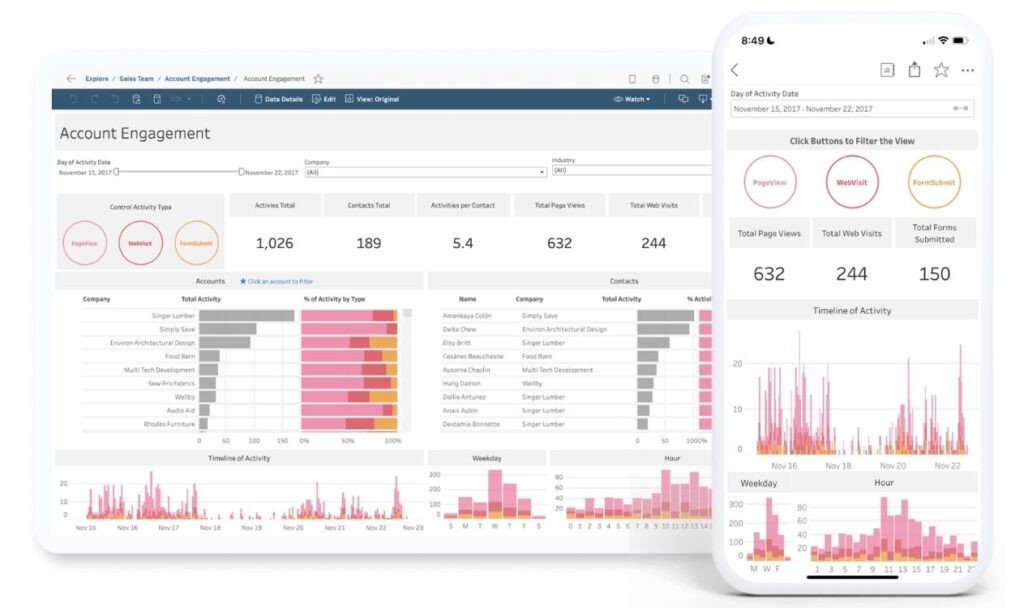
13. Tableau
Tableau is a leading big data analytics tool that helps organizations transform complex datasets into interactive visual reports and dashboards. It enables users to connect data from multiple sources, analyze trends, and communicate insights through intuitive data visualization. With support for cloud platforms, databases, and big data environments, Tableau helps businesses turn processed data into actionable information without requiring advanced programming skills. The platform is widely used by enterprises to support business intelligence, reporting, and data-driven decision-making across departments.
- Key Features: Drag-and-drop dashboard builder; interactive data visualization; connection with databases, cloud platforms, Hadoop, Spark, and data warehouses; real-time data analysis; advanced analytics features including forecasting and trend analysis; Tableau Prep for data preparation; collaboration and sharing through Tableau Server and Tableau Cloud.
- Pros: User-friendly interface suitable for both technical and business users; powerful visualization capabilities; supports large-scale data analysis; extensive integration options; strong community and learning resources.
- Cons: Licensing costs can be high for large organizations; advanced analytics features may require additional technical knowledge; dashboard performance can decrease with extremely large datasets or complex visualizations.
- Best for: Businesses that need powerful data processing tools for visualization, business intelligence reporting, performance monitoring, and converting processed data into actionable insights.
- Rating: 4.4/5 (Gartner Peer Insights)
- Pricing: Tableau offers different pricing plans depending on user roles. Tableau Creator starts at approximately $75/user/month when billed annually, while Explorer and Viewer plans are available at lower prices. Enterprise deployments with advanced governance features require custom pricing.
14. Microsoft Power BI
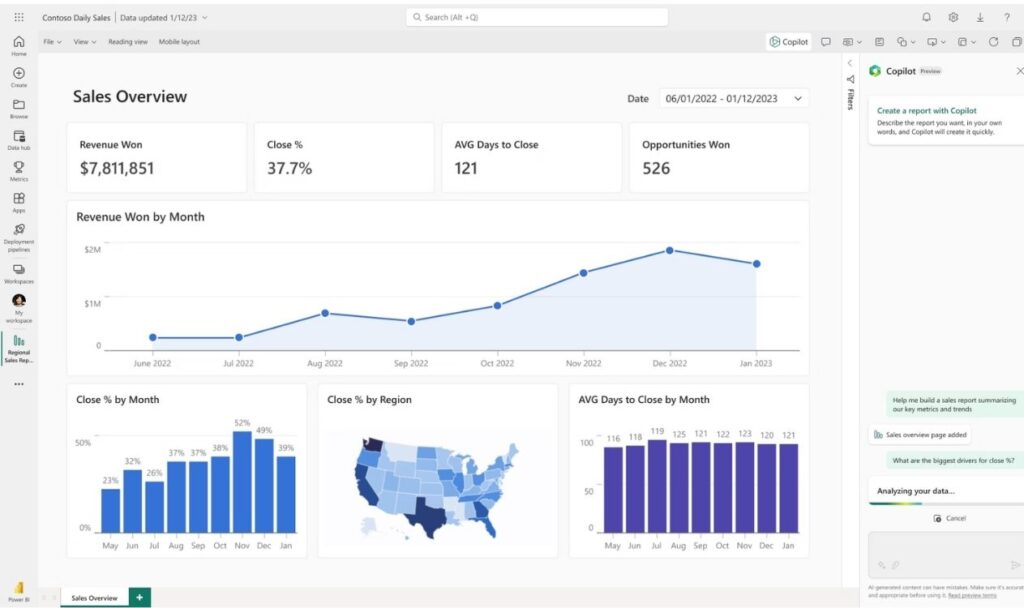
Microsoft Power BI is a cloud-based big data software and business intelligence platform designed to help organizations analyze data, create reports, and monitor business performance. As part of the Microsoft ecosystem, Power BI integrates seamlessly with Excel, Azure services, SQL Server, and various enterprise applications. It enables users to connect multiple data sources, transform raw information into processed data, and build interactive dashboards for faster decision-making. With AI-powered analytics and strong collaboration features, Power BI is widely adopted by businesses of all sizes.
- Key Features: Data connection from hundreds of sources including databases, cloud platforms, and enterprise applications; Power Query for data preparation and transformation; interactive dashboards and reports; AI-powered analytics capabilities; integration with Microsoft Fabric, Azure, Excel, and Teams; real-time data monitoring; natural language querying through Power BI Q&A.
- Pros: Cost-effective compared with many enterprise BI platforms; easy integration with Microsoft products; user-friendly interface for business users; strong data modeling capabilities; extensive visualization options and community support.
- Cons: Advanced features may require knowledge of DAX and data modeling; performance depends on data model optimization; less flexible than some specialized platforms for highly complex enterprise analytics scenarios.
- Best for: Organizations looking for scalable data processing software to analyze business data, create dashboards, and support reporting workflows, especially companies already using Microsoft technologies.
- Rating: 4.4/5 (Gartner Peer Insights)
- Pricing: Power BI offers a free version with basic features. Power BI Pro starts at approximately $14/user/month, while Power BI Premium Per User costs around $24/user/month. Enterprise pricing is available through Microsoft licensing agreements.
15. Looker
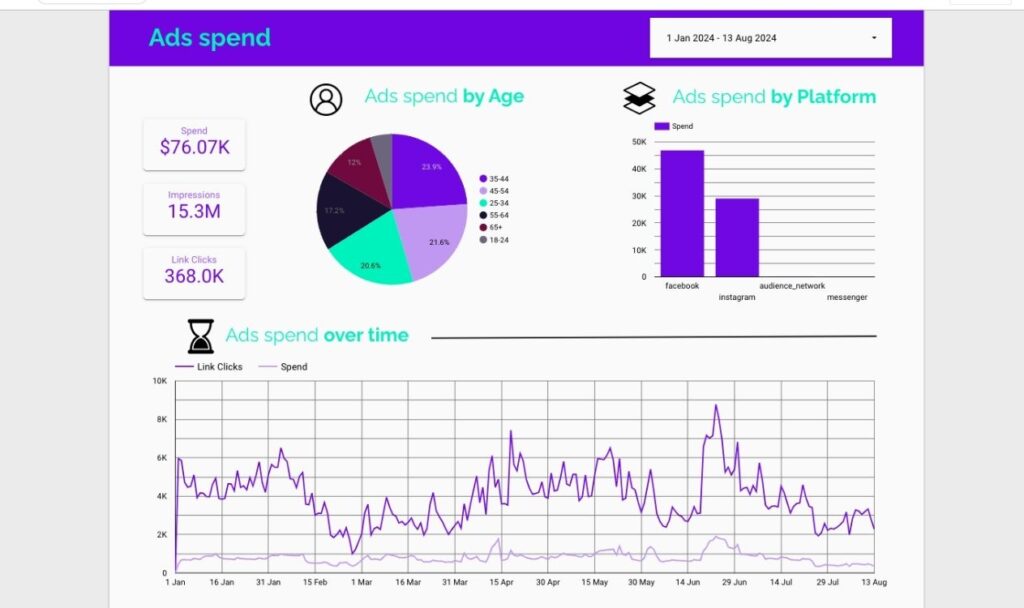
Looker is a cloud-based big data analytics tool from Google Cloud that focuses on data exploration, business intelligence, and governed analytics through a centralized semantic modeling layer. Unlike traditional BI tools that mainly focus on visualization, Looker uses LookML, a modeling language that allows organizations to define consistent business metrics and data relationships across teams. By connecting directly to cloud data warehouses, Looker helps businesses analyze processed data, create reliable reports, and maintain data consistency across different departments.
- Key Features: LookML semantic modeling layer; direct connection to cloud data warehouses including BigQuery, Snowflake, and Amazon Redshift; customizable dashboards and reports; embedded analytics capabilities; data exploration tools; real-time query execution; integration with Google Cloud services and third-party applications.
- Pros: Strong data governance through centralized modeling; ensures consistent business metrics across teams; scalable for enterprise analytics; excellent integration with modern cloud data platforms; supports embedded analytics for applications.
- Cons: Requires technical knowledge of LookML for advanced customization; higher learning curve compared with self-service BI tools; pricing may be expensive for smaller organizations.
- Best for: Medium to large enterprises that need reliable big data tools for governed analytics, enterprise reporting, embedded BI solutions, and cloud-based data exploration.
- Rating: 4.3/5 (Gartner Peer Insights)
- Pricing: Looker does not publish fixed pricing. Costs depend on the number of users, deployment requirements, data volume, and selected features. Google Cloud provides custom pricing plans based on business needs.
How to Choose the Right Big Data Tool
Choosing the right big data tool depends on an organization’s data environment, business goals, technical capabilities, and future scalability needs. There is no single solution that fits every business, as different tools are designed for different workloads, such as batch processing, real-time analytics, data integration, or artificial intelligence applications.
Before selecting a platform, businesses should evaluate factors such as data volume, processing requirements, deployment preferences, and analytics objectives to ensure the chosen big data software can support long-term growth.
Based on your data volume
The amount of data an organization generates and processes is one of the most important factors when selecting big data processing tools. For businesses handling smaller datasets, lightweight solutions with simple architectures may be sufficient. These tools can support basic analytics, reporting, and data management without requiring complex infrastructure.
Organizations managing large-scale datasets should prioritize platforms designed for distributed computing and high-performance processing, such as Apache Spark, Databricks, Snowflake, or Google BigQuery. These solutions can scale processing capacity as data volumes increase while maintaining performance.
For enterprises processing massive amounts of structured and unstructured data, it is important to consider tools with strong scalability, fault tolerance, and efficient resource management.
Based on processing requirements (Batch vs. Streaming)
The type of data processing workflow also affects tool selection. Businesses should determine whether they need batch processing, real-time streaming, or a combination of both.
Batch processing tools are suitable for workloads where data is collected and processed periodically. They are commonly used for historical analysis, reporting, data transformation, and large-scale data preparation. Solutions such as Apache Hadoop and Apache Spark are widely used for batch processing big data.
Streaming processing tools are designed for continuous data flows that require immediate analysis and response. Platforms such as Apache Kafka and Apache Flink support real-time applications including IoT monitoring, fraud detection, and operational analytics.
Businesses requiring both historical insights and real-time decision-making should consider platforms that support hybrid processing capabilities.
Based on deployment model (Cloud, Hybrid, On-premises)
Deployment requirements play an important role in selecting the right data processing software. Cloud-based tools such as Snowflake, Google BigQuery, and Databricks provide flexible scalability without requiring businesses to manage physical infrastructure. They are suitable for organizations looking for faster deployment and reduced maintenance.
Hybrid solutions allow businesses to connect cloud environments with existing on-premises systems. This approach is commonly used by enterprises that need to modernize their data infrastructure while maintaining legacy applications.
On-premises solutions provide greater control over infrastructure, security, and compliance. They are often preferred by organizations operating in highly regulated industries with strict data management requirements.
Based on analytics and AI requirements
Businesses should also evaluate their analytics and artificial intelligence needs when choosing big data tools. For traditional reporting and business intelligence, platforms such as Tableau, Microsoft Power BI, and Looker provide visualization and dashboard capabilities.
For advanced analytics, machine learning, and AI development, organizations may require platforms with built-in AI capabilities, such as Databricks, Apache Spark MLlib, or cloud-based machine learning services.
Choosing a tool that supports future AI initiatives can help businesses maximize the value of their data and build more intelligent applications over time.
Benefits of Using Big Data Tools
Modern organizations generate data from multiple sources, including applications, customer interactions, IoT devices, and business systems. Without suitable big data processing tools, managing and analyzing this information can become complex and time-consuming.
The right tools help businesses transform raw information into processed data, improve operational efficiency, and support better decision-making.
Accelerate Data Processing
One of the main benefits of big data tools is their ability to process large volumes of information faster than traditional systems.
Distributed processing platforms can divide workloads across multiple computing resources, allowing businesses to analyze massive datasets more efficiently. This helps reduce processing time for analytics, reporting, and data-intensive applications.
By automating complex workflows, organizations can focus more on extracting insights rather than managing manual data operations.
Improve Data Quality and Consistency
Big data platforms often include capabilities for data integration, transformation, validation, and cleansing. These features help organizations standardize information collected from different sources.
Improved data quality ensures that analytics teams work with accurate and consistent datasets, reducing errors caused by duplicated, incomplete, or outdated information.
Reliable processed data enables businesses to make more confident decisions based on trustworthy insights.
Enable Scalable Analytics
As businesses grow, their data requirements continue to increase. Scalable big data software allows organizations to expand storage and processing capabilities without rebuilding their entire infrastructure.
Cloud-based platforms and distributed computing solutions can automatically adjust resources based on workload demands, making them suitable for organizations with changing data volumes.
This scalability supports long-term growth and helps businesses manage increasingly complex analytics requirements.
Support Real-Time Decision-Making
Modern businesses often require immediate insights to respond quickly to market changes, customer behavior, and operational issues.
Streaming platforms and real-time analytics tools allow organizations to process incoming data continuously and generate insights faster.
These capabilities are particularly valuable for industries such as finance, retail, healthcare, manufacturing, and IoT, where rapid decision-making can directly impact business performance.
Power AI and Machine Learning Initiatives
Big data provides the foundation for artificial intelligence and machine learning applications. AI models require large volumes of high-quality data to identify patterns, make predictions, and automate decisions.
Many modern big data tools integrate with machine learning frameworks, allowing organizations to build predictive models, automate processes, and develop AI-powered solutions.
By combining big data processing with AI capabilities, businesses can unlock deeper insights and create more personalized experiences.
Frequently Asked Questions
What Are The 5 Steps Of Data Processing?
The five essential steps of data processing are data collection, data preparation (cleaning), data input, data processing, and data output (storage/interpretation). These steps turn raw facts into clear, useful information.
What Are The 7 Stages Of Data Analysis?
The seven stages of data analysis are defining the problem, collecting data, and cleaning data. This systematic framework turns raw inputs into actionable insights.
What Are The Top 10 Data Analysis Tools?
The top 10 data analysis tools include Microsoft Excel, SQL, and Python, which are essential for data processing, querying, and custom statistical analysis.
What Are The Tools Used In Big Data?
Major tools used in big data include Apache Hadoop, Apache Spark, and Apache Kafka. These platforms help store, process, and move massive data sets quickly across computer groups.
What Are The Top 5 Data Visualization Tools?
The top five data visualization tools leading enterprise analytics are Microsoft Power BI, Tableau, Looker, Qlik Sense, and D3.js.
Is Excel A Big Data Tool?
No, Excel is not a big data tool. It is built for small to medium datasets, handling a strict maximum of 1,048,576 rows and 16,384 columns per worksheet. When file sizes grow large, Excel slows down drastically, crashes, or cuts off information.
Why Choose DIGI-TEXX for Big Data Processing Services
Although modern data platforms offer advanced capabilities, businesses may face several challenges during implementation, including:
- Managing large volumes of structured and unstructured data
- Integrating data from multiple disconnected sources
- Maintaining data accuracy and consistency
- Preparing raw data for analytics and AI applications
- Managing complex infrastructure and technical requirements
- Ensuring data security and compliance
Without proper data preparation and management processes, organizations may struggle to fully utilize their investment in big data technologies.
DIGI-TEXX helps businesses improve their data workflows through reliable data processing and integration support.
Our services include:
- Data collection, classification, and processing
- Data cleansing and validation to improve accuracy
- Data preparation for analytics and AI applications
- Data labeling and annotation services
- Document and information processing
- Support for large-scale data management workflows
By combining operational expertise with technology-driven processes, DIGI-TEXX helps businesses transform complex data into structured, analysis-ready information.
Businesses choose DIGI-TEXX as a data processing partner because we provide:
- Experience handling large-scale data processing projects
- Scalable solutions for different business requirements
- Focus on data accuracy, security, and quality control
- Flexible support for complex data workflows
- Expertise in preparing data for analytics and AI applications
With reliable data processing support, organizations can reduce operational complexity, improve data quality, and focus on generating valuable insights from their information.
For businesses facing these challenges, outsourcing data processing becomes a practical and scalable approach. With deep experience in document and data processing, DIGI-TEXX supports organizations in managing large volumes of complex data, delivering reliable, analysis-ready outputs that help teams focus on insights and decision-making rather than operational complexity.
If you are looking for a trusted partner to streamline your data processing operations, the DIGI-TEXX team is ready to support your business.
DIGI-TEXX Contact Information:
Website: https://digi-texx.com/
Hotline: +84 28 3715 5325
Email: [email protected]
Address:
- Headquarters: Anna Building, QTSC, Trung My Tay Ward
- Office 1: German House, 33 Le Duan, Saigon Ward
- Office 2: DIGI-TEXX Building, 477-479 An Duong Vuong, Binh Phu Ward
- Office 3: Innovation Solution Center, ISC Hau Giang, 198 19 Thang 8 street, Vi Tan Ward
References
- Apache Spark. (2026). Apache Spark Documentation. https://spark.apache.org/
- Databricks. (2026). Databricks Lakehouse Platform. https://www.databricks.com/
- Snowflake. (2026). Snowflake Data Cloud Platform. https://www.snowflake.com/
- Google Cloud. (2026). BigQuery Documentation. https://cloud.google.com/bigquery
- Microsoft. (2026). Power BI Documentation. https://powerbi.microsoft.com/
- Apache Kafka. (2026). Apache Kafka Documentation. https://kafka.apache.org/
- Tableau. (2026). Tableau Data Visualization Platform. https://www.tableau.com/
- Gartner. (2026). Gartner Peer Insights – Data Analytics and Business Intelligence Reviews. https://www.gartner.com/reviews/