Records digitization is the conversion of paper or other analog records into digital files. For business use, a digitization project typically combines scanning, OCR, indexing, and quality checks so teams can retrieve records and manage them in a controlled repository.
Businesses use record digitization to improve access to contracts, invoices, employee files, and archives. The benefits depend on image quality, accurate metadata, appropriate permissions, and a tested storage process; creating a scanned file alone does not establish reliable records management.
This guide explains how to plan a records digitization project, check the output, estimate costs, and decide when to outsource. DIGI-TEXX provides document scanning and digital archiving services, including indexing, quality assurance, and delivery of digital files.
What Is Record Digitization?
Records digitization creates digital representations of physical records. Scanning captures the page image, OCR adds machine-readable text where recognition is suitable, and indexing connects each file to identifiers such as record type, department, and date. The resulting files must then be organized and managed in a document or records management system.
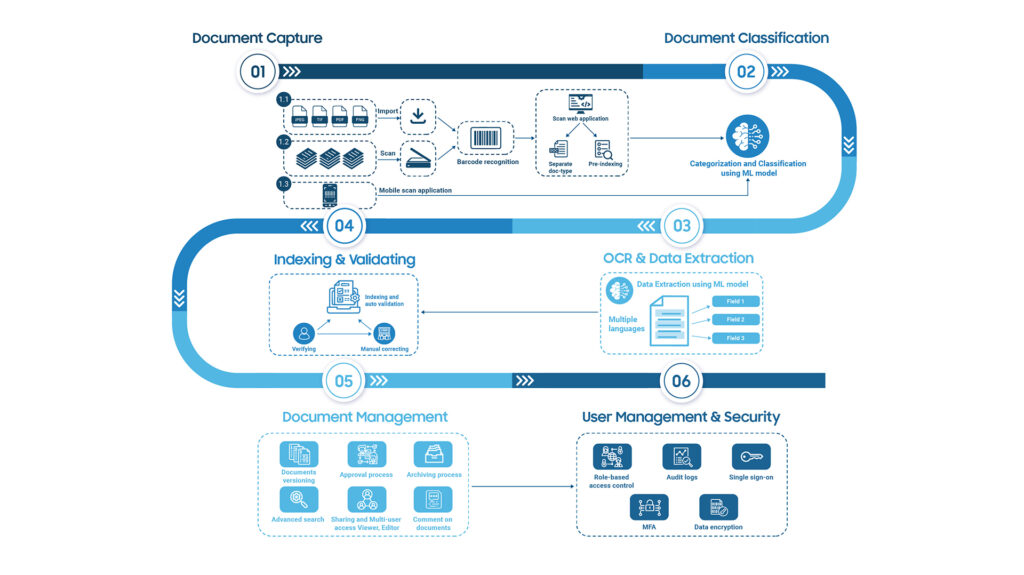
Scanning is one part of a broader business digitization workflow. OCR and indexing improve retrieval, while retention, access control, and long-term preservation are ongoing management responsibilities. A practical project may include:
- Document classification: Records are organized into clear categories such as contracts, invoices, HR files, technical documents, legal papers, etc., to facilitate accurate management and retrieval.
- Indexing: Each digitized document is assigned identifying information (such as record codes, client names, dates, document types, etc.). This enables systems to quickly search and filter documents within seconds, rather than manually searching as before.
- Integration of OCR (Optical Character Recognition) technology: OCR helps “read” and convert text within images into searchable text.
- Document lifecycle management: Link each record class to an approved retention schedule and an accountable owner. Review holds and disposal permissions before any destruction; digitization does not automatically establish compliance.
Records Digitization vs Scanning and Digital Records Management
Scanning creates page images. OCR makes recognized text searchable. Indexing assigns fields that let users find the right record. Digital records management governs access, retention and disposal after capture. A project may combine all four, but purchasing a scanner or OCR tool does not replace a records management policy.
For example, a scanned contract becomes easier to retrieve when it is linked to a contract ID, counterparty, agreement date and record owner. If OCR misreads the counterparty name, a validated index can still help locate the correct file.
Which Types of Records Should Businesses Digitize?
To implement record digitization effectively, businesses need to identify priority groups of records to digitize first. Below is a classification table of common types of records that require digitization:
| Record Group | Common Document Types | Reasons for Digitization |
| Administration – HR | Employment contracts, internal forms, appointment decisions, and candidate records | Centralized management, information security, support for audits, and internal evaluations |
| Finance – Accounting | Invoices, accounting books, payrolls, financial reports, receipts, and payment vouchers | Quick retrieval, support for tax finalization, and reducing the risk of losing original documents |
| Legal – Contracts | Business contracts, operation licenses, intellectual property registrations, and agreements | Support controlled retrieval during disputes, inspections and legal review |
| Technical – Production | Technical drawings, production procedures, machine operation manuals, and maintenance records | Improve technical efficiency, facilitate sharing, and standardize technical information storage |
| Customers – Partners | Customer records, service contracts, handover reports, and quotations | Optimize customer care processes, support quick lookup of transaction history |
| Specialized Fields | Medical records (healthcare), transcripts and certificates (education), maps and acceptance reports (construction), research documents (R&D) | Support sector-specific retention, retrieval and access-control requirements |
Benefits of Record Digitization for Businesses
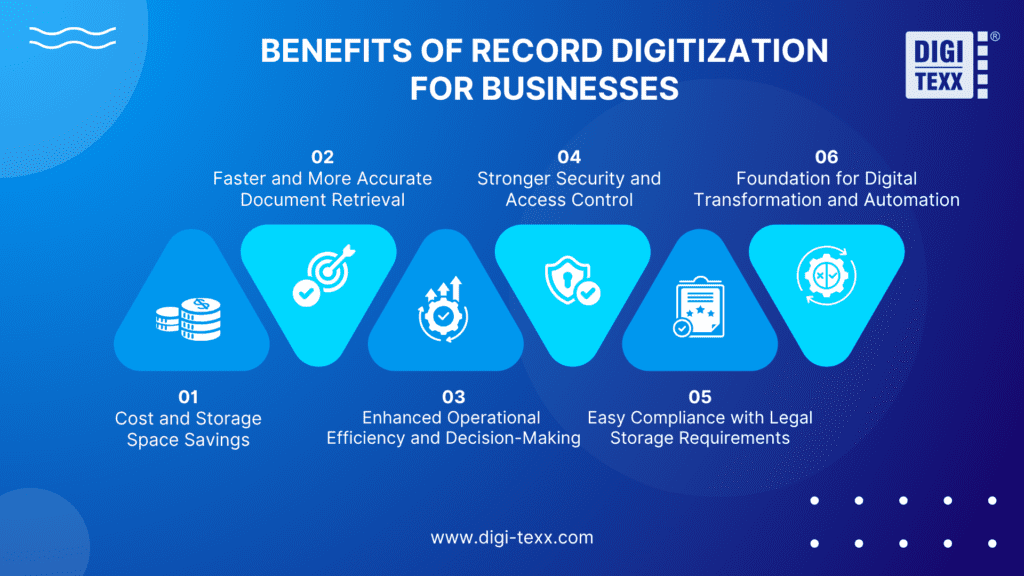
1. Cost and Storage Space Savings
Digitization can reduce paper handling and physical storage needs when original records may be disposed of lawfully. Budget for scanning, software, storage, security, and ongoing preservation alongside any expected savings:
- Reduce printing and supplies costs: When documents are converted into digital formats, printing demands drop sharply, saving expenses on paper, ink, and printer maintenance.
- Free up storage space: Reduce physical storage only after the records owner authorizes disposal under the applicable retention schedule and any legal holds.
- Simplify sharing: Authorized users can access digital copies without circulating paper files. Software, hosting, and access administration still carry costs.
2. Faster and More Accurate Document Retrieval
Traditional paper document searches are time-consuming and prone to errors or loss. Record digitization combined with OCR technology accelerates and improves accuracy in retrieving records:
- Keyword and content search: Digital document management systems allow users to search by keywords, file names, or even document content within seconds.
- Reduce risk of document loss: Documents stored centrally on a single platform minimize errors and confusion caused by manual handling.
- Save time: Staff spend less time searching for records and can focus on core tasks, boosting overall efficiency.
3. Enhanced Operational Efficiency and Decision-Making
Record digitization helps businesses synchronize information across departments, improving accuracy and flexibility in data handling.
- Information synchronization: Departments can access the most up-to-date data anytime, anywhere, avoiding inconsistencies.
- Information synchronization: Departments can access the most up-to-date data anytime, anywhere, avoiding inconsistencies.
- Support decision-making: Leaders can make quicker decisions based on accurate, comprehensive data, reducing business risks.
4. Stronger Security and Access Control
Digital records can support stronger controls when the repository is configured and maintained appropriately. Scanning alone does not make sensitive information secure:
- Access rights management: Businesses can restrict viewing, editing, or sharing rights based on employee roles.
- Audit trail: Configure and review logs of access, edits and exports where supported by the chosen system.
- Data protection: Security measures such as encryption and regular backups help safeguard documents from loss or cyberattacks.
5. Support for Records Retention and Audit Readiness
Retention periods depend on record type, jurisdiction, sector and applicable holds. Build the digitization project around an approved records schedule rather than applying one retention period to all files:
- Quick retrieval for inspections and audits: Digital records enable searching and extraction within seconds, allowing fast and accurate responses to authorities, reducing errors compared to paper documents.
- Integrity and authenticity: Preserve the relationship between the source record, scanned image and metadata. Document checks and approvals; electronic signatures or timestamps do not automatically establish legal admissibility.
- Long-term availability: Assign retention rules by record class, test restoration from backups and plan format migration when needed. For US federal agencies, NARA provides separate digitization requirements for temporary and permanent records. These federal rules should not be presented as universal requirements for private businesses.
6. Foundation for Digital Transformation and Automation
Record digitization is a crucial first step for businesses to adopt technology, automate processes, and optimize operations:
- Easy system integration: Once records are digitized, businesses can link this information with ERP, CRM, or DMS software, synchronizing data and workflows to improve management efficiency.
- Support automation: Structured metadata can support approval and archiving workflows after integration and exception handling are configured.
- Increased flexibility: Digitization allows businesses to easily expand and adjust operational processes, quickly adapting to market demands and new technological developments.
Record Digitization Process
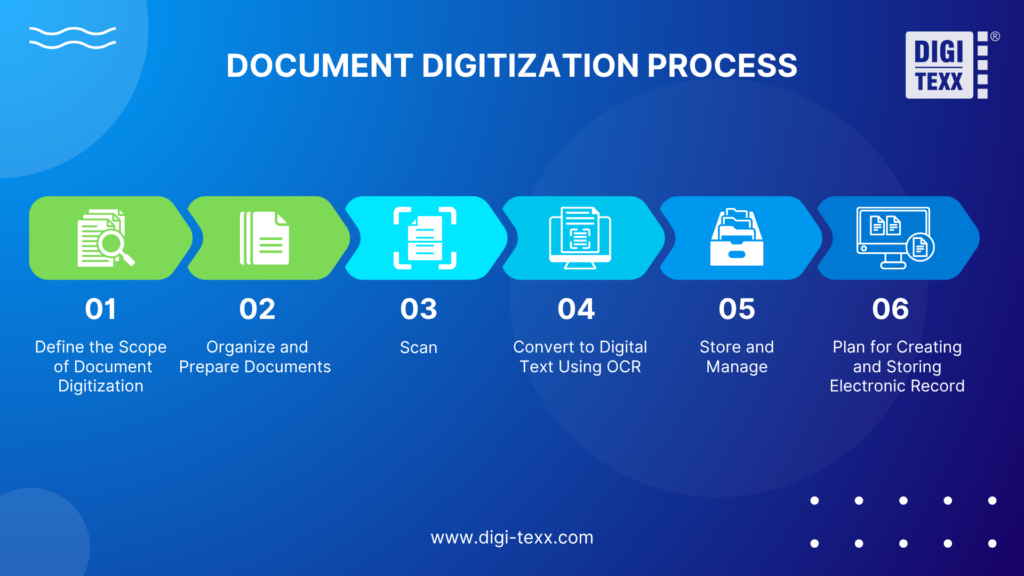
1. Define the Scope of Record Digitization
Before starting the digitization process, the business needs to clearly understand the current status of existing paper records. This helps in effective planning and implementation to avoid loss and omissions.
Storage location
Identify exactly where the records are stored, for example, in office filing cabinets, separate warehouses, or scattered across multiple branches. Knowing the exact location helps gather all records in one complete set and implement digitization in specific areas.
Volume of records
Estimate pages using representative boxes or files and record the counting method. Box size, paper thickness, bindings, and double-sided pages affect the total, do not equate one linear meter with a filing drawer or assume a universal pages-per-box figure.
Usage frequency
Consider how often each record is used to determine which should be digitized first. Frequently used records should be prioritized for digitization to support daily operations.
Record condition assessment
Check the physical condition of each record set before digitizing. Records that are torn, faded, damp, or discolored should be separated for pre-processing (e.g., cleaning, flattening) to ensure clear and durable scanned images.
Compliance and security requirements
Certain industries, such as finance, healthcare, or insurance, have specific requirements for record storage. Digitized records must be preserved according to regulations if they are used as legal evidence or for audits.
2. Organize and Prepare Record for Digitization
Before feeding records into the digitization process, the business needs to carefully sort and prepare the paper records. This not only speeds up scanning but also ensures high-quality digitized data.
Remove physical obstructions
Remove fasteners safely when the document condition permits. Preserve sticky notes, annotations and attachments that contain record information, and capture their relationship to the relevant page.
Flatten and clean documents
Handle fragile or damaged material using an appropriate preservation workflow. Avoid cleaning or flattening methods that could remove information; consult a preservation specialist for unstable originals.
Eliminate unnecessary records
Exclude duplicates or out-of-scope records only under approved rules. Keep an exception log and obtain authorization before destroying material; an old date alone does not establish that a record can be discarded.
Sort records into groups
Organize records by department, function (e.g., HR, accounting, legal), date, or reference number. This arrangement facilitates easy, logical, and consistent retrieval and management post-digitization.
Verify record counts
After grouping, double-check the number of pages in each file to ensure nothing is missing. This maintains information completeness and prevents rework later.
Create a checklist
Before proceeding, prepare a checklist to review all prepared records. Mark damaged, faded, or hard-to-read files for special handling to maintain digitization quality.
3. Scan Documents
Once records are sorted, checked, and ready, use specialized scanners to convert paper into digital files.
Select suitable equipment
Depending on document type (A4, large format, thin paper, photos), use scanners with appropriate resolution and speed. Special documents may require dedicated scanning devices.
Set proper scanning parameters
Set resolution, color mode and file format against the record condition, intended use and applicable requirements. Test legibility, small text, stamps and annotations on representative samples before approving settings for the full batch.
Maintain page order and completeness
Ensure pages remain in the correct sequence without missing or duplicated pages. Assign staff to review scanned batches promptly to fix any errors.
Handle special documents
Torn, faded, or highly confidential files should be scanned separately with appropriate methods, such as enhanced resolution, multiple scans, or image processing software.
4. Convert Scanned Images into Digital Text Using OCR Technology
Use OCR to produce a searchable text layer or extracted text where suitable. Keep the source image available for verification; OCR output can contain errors, especially in handwriting, faint text or complex layouts.
Transform images into text
OCR automatically reads characters from images and converts them into digital text, eliminating the barrier of non-searchable scanned images.
Preserve original document layout
Review tables, reading order, and layout after OCR conversion. Do not assume the extracted text reproduces every feature of the source image; retain the scanned image as the visual reference.
Verify accuracy
Once OCR is complete, it is important to review the document to ensure that there are no errors in the recognition process – especially if the document is blurred, misaligned, or contains handwriting. This review helps ensure the quality of the document and avoids errors when used later.
5. Example of an Index and Delivery Specification
For a contract collection, define a unique record ID, document type, counterparty, agreement date, owning department, access group, and source-box reference. Keep unknown values flagged for review rather than inserting guessed dates or names.
An illustrative naming convention is CONTRACT_REC000123.pdf. A companion metadata file can map that record ID to its approved fields and source location. This is a suggested specification, not a description of an actual client dataset.
Require each delivery batch to include the digital files, metadata export, file manifest, exception log and acceptance record. Test that the same record ID retrieves the correct document and that restricted files are inaccessible to unauthorized test users.
Separate the checks: image completeness measures captured pages, OCR accuracy measures recognized text, and metadata accuracy measures the assigned field values. Record the test sample, numerator, denominator, and treatment of unresolved exceptions before comparing supplier claims.
6. Approve Quality and Completeness Before Import
Define acceptance criteria in the pilot and record who can approve production batches. Review image quality separately from OCR accuracy and metadata accuracy; one percentage should not stand in for all three.
Completeness: Reconcile received files and page counts with the inventory. Check page sequence, attachments, and double-sided content; record exclusions and missing originals.
Legibility: Check orientation, cropping, faint text, stamps, and annotations. Rescan unreadable pages when the original permits it.
Text and metadata: Validate required identifiers and critical fields against source images. Escalate uncertain handwriting instead of silently guessing; define the sampling method and correction rules.
Delivery: Open the exported files, reconcile the delivery manifest, and test search and permissions in the receiving repository. Record corrections and final acceptance.
NARA’s guidance for temporary US federal records explicitly addresses capturing all source information and documenting validation. This is a useful reference for completeness, but its regulatory requirements apply to federal records within its scope. Source: NARA temporary-record digitization FAQ.
7. Store and Manage Digitized Records
After quality review and approval, import digital files and their metadata into the agreed repository. Test retrieval, permissions, and file-to-record matching before accepting the batch.
Digital records will be stored on an electronic document management system (DMS) or cloud computing platform, where files are organized in a logical structure such as classified by department, file type, storage time… This process helps businesses easily search, share and control information when needed.
Key considerations for digital storage include:
- Metadata: Attach information such as record name, creation date, author, and file type to support quick retrieval.
- Access control: Set permission levels based on user roles to secure sensitive data and restrict editing or sharing.
- Retention compliance: Define appropriate retention periods following legal or internal policies, with automated alerts or actions for document expiration.
- Backup and security: Storage systems should be backed up regularly and incorporate security measures such as encryption, access control, and data leakage protection to protect the integrity of digital records.
Reliable management requires ongoing access reviews, backup restoration tests, retention reviews and documented responsibility for the repository.
8. Plan for Creating and Storing Electronic Records Going Forward
Where business and legal requirements allow, create new records digitally and apply the same classification, access, and retention rules. Retain a process for incoming paper and documents that must remain in their original form.
This approach maintains consistency in document management, minimizes additional paper records, and prevents repetitive digitization efforts in the future. It also lays the groundwork for better data integration, sharing, and utilization.
Key Factors in the Record Digitization Process
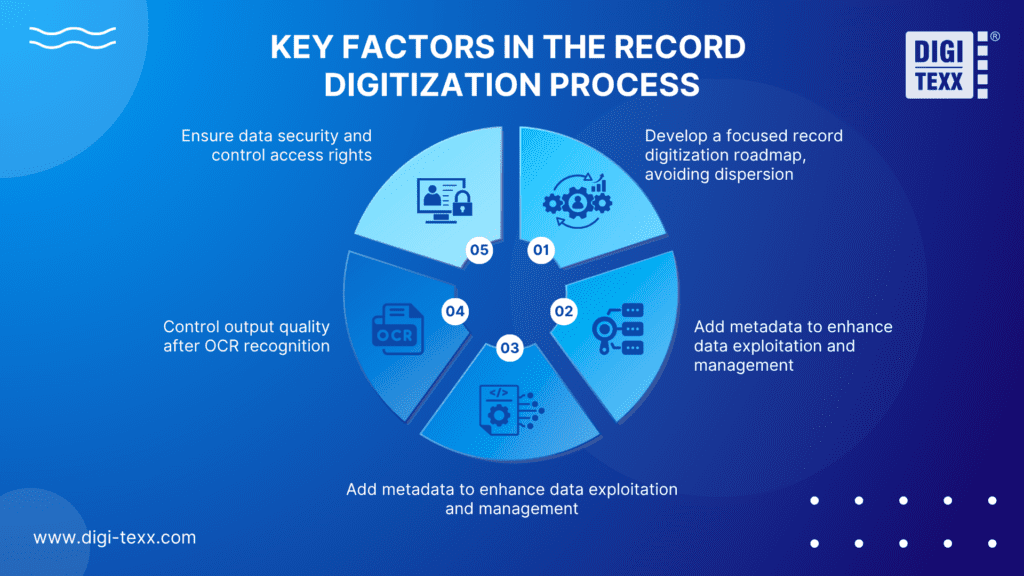
1. Develop a focused record digitization roadmap, avoiding dispersion
Businesses need to clearly define the scope and objectives of record digitization from the outset to avoid scattered efforts or inconsistencies. Priority should be given to groups of records that are frequently used or subject to strict legal and audit requirements. Breaking the process into smaller phases will help better control progress and reduce risks during implementation.
2. Standardize record classification and naming methods
A clear and consistent naming and classification system helps manage and locate records quickly and accurately. Businesses should develop a unified standard for the entire organization, such as record name, issue date, and department code. This is especially important when digitized records are shared across multiple departments or integrated with software systems.
3. Add metadata to enhance data exploitation and management
Metadata (descriptive data) such as record type, creator, effective date, retention period, etc., helps manage records systematically. This is essential to support advanced searching and access control. Without metadata, digitized records are difficult to effectively utilize despite being in electronic form.
4. Control output quality after OCR recognition
After performing OCR, businesses need to review the results to ensure the accuracy of digitized content. Especially for records with low scan quality, blurred images, or special characters, recognition errors are common. This quality check step helps prevent data errors, particularly for records related to legal or critical business matters.
5. Ensure data security and control access rights
Digitized records must be stored on secure systems with access rights assigned according to users’ roles and functions. At the same time, a mechanism to log access history and edits should be established to facilitate audits and verifications when needed. This is a crucial requirement to ensure compliance with information security regulations within the organization.
How Much Does Records Digitization Cost?
There is no single price that fits every records collection. Preparation effort, page condition, document size, color requirements, indexing fields, OCR review, security controls and delivery deadlines all affect the scope. A low scanning rate may exclude indexing, validation, transport, or repository import.
Request itemized quotes for the same sample set. Specify estimated pages, double-sided content, bound or fragile records, output formats, metadata fields, correction rounds, transfer arrangements and any return or disposal requirements. Compare total project cost and accepted deliverables, not only a headline price per page.
In-House vs Outsourced Records Digitization
An in-house workflow can suit a manageable volume of routine records when the team has suitable equipment, time, and quality-control skills. Include staff preparation time, software, review, storage, and rework when assessing the cost.
Outsourcing can suit a large backlog, mixed formats, or a fixed delivery window that exceeds internal capacity. Test the provider with representative samples and agree on custody, security, quality criteria, and batch reporting before scaling.
For sensitive collections, evaluate where physical scanning will occur and who may access digital copies. A Vietnam-based processing model does not by itself establish US onsite collection or scanning coverage. Confirm country coverage, approved processing locations, transfer restrictions, and subcontractors in the project agreement.
How to Choose a Records Digitization Provider
Ask shortlisted providers to demonstrate a complete pilot: receive records, scan, perform OCR where appropriate, index, review, export, and retrieve the files in your target system. A good-looking sample image alone does not test the full workflow.
Confirm relevant record-handling experience, a custody log, access controls, incident reporting, approved processing locations, correction procedures and exit arrangements. Ask for current certificates and verify their scope; a certification does not prove that every proposed workflow meets every client requirement.
Agree a production plan based on accepted pages or files per batch, not an unqualified scanner speed. Identify who approves exceptions, how failed batches are corrected, and when the originals may be returned or considered for authorized disposal.
How DIGI-TEXX Supports Records Digitization
DIGI-TEXX’s document scanning service describes preparation, scanning, metadata assignment, automated and manual quality checks, and delivery. Its digital archiving services address access to physical collections after digitization. Confirm the required workflow and delivery model for your collection before placing an order.
In a published case study for an investment management institution in Vietnam, DIGI-TEXX describes a scope of 1.8 million A4-equivalent pages, scanning and processing at the client’s workspace, metadata indexing, and secure delivery. The case study reports 98.6% accuracy against a 97% commitment. These are project-specific, provider-reported figures; they are not a universal OCR accuracy guarantee or a promise of current daily capacity. Source: DIGI-TEXX investment-management scanning case study.
QTSC also published an overview of DIGI-TEXX’s image-enhancement work for historical documents. This provides an external description of a relevant capability, rather than independent verification of every service claim. Source: QTSC overview of DIGI-TEXX image quality enhancement.
FAQs About Records Digitization
What Is the Difference Between Records Digitization and Document Scanning?
Scanning captures the document image. A business records digitization project usually adds organization, OCR where useful, metadata, quality review, and controlled delivery. Retention and access management continue after the files are created.
Which Records Should a Business Digitize First?
Prioritize records that are frequently retrieved, needed across teams, or at risk of deterioration. Check retention requirements and holds before choosing the scope. Test a representative subset before committing a complete archive.
Can Paper Originals Be Destroyed After Scanning?
Not automatically. Confirm the applicable retention schedule, any legal holds, the need to preserve originals and approval responsibilities. Accept and validate the digital output before considering authorized disposal. NARA’s GRS 4.5 FAQ explains specific conditions and exclusions for US federal records; it is not a blanket authorization for private businesses.
How Accurate Is OCR for Business Records?
OCR performance depends on print quality, language, layout, and handwriting. Agree how accuracy will be measured and which fields need manual review. Preserve source images and an exception process rather than promising that every recognized character is correct.
What Should Be Included in a Records Digitization Quote?
Include preparation, scanning, OCR, indexing, quality review, secure transfer, and any repository import. State page volume, document condition, required fields, formats, batch deadlines, and revision terms. Clarify whether transport, storage, return of originals, or authorized destruction are separate charges.
How Long Does a Records Digitization Project Take?
Estimate the schedule after a representative pilot. Preparation, fragile records, indexing complexity, review and client approval can constrain throughput as much as scanning. Agree batch milestones and an exception queue instead of applying a generic pages-per-day promise.
What Files and Metadata Should Be Delivered?
Agree image or searchable-document formats and a metadata export that the receiving system can import. Include unique record IDs, required business fields, a file manifest and unresolved exceptions. Test a sample import and retrieval before approving the full delivery.
Plan Your Records Digitization Project
As outlined in this article, record digitization not only helps reduce costs and save storage space but also serves as a crucial foundation for digital transformation.
When executed through a well-structured process from classification, scanning, OCR, to storage and management, businesses can better control their information, improve operational efficiency, and easily retrieve data when needed.
To achieve optimal results, it is essential to establish appropriate procedures, select reliable technologies, and ensure strong access control and security standards.
To discuss outsourcing, share representative records, estimated page volume, indexing fields, required formats, document location and delivery schedule with DIGI-TEXX. Confirm the scanning location, transfer controls and pilot acceptance criteria before committing the full collection.
=> Learn more:
Referrence: