The best scanning app depends on your device and where you want to save documents. Start with Apple Notes for everyday iPhone scans or Google Drive for scans saved to Drive on Android and iOS. Adobe Scan is worth considering for PDF and OCR work. DIGI-TEXX compares these options with paid apps and DIGI-Scan for business capture workflows. [1][2][3][20]
For a quick decision, choose a free option first and test it with a receipt, a two-page form and a page of small print. Upgrade only if you need a specific capability such as text recognition, automated exports or team controls. This is a source-based comparison, not a hands-on speed or OCR-accuracy ranking.
Best Scanning Apps at a Glance
The comparison below distinguishes free scanning from paid extras. Pricing examples are in USD, checked on 23 October 2026. App Store amounts refer to the US storefront; Android prices, regional offers, taxes and renewal terms can differ. Multiple purchase options can appear for one app, so confirm the offer presented at checkout.
| Option / platform | Useful for | Free scope / main limit | Price example (USD) | Source |
| Adobe Scan / Android, iOS | PDF + OCR | Basic scan; advanced actions paid | Free; Premium monthly listings $9.99 / $14.99 | [3][4][5] |
| OneDrive / mobile | Microsoft workflow | Lens retired; cloud destination required | Check account/storage plan; no separate scanner price asserted | [6] |
| Google Drive / Android, iOS | Save to Drive | Scan feature; account storage applies | No separate scan fee | [2] |
| Apple Notes / iPhone, iPad | Everyday capture | Included; optional storage separate | No separate scan fee | [1] |
| CamScanner / Android, iOS | Scan + document tools | Basic free; ads/watermarks and OCR limits | US iOS $9.99/month or $59.99/year listed | [7][8] |
| Genius Scan / mobile | Receipts and organization | Basic free; OCR/cloud extras paid | Ultra $39.99/year; teams $40–$20/license/year | [9][10] |
| SwiftScan / Android, iOS | Capture and upload workflow | Free download; paid features vary | US iOS Plus $7.99/$9.99 monthly; $59.99 annual | [11][12] |
| Dropbox mobile / Android, iOS | Existing Dropbox folders | Use main app; storage/plan limits | No separate scan fee; account plan applies | [13] |
| Notebloc / Android, iOS | Free notes and OCR | Free features; Android listing has ads | Free; no mandatory paid OCR tier cited | [14][15] |
| Tiny Scanner / Android, iOS | Capture and PDF tools | Free download; ads/purchases | US iOS monthly $4.99/$6.99; yearly $49.99 listed | [16][17] |
| TurboScan / Android, iOS | Focused capture | Android free edition: 3 documents | US iOS Pro $12.99 one-time; Android upgrade varies | [18][19] |
| DIGI-Scan / scoped business deployment | Centralized capture | Enterprise scope, not consumer free tier | Request quotation | [20] |
Microsoft Lens is no longer a current recommendation: Microsoft states that new scans stopped after 9 March 2026 and recommends OneDrive. The standalone Dropbox Scan app has also been removed from the iOS App Store; use scanning inside the Dropbox mobile app. These changes are reflected in the 12 entries below. [6][13]
How to Choose the Best Scanning App
Choose according to the document and destination, then compare the cost of the features you will actually use. The questions below help distinguish an attractive app listing from a workflow that fits your needs.
- Scan quality: Can you read small numbers, signatures and stamps after export? Check page edges and faded text rather than relying only on the preview.
- OCR and output: Do you need an image PDF, a searchable PDF, copied text or an editable document? These are different outputs and may use different plans.
- Storage and access: Decide whether files should remain on the device or go to an approved cloud account. Check backup, recovery and export before relying on the app.
- Free-plan limits: Test page limits, watermarks, advertisements, account requirements and whether a trial automatically renews.
- Compatibility: Confirm the current OS requirement and the exact app developer. Similar names can refer to unrelated products.
- Work use: Confirm company policy before sending customer, employee or financial documents through a personal account.
12 Scanning Apps and Solutions to Consider
Each entry covers the useful features, tradeoffs, pricing and a practical selection tip. Numbering follows the original article’s order and does not represent a measured performance score. DIGI-Scan is included as an enterprise workflow option and is evaluated separately from consumer subscriptions.
1. Adobe Scan
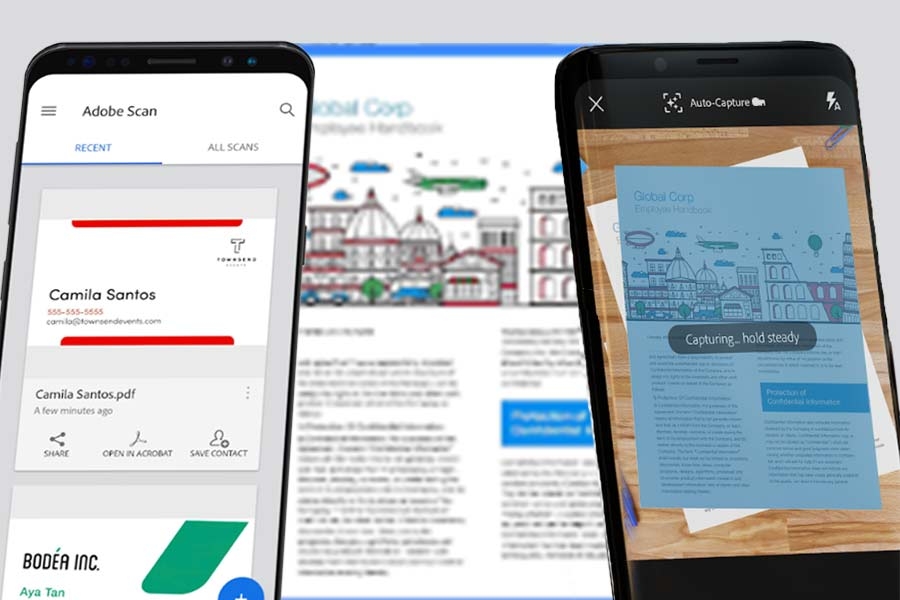
Adobe Scan is a practical shortlist option when you regularly turn printed documents into PDFs and want text recognition within Adobe’s document workflow. It is available for Android and iOS. Its free and paid capabilities should be evaluated separately, especially if your main need is editable exports rather than a readable scan. [3][5]
- Key features: Document capture, crop and rotation adjustments, multipage scans, PDF/JPEG output and OCR. [4]
- Advantages: A familiar route from a phone scan into Adobe PDF tools; useful when your existing workflow already uses Acrobat.
- Limitations: Exporting to formats such as Word or Excel and other advanced actions can require a subscription. Do not assume a Scan plan includes every Acrobat feature. [5]
- Pricing: Free download with basic scanning; the US listing includes Adobe Scan Premium – Monthly at USD 9.99 and a separate monthly offer at USD 14.99. Confirm the plan and renewal shown to your account. [4]
- Best for: Students and professionals who need recurring PDF capture and searchable text.
Selection tip: Before upgrading, scan a representative document and confirm that the exported file supports the exact search or editing action you need. Review important OCR fields against the image.
“Adobe Scan has surpassed 150 million downloads, with users creating more than 2.5 billion documents through the app.” – Adobe
>>> See more:
- Top 13 Enterprise Document Solutions for Your Business Processes
- Top AI Document Processing Tools to Automate Your Data Workflow in 2025
- What Is a Document Management System (DMS)?
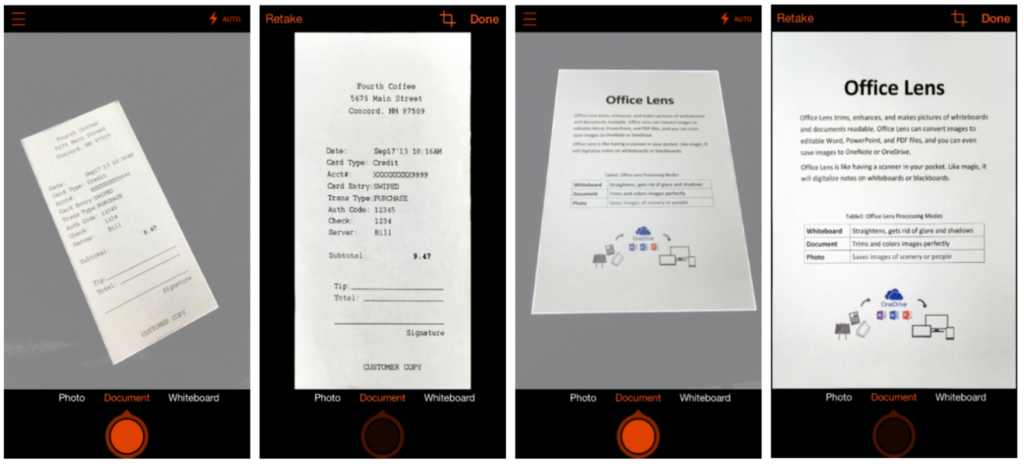
2. OneDrive Scanning — The Microsoft Lens Replacement
If you arrived here looking for Microsoft Lens, use Microsoft’s transition guidance. Lens is retired; Microsoft recommends the scanning feature in OneDrive. This is a replacement workflow, so do not assume it reproduces Lens’s Word, Excel or PowerPoint export capabilities. [6]
- Key features: Capture documents through the OneDrive mobile app and save them to a chosen OneDrive location. [6]
- Advantages: A direct fit when your documents already belong in a Microsoft cloud account.
- Limitations: Microsoft states that this scanning workflow does not support saving scans locally on the device. Evaluate another option if local-only storage is essential. [6]
- Pricing: Lens’s former free offer is historical, not a current product plan. For OneDrive, check the storage allowance and subscription attached to your account; no separate scanner price is asserted here.
- Best for: Existing OneDrive users who want scanning connected to their current file storage.
Selection tip: Confirm which account receives the scan before capturing work documents. For older Lens files, follow Microsoft’s account-access instructions and export needed records while you still have access.
3. Google Drive Scanner — For Saving Directly to Drive
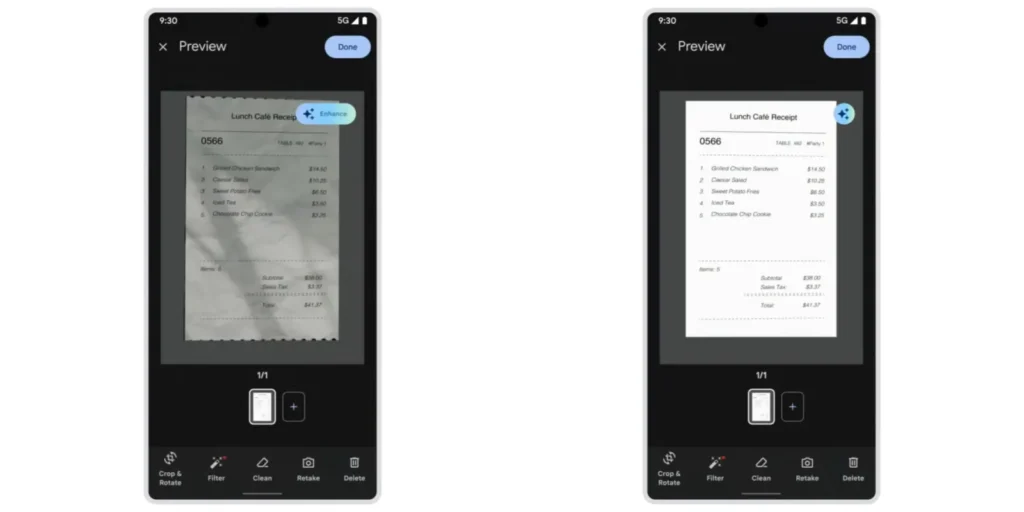
Google Drive offers document scanning on both Android and iOS. It is useful when your next step is to organize or share a scan in an existing Drive folder. The earlier Android-only description is outdated. Install or update Drive if the feature is not already available on your phone. [2]
- Key features: Capture pages, adjust the scan, add pages and save the result to Drive. Google describes scanned documents as searchable PDFs. [2]
- Advantages: Fewer handoffs when your filing system already uses Drive folders.
- Limitations: This is a cloud-oriented workflow. Searchable content is not the same as a fully editable Word document; test the output before using it for data entry.
- Pricing: No separate scanning fee; storage is governed by the Google account or Workspace plan. Additional storage is a separate purchase.
- Best for: Android and iPhone users who want documents available in their Drive account.
Selection tip: Choose the destination folder and a useful filename before saving. Check that shared-folder permissions match the document’s intended audience.
4. Apple Notes — For Everyday iPhone and iPad Scanning
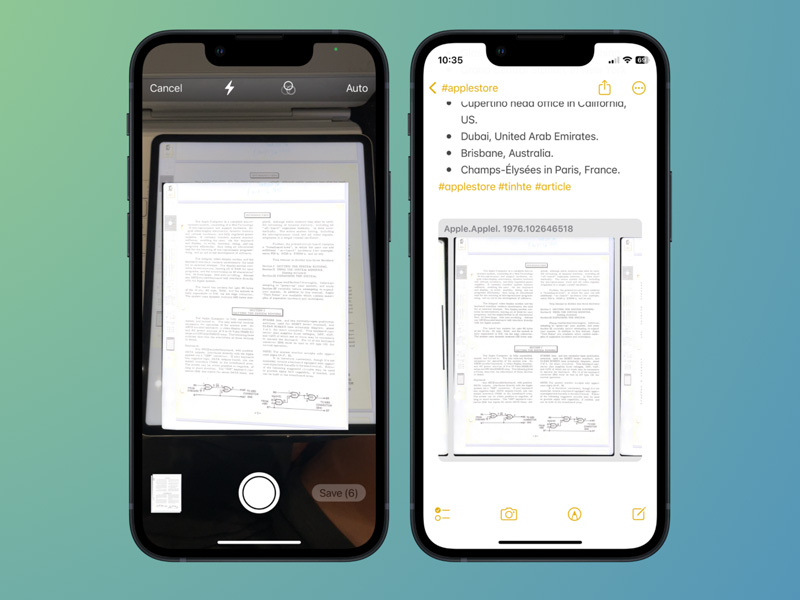
Apple Notes provides a built-in scanning workflow on iPhone and iPad. It is a sensible first option for occasional forms, receipts and household paperwork because you can scan into a note without installing a dedicated scanner. Apple also documents adding a signature to a scanned document. [1]
- Key features: Automatic or manual capture, corner adjustment, additional pages and saving the scanned document within Notes. [1]
- Advantages: Convenient for users who already organize information in Notes.
- Limitations: Check how the note is stored and shared. Saving a scan does not automatically give it a records-retention policy or convert every part of it into editable text.
- Pricing: Included with supported Apple devices; no separate scan subscription. Optional iCloud storage is a separate service.
- Best for: iPhone and iPad users who need a straightforward scan-and-share workflow.
Selection tip: Open the exported attachment before sending it to confirm all pages are present. Use a dedicated PDF workflow if you repeatedly need transformations that Notes does not provide.
>>> See more:
- How Automated Invoice Processing Saves Time and Reduces Errors?
- What Is Document Digitization and Why Should You Digitize Your Documents?
- 16 Key Factors To Improve Data Accuracy
5. CamScanner — For Scanning and PDF Tools in One App
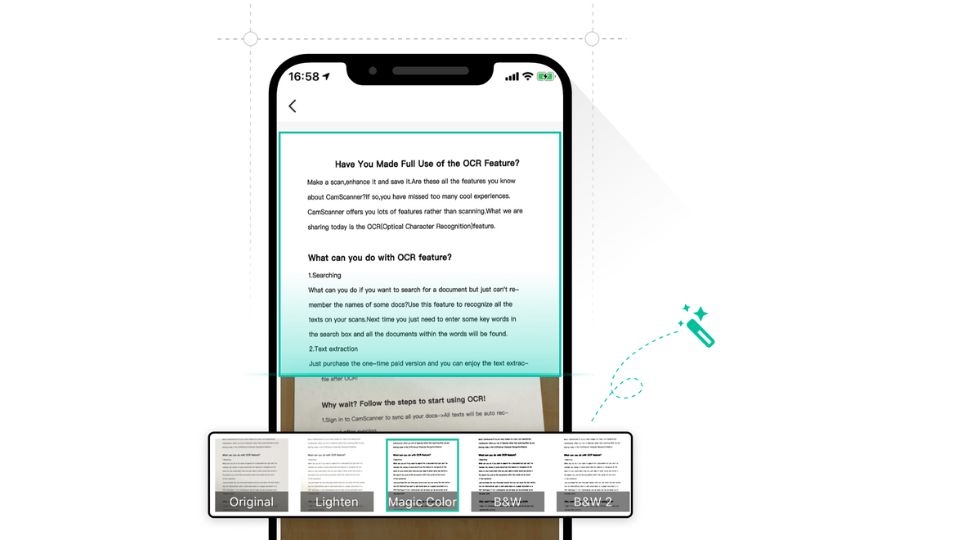
CamScanner combines mobile capture with OCR and document tools. It can suit users who scan varied paperwork and want more than a simple camera-to-PDF conversion. Its official FAQ distinguishes basic free scanning and limited OCR from Premium features. [7]
- Key features: Document capture, PDF/JPG output, OCR and tools for handling multipage files. [7][8]
- Advantages: Broad document functionality in one workflow; suitable for users who frequently reuse captured text.
- Limitations: The free plan includes restrictions; Premium removes ads and watermarks and expands features. Avoid assuming that all OCR use is unlimited. [7]
- Pricing: Free tier; the US App Store lists Premium Account (1 Month) at USD 9.99 and Premium Account (1 year) at USD 59.99. Other offers are also listed. [8]
- Best for: Frequent personal or business-paperwork scanning where the paid tools justify the subscription.
Selection tip: Export a test file before deciding. Confirm whether the free output has a watermark and whether your intended OCR or conversion action triggers a paid offer.
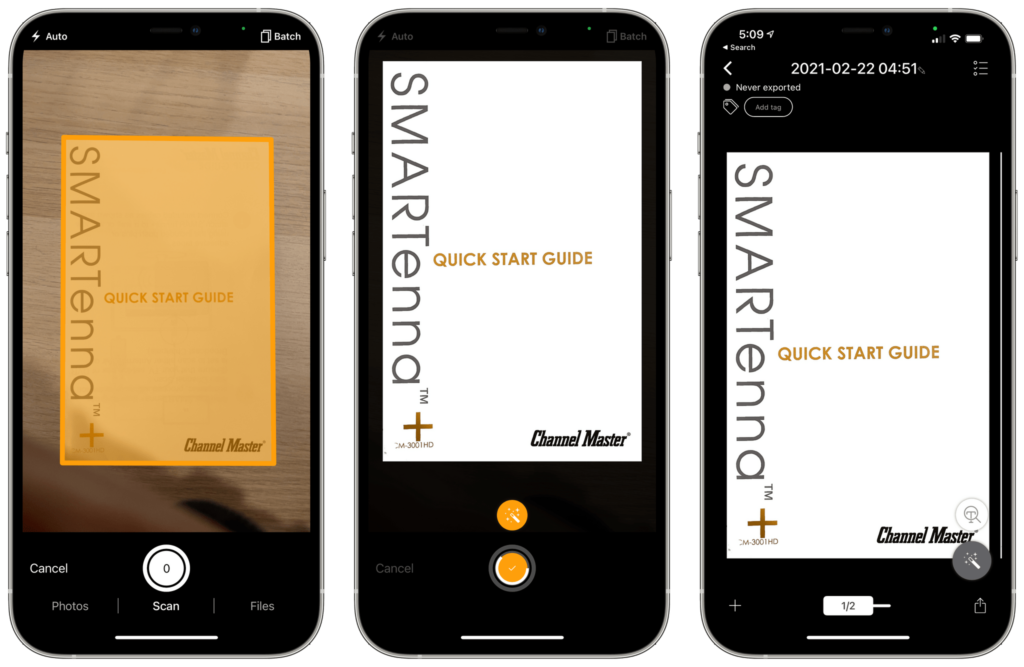
6. Genius Scan — For Receipts and Document Organization
Genius Scan is designed for users who need more than a basic document scanner. It excels at Genius Scan is a useful option for collecting receipts, forms and expense documents into an organized mobile workflow. The product supports batch capture and document organization, while its current pricing separates Basic scanning from Ultra’s OCR, cloud export and backup features. [9][10]
- Key features: Document detection, perspective correction, multipage PDFs and organization tools; enhanced features depend on plan. [9][10]
- Advantages: A clearly described free scanning tier and a paid upgrade for users who need more workflow support.
- Limitations: OCR and advanced cloud features belong to the paid scope. Confirm the distinction between sending a file to cloud storage and synchronizing the app’s document library.
- Pricing: Basic is free; Ultra is USD 39.99/year on the official pricing page. Team pricing is listed from USD 40 down to USD 20 per license/year depending on volume. [9]
- Best for: People managing receipts or recurring paperwork, and teams evaluating centrally managed licenses.
Selection tip: Test your naming, tagging and export routine with one expense batch. A scan becomes more useful when another person can find the right document without opening every file.
>>> See more:
- An Overview of Document Processing Company: What You Need to Know
- Top 13 Enterprise Document Solutions for Your Business Processes
- Online Data Processing Services: Streamline Your Data Management
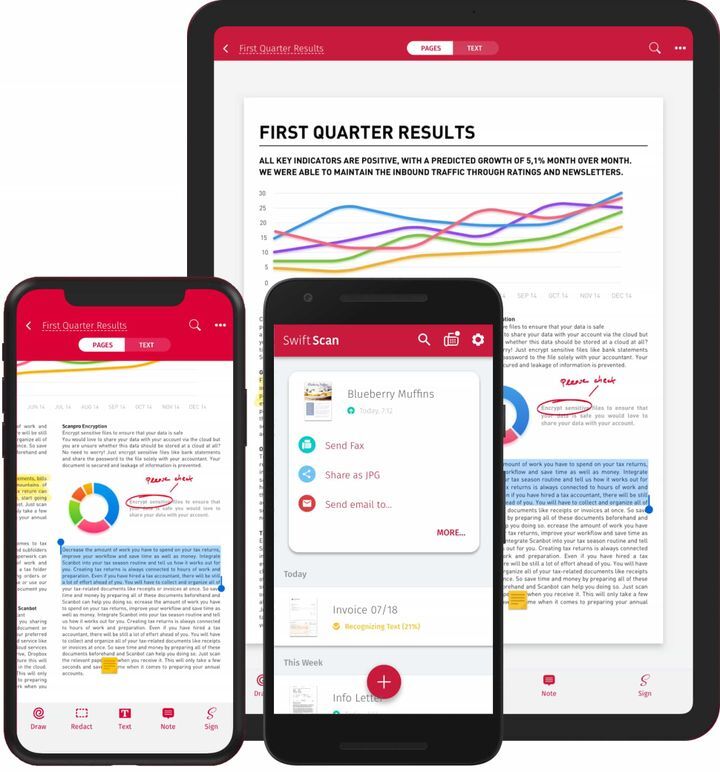
7. SwiftScan — For Automated Upload and PDF Workflows
SwiftScan offers capture, PDF/JPG output and connections to several storage services. Its published features make it worth evaluating when scans repeatedly go to the same destination. Available tools and purchase options should be checked on the version installed on your device. [11][12]
- Key features: Automatic capture, cropping, OCR, PDF tools and supported cloud upload workflows. [11]
- Advantages: Useful for reducing repeated export steps when the destination is predictable.
- Limitations: Do not infer blanket privacy or healthcare compliance from a product description. Review the current privacy policy and the behavior of optional AI, cloud and fax features.
- Pricing: Free download with paid purchases. US examples include SwiftScan Plus Monthly at USD 7.99 or USD 9.99 and Plus Annual at USD 59.99; other VIP/legacy offers appear separately. [12]
- Best for: Users who need repeatable capture-to-folder workflows and will use the paid features.
Selection tip: Confirm the destination and uploaded output with a non-sensitive sample. On-device processing of one feature does not establish how every optional feature handles data.
8. Dropbox Mobile Scanner — For Existing Dropbox Users
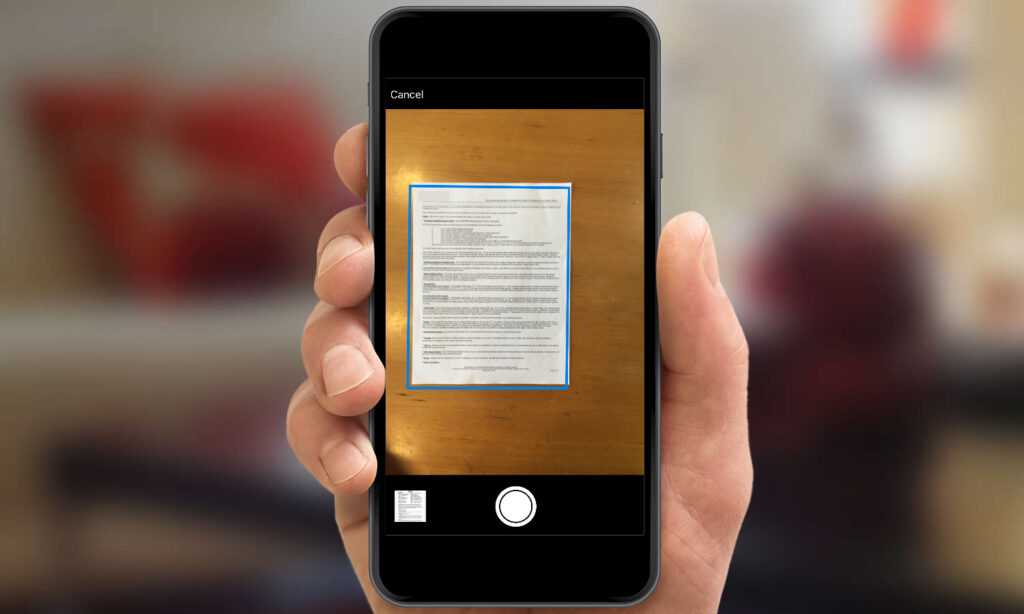
Use the scanner inside the main Dropbox mobile app. Dropbox states that its standalone Dropbox Scan iOS app is no longer supported and has been removed from the App Store. The current mobile workflow scans directly to a Dropbox account on iOS or Android. [13]
- Key features: Capture a document, adjust the scan, add pages and save it to Dropbox; the help page also describes converting existing images to scans. [13]
- Advantages: A straightforward choice when the destination and sharing workflow already use Dropbox.
- Limitations: A Dropbox account and available storage are part of the workflow. Confirm plan-specific text-search and export behavior rather than assuming every saved PDF has a portable OCR text layer.
- Pricing: Document scanning is available to Dropbox users; storage and collaboration costs depend on the account plan. There is no current standalone Dropbox Scan subscription to recommend.
- Best for: Individuals and teams who already keep documents in Dropbox.
Selection tip: Test whether a recipient outside your account can open the shared file with the intended permissions. Review link access before sending confidential documents.ssionals who manage documents primarily in cloud storage.
9. Notebloc — For Free, Watermark-Free Scans
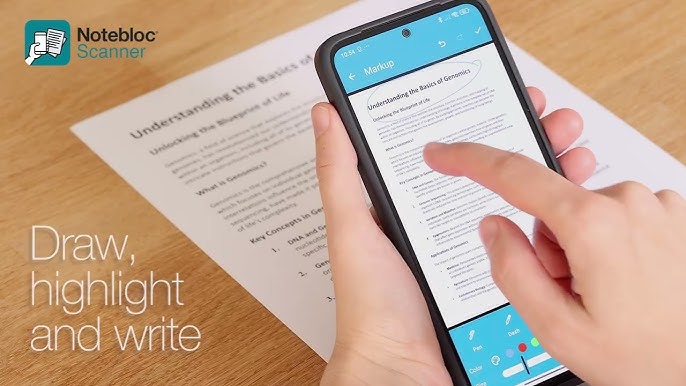
Notebloc is a useful free option for students, teachers and everyday paperwork. Its official site describes scanning, batch scanning, typed-text OCR and markup as free, and states that exported documents do not carry its watermark. The original claim that OCR needs a premium plan should therefore be replaced. [14]
- Key features: Scan pages, organize documents, use markup and extract typed text. [14][15]
- Advantages: Free core functionality and watermark-free output make it worth trying before purchasing a scanner subscription.
- Limitations: Typed-text OCR should not be treated as guaranteed handwriting recognition. The Google Play listing includes advertising, so “free” should not be described as “ad-free.” [15]
- Pricing: USD 0 for the features described on the official site; no mandatory paid OCR tier is established by that source. [14]
- Best for: Notes, study materials and routine documents where a free capture tool is sufficient.
Selection tip: Check the available OCR languages against your documents. Proofread names and numbers before reusing extracted text, and make a backup of important files.
>>> See more:
- What Is Digitization Service? Common Types of Digitization Services
- How AI-Powered Document Automation Transforms Business Operations?
- Top 10 Automated Document Processing Software
10. Tiny Scanner — For Capture with Additional PDF Tools
Tiny Scanner now offers a broader set of document tools than the original “lightweight scanner” label suggests. Its current listings describe batch scanning, PDF editing and OCR, with Android and Apple-device versions available. Check the exact feature entitlement rather than assuming the same free tier on both platforms. [16][17]
- Key features: Border detection, multipage scanning, filters, compression and PDF tools; the Android listing also describes OCR and file conversion. [17]
- Advantages: A candidate for users who want capture and follow-up document actions in one app.
- Limitations: Ads, in-app purchases and plan differences need checking. The app name alone is not evidence of low storage use or strong performance on older phones.
- Pricing: Free download. US purchase examples include monthly options at USD 4.99 and USD 6.99, and a yearly plan at USD 49.99. Weekly and promotional offers also appear; confirm the billing period. [16]
- Best for: Users who need more document actions after capture and are willing to compare the paid options.
Selection tip: Check the current OS requirement and export limits before paying. Try the most demanding document you expect to scan, rather than only a clean single-page sheet.
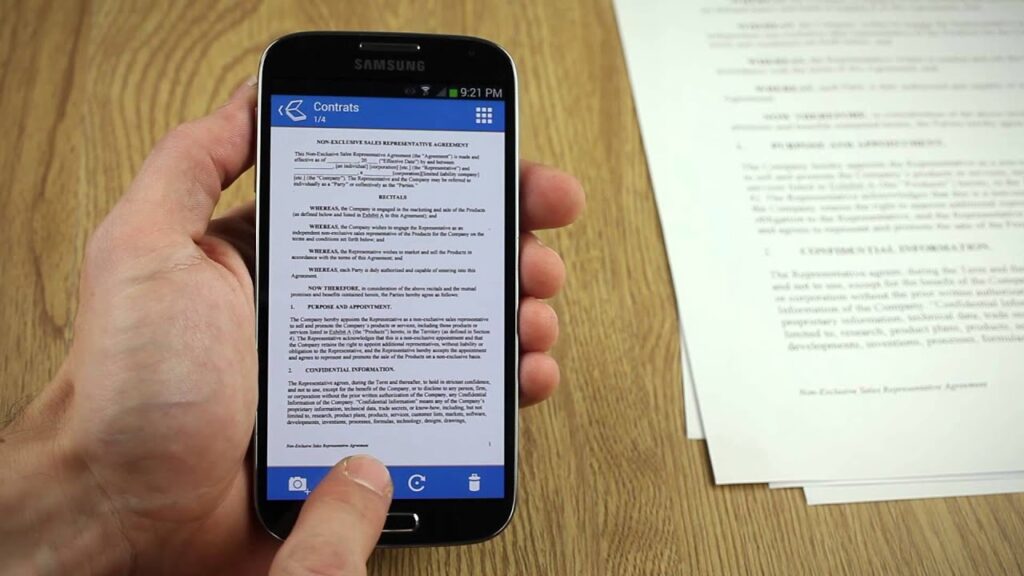
11. TurboScan — For a One-Time-Purchase Scanning Option
TurboScan is worth comparing if you prefer a focused document scanner and want to avoid an ongoing subscription. The US TurboScan Pro listing describes a one-time purchase and multipage PDF/JPEG scanning. Select the Piksoft product carefully because similarly named apps can have different developers and features. [18]
- Key features: Edge detection, perspective correction, multipage capture and SureScan’s multi-image capture method. [18]
- Advantages: A clearly priced one-time Pro option on iOS can be easier to budget than a recurring plan.
- Limitations: Do not assume it includes the same editable OCR and cloud workflow as another scanner. Check the exact edition and your backup routine.
- Pricing: TurboScan Pro is USD 12.99 on the US App Store. The separate Android free edition allows up to three multipage documents; confirm its upgrade price locally. [18][19]
- Best for: People who prioritize document capture and a one-time purchase over a larger subscription toolkit.
Selection tip: Compare a normal scan with SureScan on your own paperwork. Keep the version that preserves faint text and detail, and verify exported files before archiving them.
12. DIGI-Scan — For Centralized Business Capture
DIGI-Scan is DIGI-TEXX’s configurable capture and document-transfer solution for organizations working across devices and locations. Evaluate it when the challenge includes standardized intake, validation and routing across a business, beyond an individual’s phone scans. [20]
- Key features: Automatic upload, image correction, OCR, classification rules, access controls and reporting are described on the product page. [20]
- Advantages: A business workflow can connect capture with downstream processing and an agreed document-management environment.
- Limitations: Integration, deployment, supported devices and operational responsibilities need scoping. DIGI-Xtract is a data-extraction solution; it should not be mislabeled as a DMS.
- Pricing: Request a scoped quotation. No verified public fixed subscription price is provided in the cited product material.
- Best for: Organizations that need a controlled capture process across teams, branches or document types.
Selection tip: For a pilot, agree accepted image quality, required metadata, exception handling, throughput and delivery checks. Measure results using your actual document mix rather than treating a vendor’s general description as a project guarantee.
| Scanner App | Best For | Free Version | OCR | Key Strength |
| Adobe Scan | High-quality scans & OCR | Yes | Yes | Excellent scan quality and accurate OCR |
| Microsoft Lens | Microsoft 365 users | Yes | Yes | Free scanning with Office integration |
| Google Drive Scanner | Android users | Yes | Basic | Built-in scanning and cloud backup |
| Apple Notes | iPhone & iPad users | Yes | Limited | Built-in scanner with iCloud integration |
| CamScanner | Business documents | Yes | Yes | OCR, batch scanning, and document management |
| Genius Scan | Receipt & expense management | Yes | Premium | Smart document organization |
| SwiftScan | Privacy & secure scanning | Yes | Premium | Security and high-quality scanning |
| Dropbox Scan | Dropbox users | Yes | Basic | Seamless cloud storage and sharing |
| Notebloc | Watermark-free PDFs | Yes | Limited | Clean scans without watermarks |
| Tiny Scanner | Lightweight scanning | Yes | Premium | Fast and lightweight performance |
| TurboScan | High-quality scans | Limited | Limited | SureScan® image enhancement |
| DIGI-Scan | Enterprise document processing | Custom | Yes | High-volume scanning, OCR, and automation |
>>> See more:
- How to Retouch Wedding Photos: Best Techniques and Tools
- Wedding Photo Editing Service | Elevating Your Wedding Photos
How to Turn Your Phone into a Scanner for Free
Turning your phone into a scanner starts with a supported app and a readable capture. Follow the workflow for your device, then check the saved file. A photo in your camera roll and a multipage PDF are different outputs.
On iPhone or iPad: Use Apple Notes
Open Notes and create or select a note. Choose the attachment control, select Scan Documents, frame the page, then use automatic capture or take the scan manually. Adjust the corners if necessary, add further pages and save. Apple’s instructions also explain how to add a signature. [1]
On Android: Use Google Drive
Open Drive and select the camera/scanning control. Capture the page, adjust the crop and filter, add any additional pages, and save with a descriptive filename in the correct folder. Interface labels can vary by version; Google’s help page provides the current steps and also links to the iOS workflow. [2]
Check the Result Before Sharing
- Use even light and a contrasting background; keep the phone steady and the page flat.
- Inspect the full page, including edges, signatures and small numbers. Retake blurred pages rather than relying on an enhancement filter.
- Check page count and order, then open the exported file outside the scanner app.
- If you need OCR, search for a known phrase and compare the recognized text with the image.
- Use a filename such as 2026-10-23_supplier_invoice-1042.pdf and store it in an agreed folder.
Turning your phone into a mobile document scanner is most effective when capture, naming and storage work together. A clear scan that cannot be found later still creates extra work.
Reducing Household Paper Usage with Scanning Apps
Reducing household paper usage with scanning apps works best as a small filing routine. Start with receipts, manuals and reference copies, then decide which records still need their physical originals. Scanning an existing sheet reduces storage clutter; choosing electronic delivery and avoiding reprinting can reduce future paper use.
- Create a few useful folders, such as Home, School, Purchases and Warranties.
- Use dates and recognizable names so files remain searchable even when OCR is imperfect.
- Keep originals when a bank, authority, insurer or agreement requires them, or when their long-term value makes retention appropriate.
- Back up important scans and test opening a file from the backup.
- Review and securely dispose of eligible paper only after checking readability, completeness and any retention requirements.
Best Phone Apps for Scanning Checks: Use Your Bank’s App for Deposits
If you are looking for the best phone apps for scanning checks to deposit money, use the mobile-deposit feature provided by your bank or credit union, if your account is eligible. A PDF scanner creates a copy; it does not submit a check for deposit.
For example, Chase’s documented workflow uses its own mobile app to select the account, enter the amount, photograph the endorsed front and back, and submit the deposit. Follow your bank’s instructions for endorsement, eligibility, limits, confirmation and retaining the original check. [22]
- Do not assume a scanner export will be accepted as a mobile-deposit image.
- Confirm acceptance in the bank’s workflow and avoid submitting the same check again.
- For a recordkeeping copy, check whether the bank already provides an image or receipt before storing another sensitive copy.
When a Business Needs More Than a Phone Scanning App
A phone app may be enough for occasional capture. A shared business process becomes more useful when teams need consistent metadata, controlled access, document tracking and reliable delivery to downstream systems. Define those requirements before comparing consumer subscriptions with enterprise services.
A Related DIGI-TEXX Scanning Case Study
DIGI-TEXX’s Intelligent Document Scanning Solution case study describes an insurance workflow that captures, classifies, indexes, validates and routes branch documents to relevant departments. The company reports that manual work and operation time were reduced by half and accuracy increased from 70% to 97%. These are vendor-reported results for that project; the page does not provide enough measurement detail to treat them as a universal mobile-scanning benchmark. [21]
Evidence to Request Before Procurement
DIGI-TEXX’s About page lists ISO 27001:2022 and ISO 9001:2015. Review the current certificates and their scope for the proposed service. QTSC’s directory also lists DIGI-TEXX’s document processing, scanning and archiving activities; this is an external company reference, not an independent assessment of scanning accuracy. [23][24]
- Request a pilot covering representative documents, devices and locations.
- Agree expected volume, peak demand, turnaround and who resolves failed quality checks.
- Test image completeness, document-to-metadata matching and source/destination reconciliation.
- Confirm integration responsibilities, access permissions, retention and export requirements.
FAQs About Scanner Apps
What Is The Best Free Scanner App?
For occasional iPhone scans, start with Apple Notes. For files going to Google Drive, use its scanner on Android or iOS. Notebloc and Genius Scan Basic are additional free options to evaluate. Choose based on the required output and storage destination; a free scanner does not necessarily include every OCR or export feature. [1][2][9][14]
Is Google Scanner Free?
Google Drive’s scanning feature does not have a separate scanning fee; your account’s storage conditions still apply. Use Drive for document capture. Tools intended for photographs, QR codes or visual search serve different needs and should not be treated as interchangeable document scanners. [2]
Does Android Have A Built-in Scanner App?
Many Android users can scan through Google Drive, but installed apps and camera features vary by device. Check whether Drive is available and updated; otherwise install a suitable supported scanner. Google documents scanning on Android and iOS. [2]
Are There Any Scanner Apps That Are Actually Free?
Yes. Apple Notes, Drive scanning, Notebloc and Genius Scan Basic provide useful scanning without a separate paid scanner subscription. Free access can still involve storage limits, ads or paid extras. Microsoft Lens should no longer be included as a current free recommendation. [1][2][6][9][14][15]
How Can I Turn My Cell Phone into a Digital Scanner?
To turn your cell phone into a digital scanner, open a document-scanning feature, capture the page, correct the crop, add any remaining pages and save the result. Check the exported file for readability and completeness. Use OCR only when you need searchable or reusable text.
Can I Turn My Phone into a Scanner Free of Charge?
Yes. Try a supported built-in or free scanning option first. Test the entire workflow through saving and sharing, because “free download” alone does not establish that your required export, OCR or storage feature is free.
What Is the Difference Between a Scan and OCR?
A scan creates a digital image of the page. OCR recognizes text in that image. A PDF can contain only images or include a searchable text layer, so confirm what the app exports. Recognition errors still need checking before the text is reused. W3C’s PDF guidance also requires checking recognized text and reading order; running OCR alone does not prove that a document is fully accessible. [27]
Can I Use a Scanning App to Deposit a Check?
Use your bank’s mobile-deposit service, not a general PDF scanner, to submit a check. Follow the bank’s capture, endorsement and retention instructions and wait for its confirmation. A saved document image is not evidence that a deposit was accepted. [22]
What Replaced Microsoft Lens?
Microsoft recommends OneDrive’s scanning feature following the retirement of Lens. Lens stopped supporting new scans after 9 March 2026. Check OneDrive’s workflow against your needs, especially if you previously saved scans only on the device. [6]
Should I Pay for a Scanning App?
Pay when a specific feature saves enough work to justify the cost: frequent OCR, automated exports, document organization or team controls. Compare the billing period and renewal price, then test the output using your own documents before subscribing.
Choose a Scanning Workflow That Fits Your Documents
Start with the simplest app that produces the file you need and saves it in the right place. Compare paid features only after testing the free workflow. For teams, include access, quality checks and handoff requirements in the decision.
For businesses handling large document volumes, a digital scanner app may not be enough.
Contact DIGI-TEXX to discuss document volumes, capture devices, quality requirements and integration needs. A scoped DIGI-Scan pilot can help determine which workflow fits your organization.
DIGI-TEXX Contact Information:
🌐 Website: https://digi-texx.com/
📞 Hotline: +84 28 3715 5325
✉️ Email: [email protected]
🏢 Address:
- Headquarters: Anna Building, QTSC, Trung My Tay Ward
- Office 1: German House, 33 Le Duan, Saigon Ward
- Office 2: DIGI-TEXX Building, 477-479 An Duong Vuong, Binh Phu Ward
- Office 3: Innovation Solution Center, ISC Hau Giang, 198 19 Thang 8 street, Vi Tan Ward
Reference:
- [1] Apple Support — Scan documents on iPhone or iPad — https://support.apple.com/en-us/108963
- [2] Google Drive Help — Scan documents — https://support.google.com/drive/answer/3145835?hl=en
- [3] Adobe — Scan FAQ — https://helpx.adobe.com/mobile-apps/help/adobe-scan-faq.html
- [4] Adobe Scan — US App Store listing and purchases — https://apps.apple.com/us/app/adobe-scan-pdf-doc-scanner/id1199564834?platform=mac
- [5] Adobe — Manage Scan subscriptions — https://www.adobe.com/devnet-docs/adobescan/ios/en/managingsubscriptions.html
- [6] Microsoft — Retirement of Microsoft Lens — https://support.microsoft.com/en-us/lens/retirement-of-microsoft-lens
- [7] CamScanner — Official product and free-plan FAQ — https://www.camscanner.com/
- [8] CamScanner — US App Store listing — https://apps.apple.com/us/app/camscanner-pdf-scanner-app/id388627783
- [9] Genius Scan — Official pricing — https://thegrizzlylabs.com/genius-scan/pricing
- [10] Genius Scan — Product overview — https://thegrizzlylabs.com/genius-scan/
- [11] SwiftScan — Product overview — https://swiftscan.app/en/
- [12] SwiftScan — US App Store listing — https://apps.apple.com/us/app/swiftscan-ai-document-scanner/id834854351
- [13] Dropbox — Mobile document scanning and standalone app status — https://help.dropbox.com/create-upload/document-scanning
- [14] Notebloc — Features and free plan — https://www.notebloc.com/
- [15] Notebloc — Google Play listing — https://play.google.com/store/apps/details?hl=en_US&id=com.notebloc.app
- [16] Tiny Scanner — US App Store listing — https://apps.apple.com/us/app/tiny-scanner-pdf-scanner-app/id595563753
- [17] Tiny Scanner — Google Play listing — https://play.google.com/store/apps/details?id=com.appxy.tinyscanner
- [18] TurboScan Pro — US App Store listing — https://apps.apple.com/us/app/turboscan-pro-pdf-scanner/id342548956
- [19] TurboScan — Android free edition — https://play.google.com/store/apps/details?hl=en_US&id=com.piksoft.turboscan.free
- [20] DIGI-TEXX — DIGI-Scan — https://digi-texx.com/digi-scan/
- [21] DIGI-TEXX — Intelligent Document Scanning Solution case study — https://digi-texx.com/case-studies/intelligent-document-scanning-solution/
- [22] Chase — Mobile deposits — https://www.chase.com/digital/mobile-deposits
- [23] DIGI-TEXX — About us / international standards — https://digi-texx.com/about-us/
- [24] QTSC — DIGI-TEXX company directory — https://www.qtsc.com.vn/en/business/digi-texx-vietnam-ltd
- [25] DuckDuckGo — Search result sources — https://duckduckgo.com/duckduckgo-help-pages/results/sources
- [26] Schema.org — BlogPosting — https://schema.org/BlogPosting
- [27] W3C WAI — PDF7: OCR and PDF text — https://www.w3.org/WAI/WCAG22/Techniques/pdf/PDF7
- Original reference retained: University of Arkansas — OCRed documents — https://www.uada.edu/employees/division-accessibility/documents/ocred.asp