Enterprise document management system is the foundation of modern businesses looking to improve document processing, accelerate document digitalization, and automate document-intensive workflows. Whether managing contracts, invoices, or business records, the right solution helps organizations enhance efficiency, strengthen data security, and ensure data accuracy across every stage of the document lifecycle.
In this article, DIGI-TEXX explores what an enterprise document management system is, its key features, benefits, and the leading solutions that support digital transformation with AI document processing, AI document automation, and automated invoice processing.
=> Read more: How Document Processing Companies Improve Efficiency and Accuracy
What Is An Enterprise Document Solution?
An Enterprise Document Solution (EDS) is a system that helps businesses manage, store, and organize electronic documents efficiently. It combines enterprise document management solutions, secure storage, workflow automation, and collaboration tools into a single platform. By converting physical files into digital formats, it streamlines document workflows, improves accessibility, and enhances security.

EDS reduces reliance on paper, lowers operational costs, and ensures compliance with data regulations. It enables seamless collaboration by providing quick access to files anytime, anywhere. As one of today’s most effective enterprise document management solutions, EDS streamlines enterprise documentation, strengthens security, and transforms how organizations manage information across the entire document lifecycle.
Why Is Enterprise Document Management Important?
Enterprise Document Management (EDM) is essential for modern businesses to efficiently handle large volumes of information.
- It simplifies storing, organizing, and retrieving documents, ensuring quick access to critical data.
- EDM enhances collaboration by allowing teams to work on files simultaneously and securely. Enterprise document sharing features enable employees to securely collaborate across departments and remote work environments without compromising document security.
- By digitizing paper documents, it reduces costs, saves space, and minimizes the risk of loss or damage.
Additionally, EDM supports regulatory compliance and improves data security, making it a vital tool for streamlined operations and informed decision-making. Strong enterprise document security features such as encryption, role-based access, and audit logs help protect sensitive business information.
“Organizations that embrace digital workflows and intelligent automation can significantly improve operational efficiency while enabling employees to focus on higher-value work instead of repetitive manual tasks.” — Michael Chui, Partner, McKinsey Global Institute
=> See more: Essential Document Management Software Solutions for Every Business
Types Of Document Management Systems
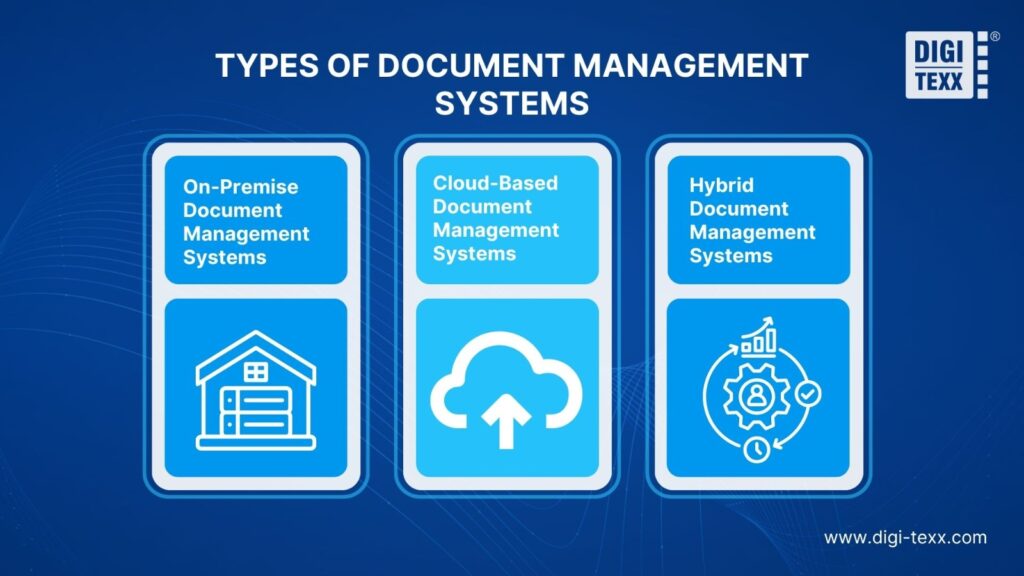
Enterprise document management systems come in different deployment models to meet varying business needs. The three main types are on-premise, cloud-based, and hybrid, each offering different levels of security, flexibility, and scalability.
On-Premise Document Management Systems
An on-premise document management system stores documents on servers located within an organization’s own facilities. Since the business manages the infrastructure, it has full control over data security, system configuration, and regulatory compliance. This deployment model is commonly used by government agencies, healthcare providers, financial institutions, and other organizations that handle highly sensitive or confidential information.
Cloud-Based Document Management Systems
A cloud-based document management system stores files on secure servers managed by a third-party provider and makes them accessible through the internet. Employees can securely access, edit, and share documents from anywhere, making this option ideal for remote and hybrid work environments. Cloud-based solutions are also easy to scale, require minimal IT maintenance, and offer lower upfront costs than on-premise systems.
Hybrid Document Management Systems
A hybrid document management system combines the security of on-premise infrastructure with the flexibility of cloud technology. Many organizations adopt this approach when building an enterprise document management system, allowing sensitive documents to remain on local servers while storing less-critical files in the cloud. This model helps businesses balance security, compliance, accessibility, and cost, making it a practical choice for organizations with diverse document management requirements.
How Does An Enterprise Document Management System Work?
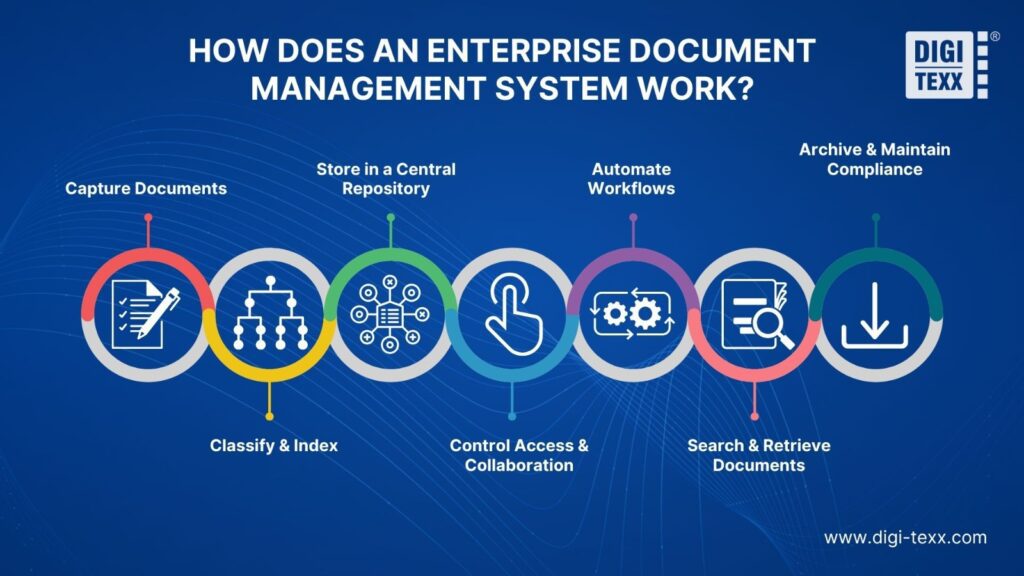
An enterprise document management system (EDMS) centralizes the entire document lifecycle—from capture and storage to retrieval, collaboration, and archiving. Instead of relying on paper files or scattered folders, organizations can securely manage all business documents in a single platform while automating routine processes. As an enterprise document management platform, it streamlines approvals, document routing, compliance, and information governance across the organization.
A typical enterprise document management workflow includes the following steps:
- Step 1 – Capture Documents: Documents are imported from multiple sources, including paper files, scanners, emails, mobile devices, and business applications. Many EDMS platforms use OCR (Optical Character Recognition) to convert scanned documents into searchable digital files. Many organizations also use enterprise document scanning solutions to digitize paper records before processing and storing them in the system.
- Step 2 – Classify and Index: The system automatically organizes documents using metadata such as document type, department, customer name, invoice number, or creation date. This structured indexing makes files easier to search and manage.
- Step – 3: Store in a Central Repository: All documents are securely stored in a centralized repository, whether on-premise, in the cloud, or in a hybrid environment. This ensures a single source of truth and prevents duplicate or outdated files. The repository supports secure enterprise document storage, making documents easier to access, manage, and govern across the organization.
- Step – 4: Control Access and Collaboration: Role-based permissions ensure only authorized users can view, edit, or share specific documents. Teams can collaborate on the latest version while version control tracks every change and maintains a complete revision history.
- Step – 5: Automate Workflows: Built-in workflow automation routes documents through approval, review, and notification processes without manual intervention. This speeds up business operations, reduces bottlenecks, and minimizes human error. Workflow automation also streamlines business document processing, enabling faster approvals and greater operational efficiency.
- Step – 6: Search and Retrieve Documents: Users can quickly locate documents using keywords, metadata, filters, or full-text search, eliminating the need to manually browse folders and significantly reducing retrieval time. These capabilities enhance enterprise file management by improving document organization and ensuring faster access to business-critical information.
- Step – 7: Archive and Maintain Compliance: Once documents are no longer actively used, the system automatically archives them according to predefined retention policies. Audit trails, encryption, and compliance controls help organizations meet industry regulations while protecting sensitive information.
Key Features Of An Enterprise Document Management System
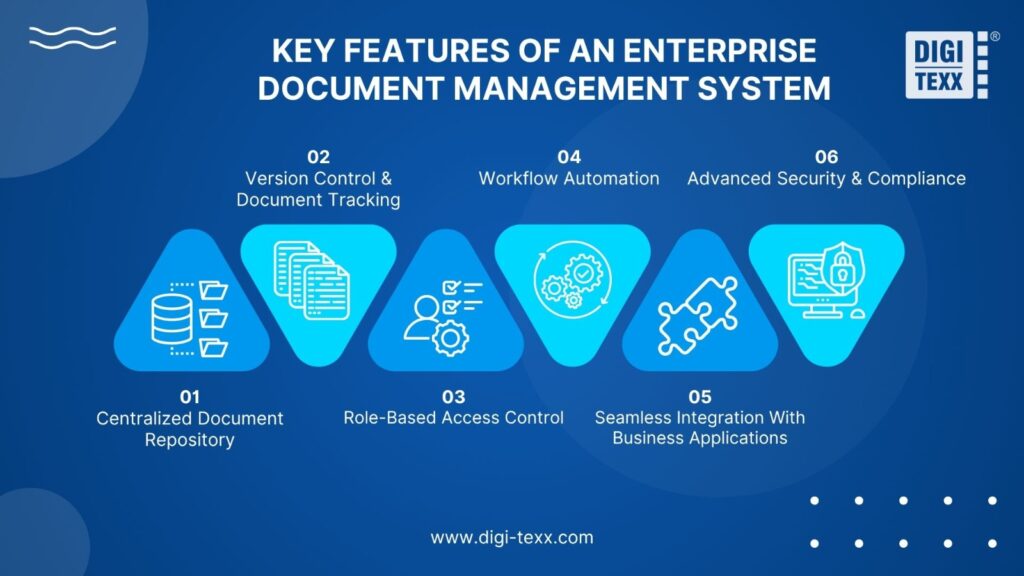
An enterprise document management system combines essential features that simplify document storage, access, collaboration, security, and workflow automation. Together, these capabilities help businesses improve efficiency, protect sensitive information, and manage documents throughout their lifecycle.
Centralized Document Repository
A centralized repository keeps all business documents in a single, secure location, making information easier to organize and access. Instead of searching through multiple folders or storage platforms, employees can quickly locate the files they need, reducing duplicate documents and improving collaboration across departments.
This approach supports document management enterprise initiatives by centralizing information, strengthening governance, and ensuring consistent document access across multiple business units.
Version Control And Document Tracking
Version control records every change made to a document and maintains a complete revision history. Teams can always access the latest approved version while reviewing or restoring previous versions when necessary. This minimizes errors, prevents conflicting edits, and provides a clear audit trail for document changes.
Role-Based Access Control
Role-based access control ensures that employees can only view, edit, or share documents based on their responsibilities. By assigning permissions according to user roles, organizations can protect confidential information, reduce the risk of unauthorized access, and maintain better control over sensitive business data.
Workflow Automation
Workflow automation simplifies repetitive document-related tasks, such as approvals, reviews, notifications, and routing. Automating these processes reduces manual effort, speeds up document processing, and helps teams complete tasks more accurately and efficiently. Many organizations adopt leading document processing automation for businesses to accelerate approvals, improve operational efficiency, and reduce administrative costs.
Seamless Integration With Business Applications
An effective document management system should integrate with essential business applications, including ERP, CRM, HR, and accounting software. Seamless integration enables information to flow between systems automatically, reducing duplicate data entry, improving data accuracy, and creating more efficient business processes.
Advanced Security And Compliance
Protecting sensitive information is a core function of any enterprise document management system. Features such as data encryption, audit logs, user authentication, and compliance monitoring help organizations safeguard documents, meet industry regulations, and reduce security and compliance risks.
Enterprise Document Management System vs Other Solutions
| Criteria | Enterprise Document Management System (EDMS) | Enterprise Content Management (ECM) | Google Drive |
| Primary purpose | Manage the entire document lifecycle | Manage all enterprise content, including documents, emails, images, videos, and records | Cloud storage and file sharing |
| Content supported | Primarily digital documents | Multiple types of enterprise content | Documents and common file formats |
| Workflow automation | Advanced document approval and business workflows | Enterprise-wide workflow and process automation | Basic automation through Google Workspace tools |
| Document security | Role-based permissions, encryption, audit trails | Advanced governance, compliance, and security controls | Basic permission settings and encryption |
| Compliance support | Strong support for regulatory compliance and records retention | Comprehensive enterprise governance and compliance | Limited compliance and records management capabilities |
| Integration | ERP, CRM, HR, Microsoft 365, and other business applications | Enterprise systems across multiple departments | Google Workspace applications and selected third-party tools |
| Best for | Organizations that need secure document management and workflow automation | Large enterprises managing diverse business content across the organization | Individuals, small teams, and businesses with basic collaboration needs |
Top 13 Enterprise Document Solutions Providers
In today’s digital age, enterprise document management solutions are essential for businesses to streamline operations, enhance collaboration, and ensure secure access to documents. Here are the top 13 document solutions providers that are leading the industry in terms of features, benefits, and scalability.
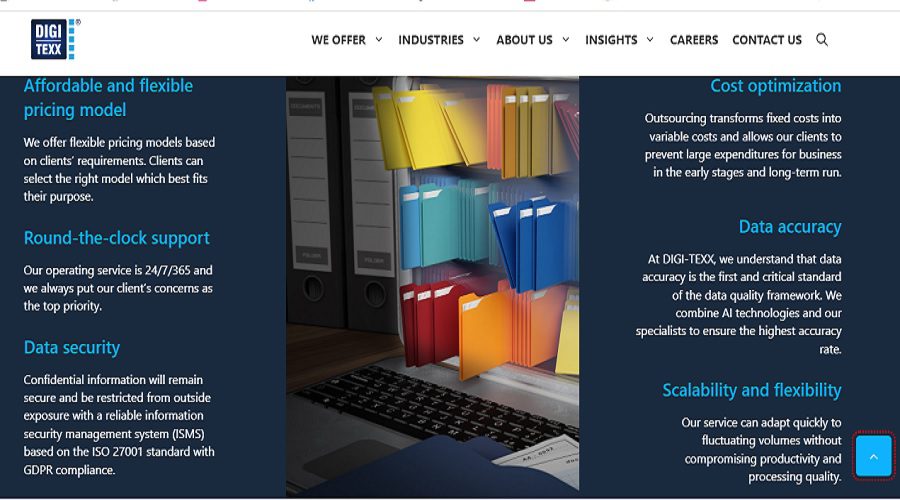
DIGI-DMS
DIGI-DMS offers a comprehensive document management solution designed to improve productivity through automated workflows and advanced security features, making it ideal for growing businesses.
Top 5 Features:
- Cloud-based storage for easy access
- Customizable workflow automation
- Advanced security with encryption
- Seamless integration with third-party apps
- Powerful document search capabilities
Top 5 Benefits:
- Boosts team collaboration and productivity
- Reduces manual document handling errors
- Secure and compliant document storage
- Easy document retrieval and management
- Scalable to accommodate business growth
Best For: Small to medium-sized businesses looking for an affordable, scalable enterprise file management software and document automation platform.
DocuWare
DocuWare is known for its powerful document management and workflow automation tools, offering businesses secure, cloud-based solutions that increase efficiency and streamline operations.
Top 5 Features:
- Cloud-based storage for secure access
- Automated workflow management
- Role-based access controls
- Advanced search capabilities
- Integration with ERP and CRM systems
Top 5 Benefits:
- Increased efficiency and document accessibility
- Cost-effective storage and document management
- Enhanced collaboration through workflow automation
- Compliance with data security regulations
- Scalable for businesses of all sizes.
Best For: Medium to large enterprises needing a comprehensive, secure document management and workflow automation solution, making DocuWare one of the leading enterprise DMS platforms for organizations with complex document management needs.
Laserfiche
Pros: Laserfiche offers an intuitive document management platform that combines process automation, secure document storage, and powerful analytics to enhance business operations.
Top 5 Features:
- Document capture and management
- Workflow automation
- Built-in eForms for data collection
- Cloud and on-premise deployment options
- Data analytics and reporting tools
Top 5 Benefits:
- Improves operational efficiency through automation
- Enhances document security and compliance
- Simplifies data retrieval and management
- Facilitates digital transformation for businesses
- Scalable and customizable to meet various needs.
Best For: Large enterprises and government agencies that require high-level document security and process automation.
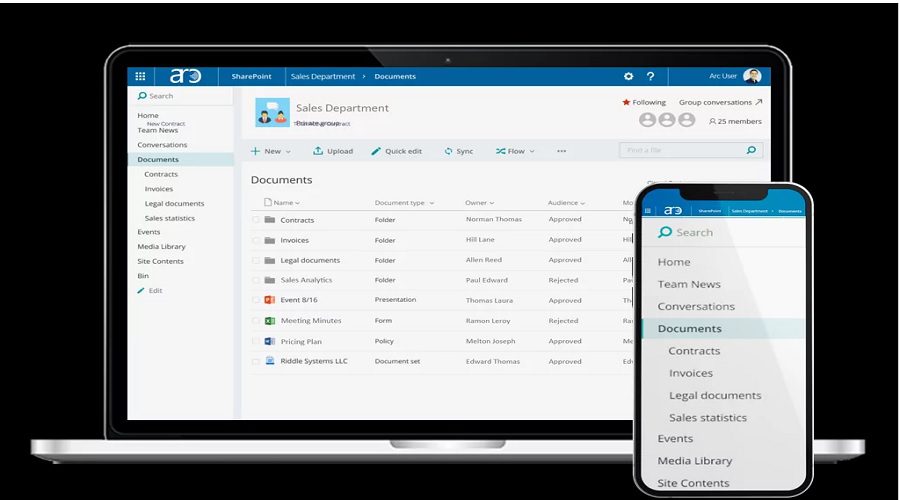
Microsoft SharePoint
Microsoft SharePoint provides a collaborative platform that integrates seamlessly with Microsoft 365, offering businesses a flexible and secure document management solution.
Top 5 Features:
- Integration with Microsoft 365
- Document version control
- Customizable document libraries
- Workflow automation with Power Automate
- Secure access control with permissions
Top 5 Benefits:
- Centralized document storage for easy access
- Seamless collaboration with Microsoft tools
- Enhanced security with enterprise-level access controls
- Streamlined content management
- Scalable for growing businesses
Best For: Enterprises already using Microsoft tools need a collaborative document management platform.
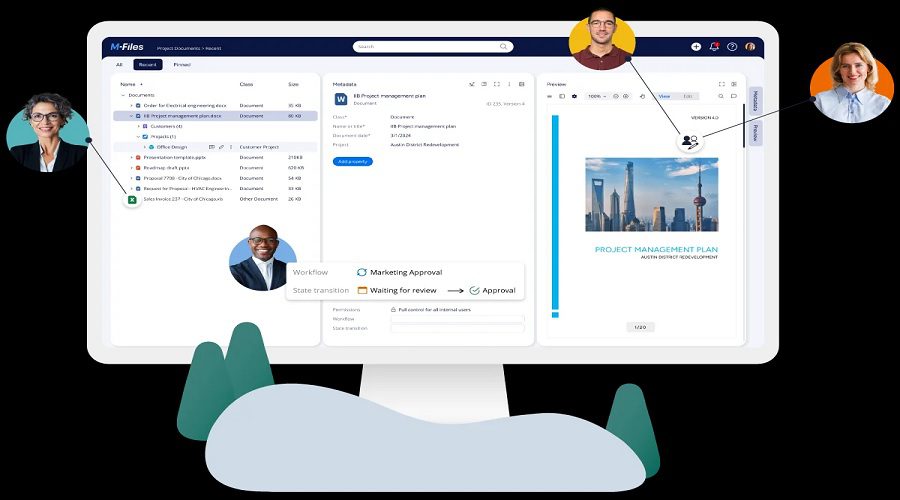
M-Files
M-Files provides an intuitive, AI-powered document management system that simplifies organization and retrieval, with a focus on compliance and scalability.
Top 5 Features:
- Metadata-driven document management
- AI-based document categorization
- Cloud and on-premise deployment options
- Workflow automation and task management
- Secure document access and version control.
Top 5 Benefits:
- Increased document retrieval speed
- Enhanced compliance and security
- Better collaboration through automated workflows
- Reduces document redundancy
- Scalable solution for growing businesses.
Best For: Businesses needing a flexible, AI-driven document management system with strong compliance features.
PandaDoc
PandaDoc specializes in document automation and e-signatures, offering businesses a solution that simplifies the creation, distribution, and signing of documents.
Top 5 Features:
- Document creation and editing tools
- E-signature integration
- Customizable templates
- Workflow automation
- Document analytics and tracking.
Top 5 Benefits:
- Simplifies document creation and approval processes
- Reduces paper-based workflows
- Enhances customer experience with e-signatures
- Increases document visibility and tracking
- Saves time and resources through automation.
Best For: Sales teams and businesses focused on automating document workflows and e-signatures.
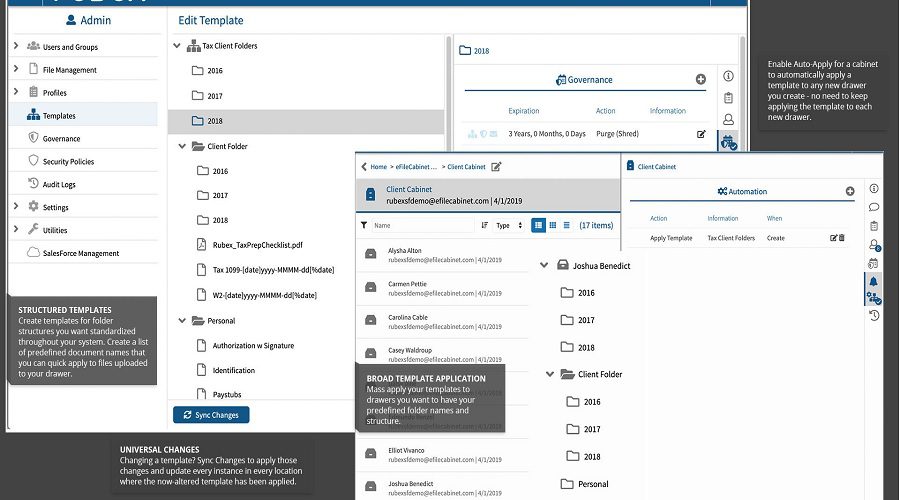
eFileCabinet
eFileCabinet offers a robust, cloud-based document management system with powerful security features, ideal for businesses seeking an affordable solution for organizing and storing documents.
Top 5 Features:
- Cloud-based storage and access
- Robust security with encryption
- Automated workflow tools
- Integrated e-signature functionality
- Customizable document storage structure.
Top 5 Benefits:
- Secure, compliant document storage
- Simplified document retrieval and management
- Increased productivity through automation
- Cost-effective solution for small to medium-sized businesses
- Scalable to meet evolving business needs.
Best For: Small and medium-sized businesses looking for an affordable, secure document management system.
PrizmDoc Viewer
PrizmDoc Viewer is an advanced document viewer that allows businesses to view and manage multiple file types without requiring additional software, enhancing user experience.
Top 5 Features:
- Support for over 200 file types
- Built-in document viewing without downloads
- Secure document sharing
- Cloud-based or on-premise deployment
- Customizable viewer interface.
Top 5 Benefits:
- Eliminates the need for additional software
- Enhances document accessibility
- Streamlines collaboration across teams
- Increases document security with secure viewing options
- Reduces document download risks.
Best For: Companies that need to view and share various file formats securely without downloading software.
Zoho Docs
Zoho Docs offers a user-friendly, cloud-based document management system with collaborative features, making it ideal for businesses seeking simplicity and flexibility.
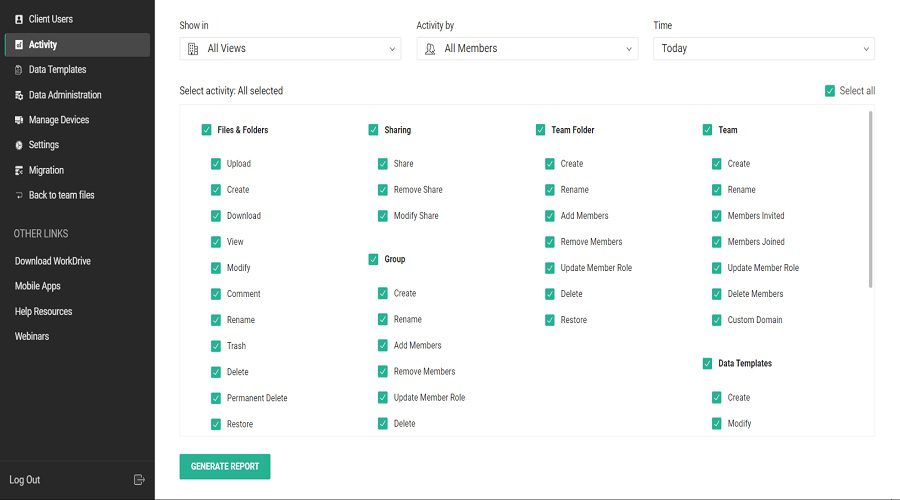
Top 5 Features:
- Cloud-based document storage
- Real-time collaboration
- Advanced access control features
- File versioning and tracking
- Integration with Zoho applications.
Top 5 Benefits:
- Simplifies document collaboration and sharing
- Enhances document security and access control
- Easy document organization and retrieval
- Supports seamless integration with other Zoho apps
- Cost-effective for small businesses.
Best For: Small to medium-sized businesses that use other Zoho applications and need a collaborative document solution.
OpenText Content Suite
OpenText Content Suite is an enterprise-level document management system that provides businesses with powerful tools for document storage, management, and compliance.
Top 5 Features:
- Enterprise-grade security and compliance
- Advanced content management capabilities
- Automated workflow tools
- Integration with ERP and CRM systems
- Scalable deployment options.
Top 5 Benefits:
- Strengthened document security and compliance
- Streamlined business processes through automation
- Centralized document storage and management
- Seamless integration with enterprise applications
- Flexible, scalable solution for large businesses.
Best For: Large enterprises requiring robust document management and compliance features.
DocuSign
DocuSign is the industry leader in electronic signature solutions, enabling businesses to quickly and securely sign, send, and manage documents online.
Top 5 Features:
- E-signature functionality
- Document routing and tracking
- Mobile-friendly interface
- Integration with various apps and CRMs
- Templates for fast document creation.
Top 5 Benefits:
- Speeds up contract signing and approval processes
- Reduces paper-based workflows
- Enhances security with encryption and authentication
- Increases document visibility and tracking
- User-friendly interface for all team members.
Best For: Businesses seeking an efficient and secure solution for e-signatures and contract management.
Jotform Enterprise
Jotform Enterprise is a versatile document management platform that allows businesses to create forms, collect data, and store documents securely in a user-friendly interface.
Top 5 Features:
- Customizable online forms
- Secure document storage and sharing
- Integration with various apps
- Advanced form analytics and reporting
- API for custom integrations.
Top 5 Benefits:
- Simplifies data collection and document storage
- Enhances collaboration and document sharing
- Scalable for businesses of all sizes
- Improves data accuracy through automated forms
- Seamless integrations with business apps.
Best For: Organizations that need to create forms and manage collected data and documents efficiently.
Notion
Notion provides an all-in-one workspace for notes, documents, and tasks, making it ideal for teams that require organization, collaboration, and knowledge management in one platform.
Top 5 Features:
- Document and note creation
- Task and project management tools
- Real-time collaboration
- Customizable templates
- Easy content organization.
Top 5 Benefits:
- Centralizes work into one platform
- Simplifies knowledge management
- Enhances team collaboration
- Customizable to fit unique workflows
- User-friendly interface for teams.
Best For: Teams needing a collaborative workspace for project management and document storage.
| Solution Provider | Key Features | Main Benefits | Best For |
| DIGI-DMS | Cloud storage, workflow automation, encryption, integrations, advanced search | Improves productivity, enhances security, simplifies document management, scales with business growth | Small and medium-sized businesses seeking a scalable enterprise document management system |
| DocuWare | Cloud DMS, workflow automation, role-based permissions, search, ERP/CRM integration | Streamlines operations, improves collaboration, supports compliance, scales easily | Medium and large enterprises |
| Laserfiche | Document capture, workflow automation, eForms, analytics, cloud/on-premise deployment | Automates business processes, strengthens compliance, improves operational efficiency | Large enterprises and government organizations |
| Microsoft SharePoint | Microsoft 365 integration, version control, document libraries, Power Automate, permission management | Centralized collaboration, secure document sharing, improved productivity | Organizations using Microsoft 365 |
| M-Files | Metadata-based organization, AI classification, workflow automation, version control, cloud/on-premise deployment | Faster document retrieval, improved compliance, reduced duplication | Businesses needing AI-powered document management |
| PandaDoc | Document creation, e-signatures, templates, workflow automation, analytics | Accelerates approvals, simplifies document workflows, improves customer experience | Sales teams and contract-heavy businesses |
| eFileCabinet | Cloud storage, encryption, workflow automation, e-signatures, customizable folders | Secure storage, cost savings, easier document organization | Small and medium-sized businesses |
| PrizmDoc Viewer | Supports 200+ file formats, browser-based viewing, secure sharing, customizable interface | View documents without downloads, improve accessibility, enhance security | Organizations sharing multiple file formats |
| Zoho Docs | Cloud storage, collaboration, access control, version history, Zoho integration | Simplifies teamwork, improves file organization, affordable solution | Businesses already using the Zoho ecosystem |
| OpenText Content Suite | Enterprise content management, compliance, workflow automation, ERP/CRM integration, scalable deployment | Enterprise-grade governance, stronger compliance, centralized content management | Large enterprises with complex document requirements |
| DocuSign | E-signatures, document routing, templates, mobile access, app integrations | Faster contract execution, secure digital signatures, reduced paperwork | Organizations focused on contract lifecycle management |
| Jotform Enterprise | Online forms, secure document storage, analytics, integrations, API support | Streamlines data collection, improves collaboration, automates workflows | Businesses managing forms and document-based processes |
| Notion | Documents, notes, project management, collaboration, templates | Centralized knowledge management, flexible workspace, improved team collaboration | Startups and collaborative teams |
=> See more: 10 Process Documentation Tools Worth Checking Out
Why Choose DIGI-TEXX For Enterprise Document Solutions?
DIGI-TEXX offers state-of-the-art enterprise document solutions designed to streamline your business processes and enhance efficiency. With a strong focus on automation, cloud-based storage, and top-tier security, DIGI-TEXX provides scalable solutions tailored to your business needs.
Their easy-to-use platform ensures smooth document management and workflow optimization, allowing businesses to focus on growth. Whether you need document scanning, archiving, or retrieval solutions, DIGI-TEXX delivers cost-effective, customizable, and secure options that improve productivity and ensure compliance.
Choose DIGI-TEXX for a reliable partner in transforming your document management strategy and simplifying your business operations.
=> Read more: The Role of Intelligent Document Processing Companies
FAQs About Enterprise Document Management System
What Are The Top 5 Document Management Systems?
The top 5 document management systems are DocuWare, M-Files, Laserfiche, Microsoft SharePoint, and Google Workspace (Drive). These platforms help businesses securely store, organize, share, and manage documents while improving collaboration and workflow efficiency.
Is Google Drive An EDMS?
No. Google Drive is not a full electronic document management system (EDMS). While it offers basic features such as cloud storage, file sharing, and collaboration, it lacks many advanced document management capabilities, including workflow automation, records management, compliance controls, and enterprise-level governance.
What Is The Difference Between DMS And ECM?
A Document Management System (DMS) is designed to store, organize, and manage business documents. In contrast, Enterprise Content Management (ECM) provides a broader solution that manages not only documents but also emails, images, videos, records, and other digital content, with advanced features such as workflow automation, compliance, and enterprise-wide content governance.
Top enterprise document solutions we have introduced in the article above will help your business enhances efficiency, collaboration, and security. From DIGI-TEXX’s customizable workflows to M-Files’ AI capabilities, discover the best platforms to streamline processes and support growth.
| Read more:
- How AI-Powered Document Automation Transforms Business Operations
- What is Automated Document Processing in Insurance Claims Handling?
- How to Automate the Documentation Process: A Step-by-Step Guide
- A Guide to Automated Document Processing Software
- How Automated Invoice Processing Enhances Efficiency
DIGI-TEXX Contact Information:
🌐 Website: https://digi-texx.com/
📞 Hotline: +84 28 3715 5325
✉️ Email: [email protected]
🏢 Address:
- Headquarters: Anna Building, QTSC, Trung My Tay Ward
- Office 1: German House, 33 Le Duan, Saigon Ward
- Office 2: DIGI-TEXX Building, 477-479 An Duong Vuong, Binh Phu Ward
- Office 3: Innovation Solution Center, ISC Hau Giang, 198 19 Thang 8 street, Vi Tan Ward
Reference:
- AIIM. (n.d.). What is enterprise content management (ECM)? Retrieved August 3, 2026, from https://www.aiim.org/
- ARMA International. (n.d.). Generally Accepted Recordkeeping Principles®. Retrieved August 3, 2026, from https://www.arma.org/