How to automate documentation starts with identifying repetitive documentation tasks and connecting them to the right data, workflows, and automation tools. From generating documents and extracting information to managing approvals and keeping content up to date, automation can reduce manual work while improving consistency and visibility.
In this article, DIGI-TEXX will help you understand what documentation automation is, explore practical how to automate documentation examples, and follow six steps to build an effective workflow. You’ll also learn how tools such as Power Automate, AI, OCR, and a document automation toolkit can support different documentation processes, along with practical considerations for implementation, security, and human review.
>>> See more:
- Top 10 Automated Document Processing Software for 2026
- Document Processing Company | Fast & Professional Document Processing Services
- Manual vs. Automated Data Entry: Which Is Better for Your Business?
- 25 Document Management Software & Platforms 2026
What Is Documentation Automation?
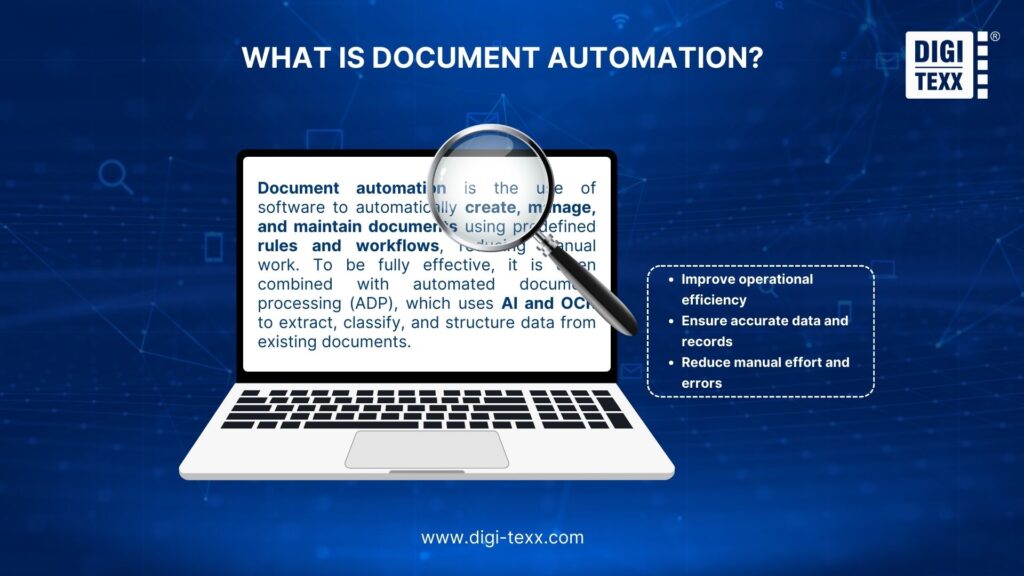
Documentation automation is the use of software, workflows, AI, and predefined rules to create, process, update, review, organize, and distribute documentation with less manual intervention.
The term can cover several processes. A business might automatically generate a customer document from information stored in a CRM, extract data from invoices using OCR, route a contract for approval, or update internal documentation when information changes in a source system.
The goal is to create a repeatable workflow in which information moves from a source to the right document, system, or person without requiring employees to perform every step manually.
This matters because data collection and data processing are among the types of work activities with relatively high automation potential. McKinsey estimates that, by 2030, up to 30% of current work hours in the United States could be automated in a midpoint adoption scenario, accelerated by generative AI. This is an estimate of automation potential, not a prediction that 30% of jobs will disappear.
Documentation Automation & Document Automation
Although the terms are sometimes used interchangeably, documentation automation and document automation are not exactly the same.
| Term | Main focus | Typical examples |
| Documentation automation | Automating the creation, maintenance, and distribution of information and documentation | Technical documentation, SOPs, reports, knowledge bases, internal guides |
| Document automation | Automating document creation and processing | Contracts, invoices, forms, claims, applications, business records |
For example, automatically generating an employee handbook from structured content is documentation automation. Automatically extracting invoice data and sending the invoice through an approval workflow is document automation.
There is overlap between the two, particularly when AI, OCR, intelligent document processing (IDP), workflow automation, and document management are combined.
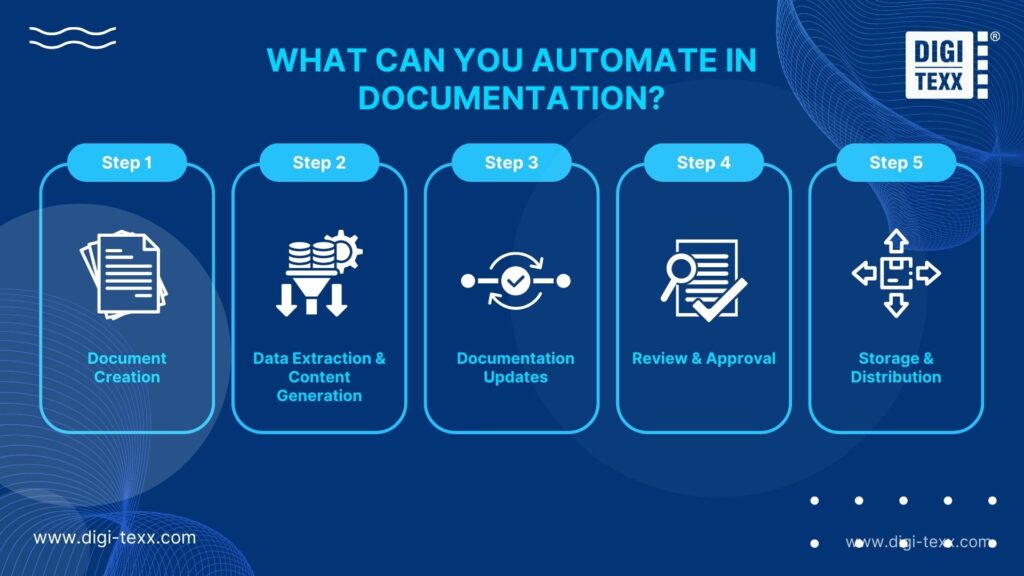
What Can You Automate In Documentation?
Documentation automation can cover much more than simply generating a Word or PDF file. Businesses can automate multiple stages of the documentation lifecycle, depending on the type of information and the systems involved.
Document Creation
Templates and workflow automation can generate documents from structured information stored in CRM, ERP, HR, or other business systems.
For example, a workflow can automatically populate a contract, invoice, customer letter, report, or employee document using predefined fields. Microsoft Power Automate supports automated workflows across applications and services, making it possible to trigger actions when specific events occur.
This approach reduces repetitive copy-and-paste work and helps keep document formats consistent.
Data Extraction And Content Generation
AI and OCR can extract information from scanned documents, PDFs, forms, invoices, receipts, contracts, and other files. The extracted data can then be sent to another workflow or used to generate new content.
Intelligent document processing goes further by handling structured, semi-structured, and unstructured documents, while machine learning can support document classification, data extraction, and validation.
Generative AI can also help turn structured information into summaries, reports, instructions, or other documentation. Human review may still be necessary when the information is sensitive, complex, or business-critical.
Documentation Updates
Automation can identify when information changes and trigger corresponding documentation updates. For example, a change to a product specification could trigger an update to a product guide, while a change to an internal process could prompt a review of the relevant SOP.
This is particularly useful for organizations managing large documentation libraries where manually checking every document for outdated information is impractical.
Review And Approval
Documentation workflows can automatically send files to the appropriate reviewer based on rules such as department, document type, location, risk level, or approval threshold.
Power Automate supports automated workflows and approval processes, while Microsoft’s document automation toolkit combines Power Automate with AI Builder, Power Apps, and Dataverse to process documents and support manual review and approval.
Storage And Distribution
Once documentation has been created or approved, automation can move it to the appropriate storage location, apply metadata, notify stakeholders, or distribute it through email, portals, or business applications.
This creates a more consistent document lifecycle and makes it easier to track where documents are stored and who needs access to them.
>>> See more:
- Top 10 Data Processing Software For Business 2026 – Best Tool Reviewed
- Business Process Automation Solutions: Benefits, Example & Service Company
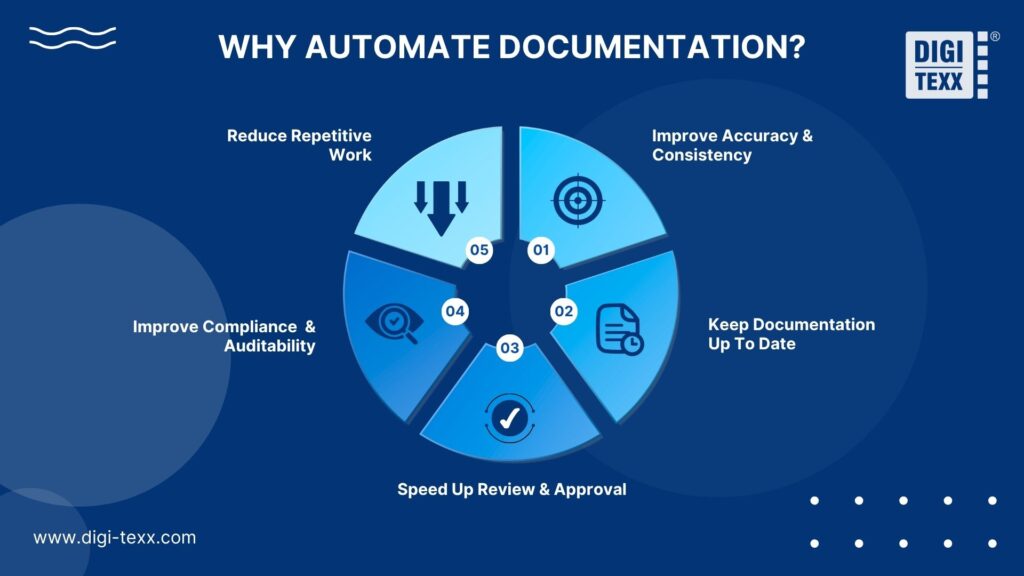
Why Automate Documentation?
The main value of documentation automation is not simply reducing the number of clicks employees make. A well-designed workflow can improve speed, consistency, visibility, and control across the documentation lifecycle.
Reduce Repetitive Work
Employees often spend time copying information between systems, filling out templates, renaming files, sending documents for approval, and performing other repetitive tasks.
Automation can handle these predictable activities so employees can spend more time on tasks that require judgment, analysis, or customer interaction.
Improve Accuracy And Consistency
Manual data entry creates opportunities for duplicated, missing, or incorrectly formatted information. Automated workflows can apply the same rules each time a document is created or processed.
For documents containing large amounts of structured or semi-structured data, OCR and intelligent document processing can also reduce manual extraction work. IBM notes that AI-powered document processing can classify and extract information from business documents and use the resulting data in downstream workflows.
Keep Documentation Up To Date
Outdated documentation can create operational and compliance risks. Automated triggers can flag or initiate updates when information in connected systems changes.
This is particularly valuable for organizations with frequently changing product information, procedures, regulations, or customer records.
Speed Up Review And Approval
Automated routing removes unnecessary waiting between process stages. Instead of an employee manually forwarding a document, the workflow can determine who needs to review it and send it automatically.
Approvers can then review documents, approve them, reject them, or request changes within the same workflow.
Improve Compliance And Auditability
Automation can create a consistent record of document activity, including submissions, approvals, changes, and processing steps.
Microsoft’s Power Automate guidance specifically emphasizes monitoring, security, governance, and lifecycle management when organizations scale automation.
>>> See more:
What Tools Can Automate Documentation?
Different documentation tasks require different tools. Some platforms focus on creating and managing technical content, while others automate document workflows, data processing, and repetitive tasks. The following tools cover these use cases and can help teams build a practical documentation automation toolkit.
GitBook
GitBook is a documentation platform for creating, managing, and publishing product and technical documentation. It supports Git-based workflows and AI features that help teams create, edit, search, and update documentation.
- Key features: GitHub/GitLab sync, AI writing and editing, AI search, GitBook Agent, API playgrounds, version control, and LLM-ready documentation.
- Best for: Software teams, developers, and businesses that need structured product or technical documentation that can be published for customers and AI systems.
- Pricing: GitBook offers a free plan. Paid plans start at $65 per site/month for Premium and $249 per site/month for Ultimate when billed annually. Enterprise pricing is customized.
Mintlify
Mintlify is an AI-powered documentation platform designed primarily for developer and API documentation. It helps teams create, publish, and maintain documentation while connecting content with AI agents and automated workflows.
- Key features: AI writing agents, AI Assistant, documentation automations, API playgrounds, Git sync, MCP server, analytics, and automated updates.
- Best for: Developer teams, startups, and technology companies that need modern API or software documentation with AI-assisted maintenance.
- Pricing: Mintlify has a free Starter plan with up to five editor seats. The Pro plan starts at $450/month, while Enterprise pricing is available on request.
Document360
Document360 is a documentation and knowledge base platform for creating internal, external, product, and API documentation. Its AI capabilities support content creation, search, summarization, and knowledge management.
- Key features: AI Writing Agent, AI search, FAQ generation, duplicate content detection, version control, analytics, workflow management, and API documentation.
- Best for: Product teams, customer support teams, and businesses that need structured internal or customer-facing knowledge bases.
- Pricing: Document360 uses custom pricing based on factors such as users, workspaces, languages, security requirements, and AI usage. A 14-day free trial is available.
Notion AI
Notion AI combines documentation, knowledge management, and AI assistance in one workspace. Teams can use it to create and edit documents, organize knowledge, search connected information, and automate recurring tasks.
- Key features: AI document creation and editing, Notion Agent, AI Meeting Notes, Enterprise Search, database autofill, connected-app search, and Custom Agents.
- Best for: Teams that want to automate internal documentation, SOPs, meeting notes, project knowledge, and other business documentation within an existing workspace.
- Pricing: Notion offers Free, Plus, Business, and Enterprise plans. Plus starts at $10/user/month, Business at $20/user/month, and Notion AI is included with Business and Enterprise. Custom Agents use additional Notion credits.
Microsoft Power Automate
Microsoft Power Automate is a low-code workflow automation platform that connects applications, data, and business processes. It can automate document-related workflows such as approvals, notifications, data movement, and repetitive tasks.
Key features: Cloud flows, desktop RPA, workflow approvals, connectors, process mining, API integrations, and integration with Microsoft 365, SharePoint, OneDrive, and other business systems.
- Best for: Businesses already using Microsoft products that need to automate document workflows, approvals, data entry, and repetitive administrative processes.
- Pricing: Power Automate offers a 30-day free trial. Premium starts at $15/user/month, while Power Automate Process starts at $150/bot/month, billed annually.
Automation Anywhere
Automation Anywhere is an enterprise automation platform that combines RPA, AI, APIs, and workflow orchestration. Its document automation capabilities can extract information from documents and connect the resulting data to automated workflows.
- Key features: Document data extraction, RPA, AI-powered automation, UI automation, API integrations, workflow orchestration, and human-in-the-loop processing.
- Best for: Mid-size and enterprise organizations automating high-volume document processing, repetitive data entry, document validation, and workflows involving legacy systems.
- Pricing: Enterprise pricing is available through a quote or demo. Automation Anywhere also offers a free community edition for eligible users, with feature and usage limitations.
| Tool | Primary focus | Key features | Best for | Pricing |
| GitBook | Product and technical documentation | GitHub/GitLab sync, AI writing, AI search, GitBook Agent, API playgrounds, version control | Software teams and developers managing structured technical documentation | Free plan; paid plans from $65/site/month |
| Mintlify | Developer and API documentation | AI writing agents, AI Assistant, documentation automation, API playgrounds, Git sync, MCP server | Developer teams and technology companies maintaining API or software documentation | Free Starter; Pro from $450/month |
| Document360 | Knowledge bases and business documentation | AI Writing Agent, AI search, FAQ generation, version control, analytics, workflows, API documentation | Product, support, and business teams managing internal or customer-facing knowledge bases | Custom pricing; 14-day free trial |
| Notion AI | Internal documentation and knowledge management | AI writing/editing, Notion Agent, AI Meeting Notes, Enterprise Search, database autofill, Custom Agents | Teams automating SOPs, meeting notes, project knowledge, and internal documentation | Free; Plus from $10/user/month; Business from $20/user/month |
| Microsoft Power Automate | Workflow and business process automation | Cloud flows, desktop RPA, approvals, connectors, process mining, API integrations | Microsoft-based businesses automating document workflows, approvals, and repetitive tasks | Premium from $15/user/month; Process from $150/bot/month |
| Automation Anywhere | Enterprise RPA and document automation | Document extraction, RPA, AI automation, UI automation, APIs, workflow orchestration, human-in-the-loop | Mid-size and enterprise organizations automating high-volume document processes | Custom enterprise pricing; free Community Edition for eligible users |
>>> See more:
- What Is Intelligent Document Recognition? Applications & Challenges
- How Automated Invoice Processing Saves Time and Reduces Errors?
- What Is Data Integrity? A Complete Guide for Businesses
How Is AI Changing Documentation Automation?
AI is expanding documentation automation beyond fixed templates and rule-based workflows. Instead of simply moving information between predefined fields, AI can interpret text, identify patterns, generate content, and support decisions within a workflow.
AI adoption is also becoming more established in document processing. An AIIM 2025 study of 600 enterprises across the United States, Germany, Austria, and Switzerland reported that 78% of surveyed companies were already operational with AI technology.
AI-Generated Documentation
Generative AI can create first drafts of reports, knowledge articles, technical explanations, summaries, and other documentation from structured or unstructured information.
However, generated content should be checked against authoritative sources before publication, particularly when documentation contains technical specifications, legal requirements, financial information, or operational procedures.
AI-Powered Document Processing
AI can extract information from documents that are difficult to process with traditional rules alone.
IDP combines technologies such as OCR, machine learning, natural language processing, classification, extraction, and validation to turn document content into structured information. IBM describes document processing as a way to extract data from structured, semi-structured, and unstructured business documents and feed it into downstream workflows.
AI-Assisted Documentation Updates
AI can compare new information with existing documentation, identify potentially outdated sections, summarize changes, and prepare suggested revisions.
This can reduce the effort required to maintain large documentation libraries. Human reviewers should still validate important changes before they become the official version.
Human-in-the-Loop Automation
AI does not have to replace human review. A more practical approach for many business processes is to automate routine cases while sending exceptions to employees.
For example, a system can automatically process documents that meet confidence or validation thresholds while routing uncertain records to a specialist.
This model combines automation speed with human judgment and is particularly useful for sensitive or unstructured documents.
Automated Documentation Examples
The best how to automate documentation examples are usually found in workflows where documents are generated or processed repeatedly and follow identifiable business rules.
Banking & Financial Services
Financial institutions handle applications, statements, loan documents, identity records, and other information-heavy documentation.
Automation can extract data from applications, classify documents, validate information, generate standardized forms, and route cases to the appropriate teams.
For example, a loan workflow could capture applicant information, extract supporting documents, check required fields, and route exceptions to a loan specialist.
Insurance
Insurance companies process claims forms, policy documents, medical records, estimates, photographs, and supporting evidence.
OCR and IDP can extract relevant information, classify incoming files, and send the resulting data into claims workflows. Human reviewers can handle exceptions or cases requiring additional judgment.
IBM identifies insurance claims processing as one example of an OCR-enabled document understanding workflow, where information can be extracted from identity documents, claims forms, and claim descriptions.
Healthcare
Healthcare organizations manage patient forms, insurance documentation, medical records, referrals, billing information, and administrative paperwork.
Automation can help classify documents, extract selected data, route information to the appropriate system, and reduce repetitive administrative work.
Because healthcare information is sensitive, automation workflows should incorporate appropriate access controls, security measures, audit trails, and human review.
Business Operations
Almost every department can have documentation tasks suitable for automation.
Common examples include:
- Automatically generating invoices and reports
- Creating contracts from approved data
- Processing employee forms
- Updating SOPs and internal knowledge bases
- Routing documents for approval
- Extracting information from supplier documents
- Converting scanned records into searchable digital content
- Archiving completed documentation
The most suitable starting point is usually a high-volume process with clear inputs, predictable rules, and measurable outcomes.
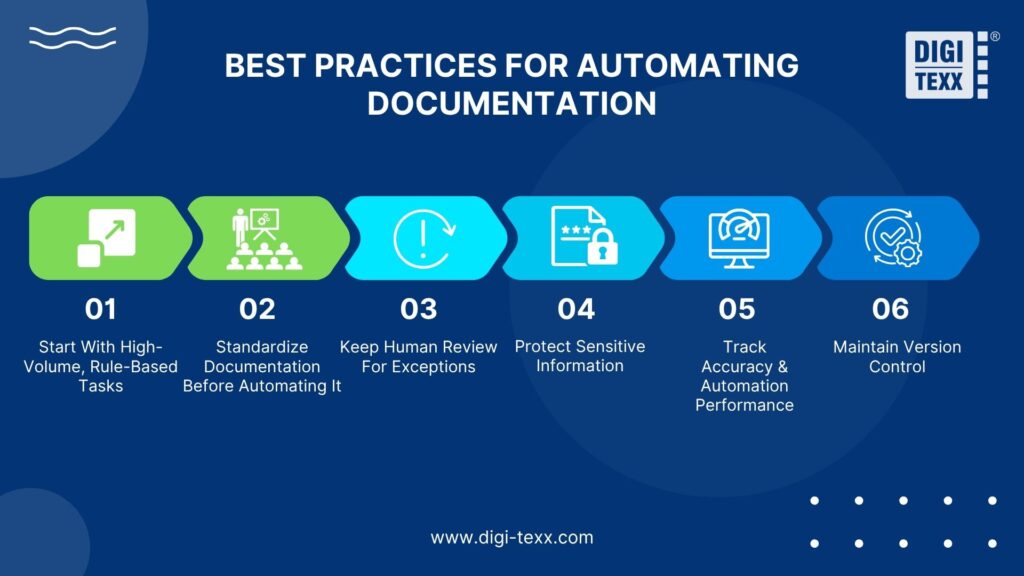
Best Practices For Automating Documentation
Documentation automation works best when organizations treat it as a process-improvement initiative rather than simply implementing another software tool. Start with predictable workflows, standardize the information being automated, keep human oversight where needed, and continuously monitor results.
Start With High-Volume, Rule-Based Tasks
Begin with documentation tasks that occur frequently and follow consistent rules. Examples include generating routine reports, updating standard records, routing documents for approval, or transferring information between systems.
Avoid automating processes that change frequently or require extensive judgment at the beginning. Starting with stable, repeatable tasks makes it easier to measure results and expand automation gradually.
Standardize Documentation Before Automating It
Automation is more reliable when document templates, naming conventions, metadata, data fields, and approval rules are standardized.
If different teams use different formats or workflows for the same type of document, automation becomes harder to configure and maintain. Establish consistent standards first, then automate the standardized process.
Keep Human Review For Exceptions
Not every document should follow a fully automated path. Human review remains important when information is incomplete, ambiguous, sensitive, or outside predefined rules.
Use confidence thresholds and exception rules to identify cases that require manual review. This approach allows automation to handle routine work while people focus on unusual or higher-risk cases.
Protect Sensitive Information
Documentation workflows may involve personally identifiable information, financial records, health information, contracts, or confidential business data.
Use appropriate access controls, authentication, encryption, retention policies, and audit trails to protect information throughout the workflow. Organizations should also define clear governance rules for who can access, modify, approve, and distribute automated documentation.
Track Accuracy And Automation Performance
Measure both operational efficiency and output quality to determine whether automation is delivering meaningful improvements. Useful KPIs include:
| KPI | What it measures |
| Average processing time | How long it takes to complete a documentation task |
| Manual touchpoints | How many steps still require human intervention |
| Data accuracy | The accuracy of extracted or generated information |
| Exception rate | The percentage of cases requiring manual handling |
| Approval time | How quickly documents move through review and approval |
| Cost per document | The average cost of processing each document |
| Automation rate | The percentage of eligible tasks completed automatically |
| Rework rate | How often documents require correction or repeated processing |
| Documentation freshness | How consistently documents are updated when information changes |
Establish a baseline before implementation, then compare the same metrics after automation. This helps identify whether the process is actually becoming faster, more accurate, and less costly rather than simply processing more documents.
Maintain Version Control
Automated documentation should have a clear history of revisions, approvals, and published versions. Version control helps prevent employees from relying on outdated information and makes it easier to identify what changed, when it changed, and who approved the update.
For documentation that is automatically generated or updated, connect version control with approval workflows and access permissions so that only validated versions are distributed or published.
>>> See more:
- Data Validation & Verification: Differences, Benefits & Real World Examples
- Best Data Entry Outsourcing Companies Reviewed for 2026
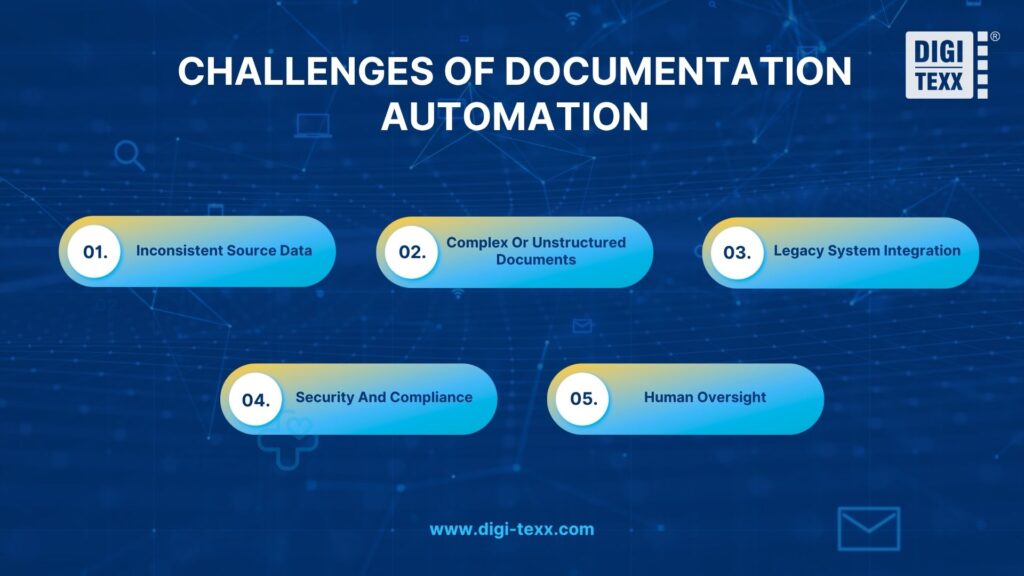
Challenges Of Documentation Automation
Automation can reduce manual work, but it does not eliminate process complexity. Businesses should address several challenges before scaling an automated documentation workflow.
Inconsistent Source Data
Automation depends on reliable inputs. Missing fields, inconsistent naming, duplicate records, and inaccurate source data can produce incorrect documentation.
Data validation should therefore be part of the workflow rather than an afterthought.
Complex Or Unstructured Documents
Documents vary widely in layout, language, quality, and structure. A workflow designed for standardized forms may struggle with handwritten information, unusual layouts, poor-quality scans, or free-form text.
AI-powered IDP can improve the handling of unstructured information, but low-confidence results should still be routed for human verification.
Legacy System Integration
Older applications may not provide modern APIs or connectors. In these cases, businesses may need RPA, custom integrations, or intermediate systems to connect documentation workflows with existing applications.
Security And Compliance
Automated workflows can move sensitive information between multiple systems. Poorly configured permissions or uncontrolled data flows can create security and compliance risks.
Security requirements should therefore be defined during workflow design, not after deployment.
Human Oversight
Not every documentation task should be fully automated. Employees may still need to validate AI-generated content, approve sensitive documents, investigate exceptions, or make decisions that cannot be reduced to predefined rules.
A hybrid model often provides a more practical balance between automation and human control.
Why Choose DIGI-TEXX For Document Automation?
For organizations processing large volumes of business documents, automation may require more than software. It can also require document preparation, data extraction, validation, quality control, and human review for exceptions.
DIGI-TEXX combines document processing and data services with automation technologies to support workflows where documents need to be captured, extracted, validated, classified, and transferred into downstream systems.
AI-Powered Document Processing
DIGI-TEXX uses AI, OCR, and intelligent document processing to extract and structure information from documents such as invoices, receipts, purchase orders, bank statements, medical records, contracts, and handwritten documents.
This approach can help organizations move information from document-heavy processes into digital workflows while reducing repetitive manual extraction.
Human-in-the-Loop Verification
Automation does not have to mean removing people from the process. For documents that require additional validation, specialist reviewers can check extracted information, correct exceptions, and verify output quality.
This is particularly useful for complex or low-quality documents where automated extraction may not provide sufficient confidence.
Document Workflow And Data Validation
Document automation can be connected with classification, data validation, verification, and workflow steps to create a more complete processing pipeline.
Instead of automating only one task, organizations can automate multiple stages from document capture and extraction through validation and delivery.
Secure And Scalable Operations
For enterprise documentation workflows, security, quality control, and scalability are important alongside automation capabilities.
DIGI-TEXX provides document processing and back-office operations for businesses that need to handle high document volumes while maintaining defined quality and security requirements.

FAQs About How To Automate Documentation
Can You Use Chat GPT To Automate Tasks?
Yes. ChatGPT can automate routine tasks through scheduled prompts, connected apps, and agentic workflows. Depending on the setup, it can handle recurring activities such as generating summaries, monitoring information, drafting messages, and managing routine workflows with less manual input.
For example, scheduled tasks can deliver daily updates or reminders automatically, while connected apps can help ChatGPT work with information from services such as Gmail, Slack, or GitHub.
Which AI Tool Is Best for Documentation?
The right AI documentation tool depends on your documentation type, team size, and workflow. Common options include:
- GitBook: A strong choice for technical documentation, internal knowledge bases, and team collaboration.
- Mintlify: Designed for developer documentation and API references, with AI-assisted search and documentation workflows.
- Document360: Suitable for structured knowledge bases and customer-facing help centers, with AI writing and conversational search.
- Notion AI: Useful for internal wikis, SOPs, project notes, and general team documentation.
What Are The Four Types Of Documentation?
The four main types of documentation in technical writing and software development are tutorials, how-to guides, reference documentation, and explanations. Each serves a different purpose, from helping beginners learn a new concept to providing detailed technical information.
- Tutorials: Designed to help beginners learn by completing a guided task. For example, a getting-started tutorial may walk users through building their first application.
- How-to Guides: Focus on helping users complete a specific task or solve a particular problem. Examples include guides for resetting a password, connecting a database, or configuring a software feature.
- Reference Documentation: Provides precise, detailed information about how a system, product, or piece of code works. API documentation, parameter descriptions, and class definitions are common examples.
- Explanations: Provide context and clarify the reasoning behind technical concepts, systems, or decisions. An explanation might describe how a system architecture works or why a particular technology was selected.
How To Automate Documents In Word?
You can automate Word document creation by combining a Word template with Microsoft Power Automate. This setup lets you pull data from another system and automatically generate completed documents without entering the same information manually.
Using Power Automate:
- Create a Word template: Open Word, enable the Developer tab, and add Plain Text Content Control fields wherever you want dynamic information to appear.
- Store the template online: Save the completed template in OneDrive for Business or SharePoint so Power Automate can access it.
- Create an automated flow: Choose a trigger, such as a new SharePoint list item, and add the Populate a Microsoft Word template action.
- Connect your data: Map the fields from your data source to the corresponding content controls in Word. Once configured, the flow can automatically generate a new document whenever the trigger occurs.
Learning how to automate documentation is ultimately about building a reliable process, not simply adding an automation tool. Start with repetitive, rule-based tasks, connect the right data sources and systems, keep human review for exceptions, and track accuracy and performance over time.
For organizations handling large volumes of documents, DIGI-TEXX can support the transition from manual document processing to more structured, scalable workflows through AI-powered document processing, data extraction, validation, and human-in-the-loop verification. The right combination of technology and expert review can help businesses automate documentation while maintaining accuracy, security, and control.
DIGI TEXX Contact Information:
🌐 Website: https://digi-texx.com/
📞 Hotline: +84 28 3715 5325
✉️ Email: [email protected]
🏢 Address:
- Headquarters: Anna Building, QTSC, Trung My Tay Ward
- Office 1: German House, 33 Le Duan, Saigon Ward
- Office 2: DIGI-TEXX Building, 477-479 An Duong Vuong, Binh Phu Ward
- Office 3: Innovation Solution Center, ISC Hau Giang, 198 19 Thang 8 street, Vi Tan Ward
References:
- Massachusetts Institute of Technology. (n.d.). Artificial intelligence and optical character recognition in FinTech. MIT CSAIL Alliances. https://cap.csail.mit.edu/artificial-intelligence-and-optical-character-recognition-fintech
- Association for Intelligent Information Management. (2025, August 13). AIIM study reveals AI-driven transformation in document processing. AIIM. https://info.aiim.org/aiim-study-reveals-ai-driven-transformation-in-document-processing