Data mapping tools help businesses connect, transform, and standardize data across databases, applications, and enterprise systems. With options ranging from AI-powered platforms to free and open-source solutions, choosing the right software requires careful evaluation.
In this guide, DIGI-TEXX will help you explore the best data mapping tools list for 2026, compare their key features, strengths, limitations, and use cases, and understand how to select the right solution for your business.
>>> See more: Beyond selecting the right data mapping tools, businesses also need reliable data conversion and cleansing processes to ensure seamless data integration. DIGI-TEXX provides professional data conversion services to help businesses transform data across formats, standardize information, and support efficient data migration.
11 Best Data Mapping Tools For USA Businesses In 2026
Choosing the right data mapping software depends on your data architecture, integration requirements, technical resources, and budget. The following comparison highlights 11 options with different capabilities, from traditional ETL platforms to specialized privacy and analytics solutions.
| Tool | Primary Use Case | Key Strength |
| Microsoft SSIS | Enterprise ETL | Data transformation and SQL Server integration |
| Adverity | Marketing data mapping | Automated field harmonization |
| Talend Data Mapper | Complex data transformation | Visual mapping and reusable components |
| Tableau | Data visualization | Geographic and analytical mapping |
| Segment | Customer data integration | Event standardization and real-time processing |
| MuleSoft Anypoint Platform | API-led integration | DataWeave transformation and connectors |
| Transcend | Privacy data mapping | Personal data discovery and inventory |
| Boomi | Cloud data integration | Low-code mapping and automation |
| Oracle Integration Cloud | Enterprise application integration | Advanced schema transformation |
| Ketch | Privacy compliance mapping | Automated data discovery and classification |
>>> See more:
- Back Office Services: Definition, Examples & Outsourcing Guide 2026
- Ecommerce Back Office Support Services For Fast Growth
- Administrative Support Outsourcing: Services, Benefits & Providers
1. Microsoft SQL Server Integration Services (SSIS)
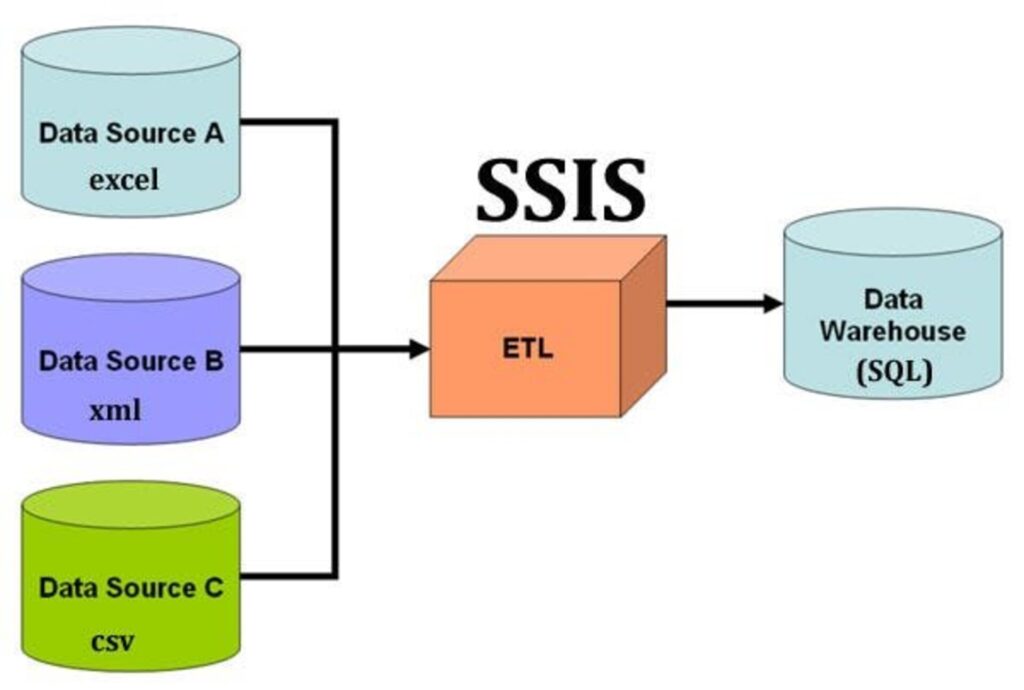
Microsoft SQL Server Integration Services (SSIS) is an enterprise data integration platform designed to extract, transform, and load data between heterogeneous sources and destinations. It is particularly useful for organizations working with SQL Server databases, data warehouses, and structured enterprise datasets.
Unlike standalone visual mapping applications, SSIS uses configurable data flow components to define how information moves between systems. Developers can build transformation pipelines through SQL Server Data Tools (SSDT), using a graphical interface to connect sources, transformations, and destinations.
Key features:
- Visual data flow designer: Provides a drag-and-drop environment for building ETL packages and connecting data processing components.
- Data type mapping and conversion: Converts source data types into formats supported by destination systems through its Data Conversion transformation.
- Advanced data cleansing: Includes Fuzzy Grouping and Fuzzy Lookup to standardize inconsistent values and identify approximate matches.
- Conditional data transformation: Uses Derived Column and Conditional Split transformations to modify records and route data based on predefined rules.
- Error handling: Supports error outputs to isolate records that fail during data conversion or processing.
These capabilities make SSIS suitable for structured ETL workflows that require detailed control over source-to-target transformations.
Pros:
- Strong integration with Microsoft SQL Server and related technologies.
- Extensive built-in transformation and data cleansing components.
- Supports complex ETL workflows with granular configuration.
Cons:
- Requires technical knowledge of SQL Server and ETL development.
- Less convenient for organizations using predominantly non-Microsoft environments.
- Package maintenance and troubleshooting can become complex as workflows grow.
Best for: Enterprise IT teams, database administrators, and data engineers managing large-scale SQL Server data warehouses and recurring ETL operations.
2. Adverity
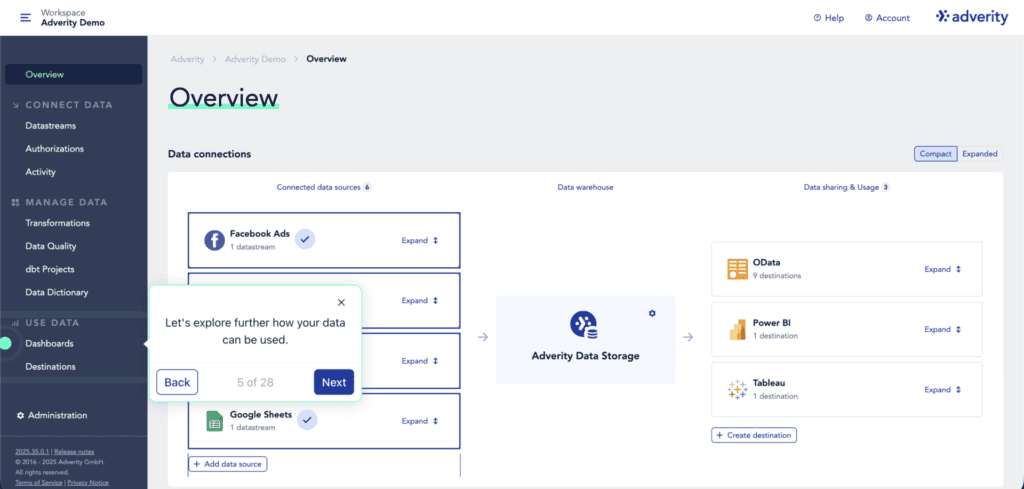
Adverity is a data integration and analytics platform that helps marketing teams collect, harmonize, and analyze information from multiple advertising and business platforms.
Its core data mapping capability standardizes source fields into consistent target fields. For example, a marketing team can map the fields spend, cost, and advertising_cost from different advertising platforms into one standardized costs field.
This approach makes campaign performance easier to compare across channels without manually renaming fields in every dataset.
Key features:
- Default Data Mapping: Automatically assigns frequently used source fields to predefined target fields based on connector-specific mapping rules.
- Custom field mapping: Allows users to create target fields and define their own source-to-target relationships.
- Data Dictionary: Centralizes target fields, data types, descriptions, and usage information to maintain consistent reporting definitions.
- Data quality monitoring: Helps teams identify missing or inconsistent fields before sending information to downstream destinations.
- Integration connectors: Collects marketing data from advertising platforms, analytics systems, cloud storage, and data warehouses.
Adverity also supports automatic mapping based on existing default mappings and previously configured field relationships, reducing repetitive configuration across data streams.
Pros:
- Automates field standardization across multiple marketing data sources.
- Reduces manual work when consolidating campaign metrics.
- Provides centralized field definitions for consistent reporting.
Cons:
- Primarily designed for marketing and analytics data rather than general-purpose enterprise ETL.
- Advanced configurations may require technical expertise.
- Custom pricing can make budget planning difficult for smaller organizations.
Best for: Marketing operations teams, digital agencies, and enterprises consolidating advertising performance data across multiple channels.
3. Talend Data Mapper
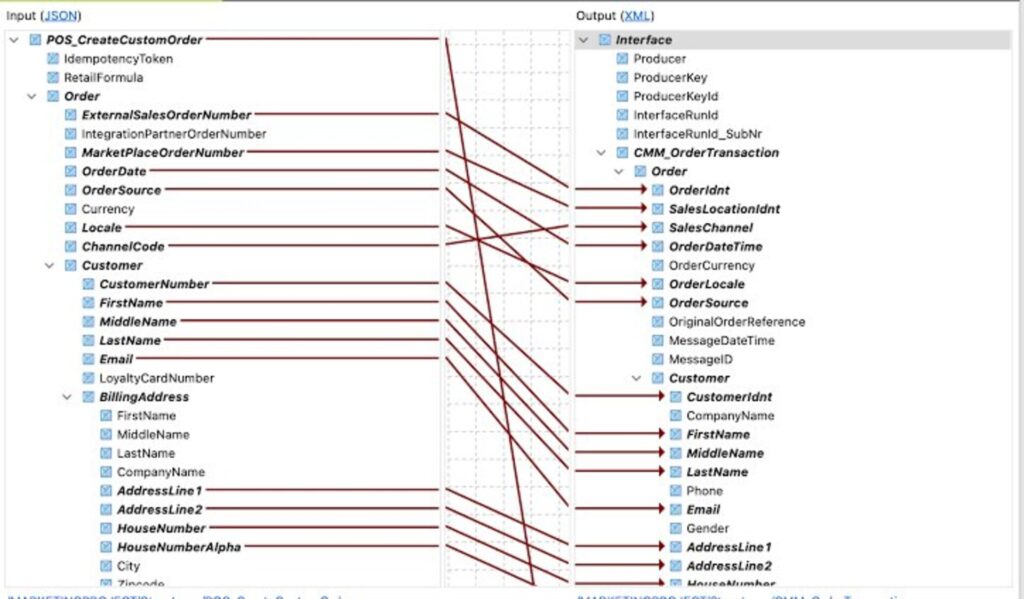
Talend Data Mapper, part of the Qlik Talend ecosystem, is designed to map and transform complex data records and documents across different systems. It is particularly useful when source and target datasets have different structures, formats, or levels of complexity.
The tool provides a visual mapping environment in Talend Studio, where developers can connect input structures to output structures through drag-and-drop operations. For more advanced requirements, they can define transformation expressions using built-in functions.
Key features:
- Visual mapping interface: Connects source and target elements through a graphical mapping environment.
- Multiple data format support: Handles complex records and documents, including XML and JSON structures.
- Custom transformation expressions: Applies functions and expressions to convert values, calculate fields, and modify data structures.
- Reusable mapping components: Allows teams to reuse existing mapping logic across integration workflows, reducing repetitive development.
- Complex document mapping: Supports nested structures and hierarchical data that require more than straightforward field matching.
The visual mapping workflow and expression-based transformations make Talend particularly relevant to developers handling heterogeneous enterprise data.
Pros:
- Handles complex data structures and transformation requirements.
- Combines visual mapping with advanced expression-based logic.
- Reusable components help standardize recurring integration processes.
Cons:
- Requires technical expertise for advanced mapping scenarios.
- Complex transformations may take time to configure and troubleshoot.
- Licensing and product availability depend on the Qlik Talend Cloud edition and region.
Best for: Data engineers and enterprise integration teams working with complex XML, JSON, and other structured or semi-structured data.
>>> See more:
- Healthcare Back-Office Support Services For Efficient Operations
- Supply Chain Business Process Outsourcing (BPO) 2026
- Insurance Back Office Support Services That Streamline Operations & Drive Growth
4. Tableau
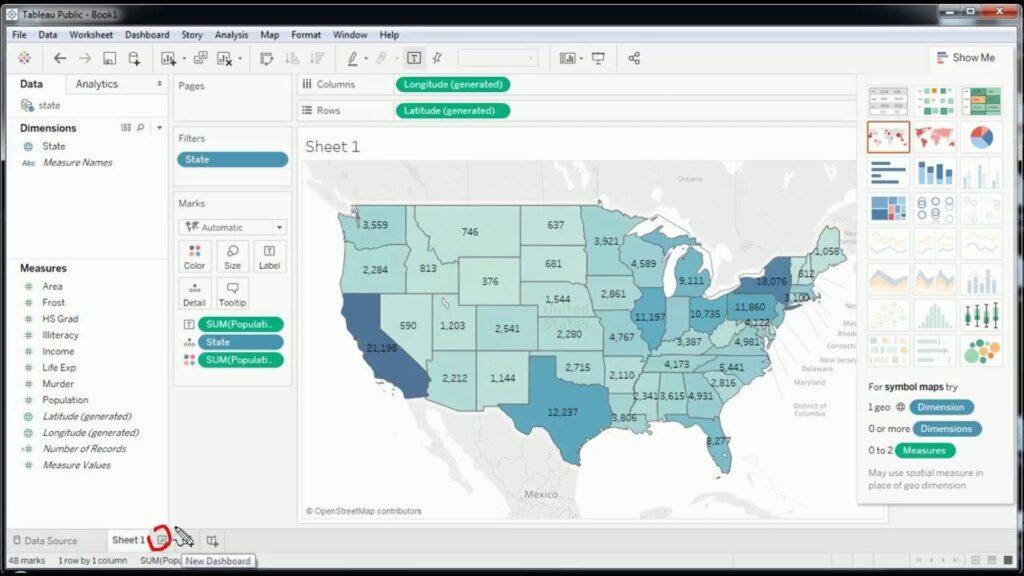
Tableau is a business intelligence and data visualization platform that helps organizations turn datasets into interactive dashboards, charts, and geographic maps.
Unlike ETL-focused data mapping tools, Tableau is primarily designed to represent relationships and patterns visually. It allows users to connect geographic fields, combine datasets, and explore location-based information without building a dedicated data transformation pipeline.
Key features:
- Geographic field mapping: Assigns geographic roles to fields such as countries, states, cities, and postal codes to generate map views.
- Spatial data support: Works with spatial files such as Shapefiles, MapInfo files, and KML.
- Data blending: Combines information from different data sources to support broader analytical views.
- Interactive dashboards: Allows users to filter and explore geographic and business data through interactive visualizations.
- Custom geographic visualization: Supports latitude and longitude coordinates and custom geocoding for location analysis.
Tableau supports geographic roles for locations worldwide, as well as latitude and longitude coordinates in decimal degrees.
Pros:
- Strong geographic visualization and interactive reporting capabilities.
- Supports multiple spatial data formats and geographic fields.
- Makes complex analytical datasets easier to understand.
Cons:
- Not a dedicated source-to-target data mapping or ETL platform.
- Advanced analytics and dashboard development require training.
- Data preparation may require additional integration or transformation tools.
Best for: Business intelligence teams, data analysts, and organizations that need to visualize geographic relationships and communicate data insights through dashboards.
5. Segment
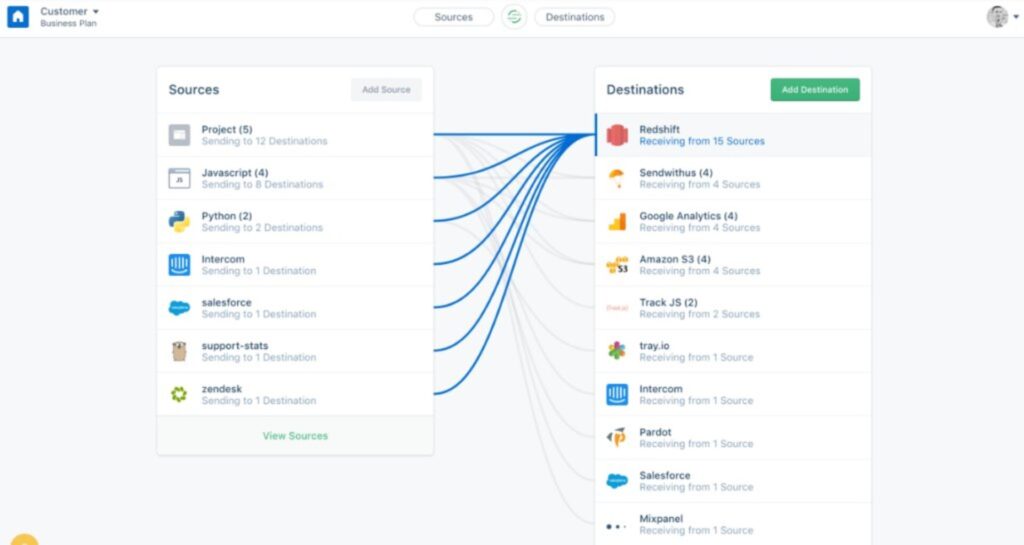
Segment is a customer data platform (CDP) that helps businesses collect, unify, and distribute customer information across their marketing, analytics, and business applications.
Its data mapping capabilities focus on standardizing customer events and properties so that different systems can interpret customer activity consistently.
For example, an ecommerce business may collect purchase events from its website, mobile application, and payment platform. Segment helps standardize these events before forwarding them to analytics and marketing destinations.
Key features:
- Event tracking plans: Defines standardized event names, properties, and data structures to maintain consistency across customer touchpoints.
- Data transformations: Changes event names, property names, and values to meet tracking standards or destination requirements.
- Customer identity resolution: Helps unify customer information collected from different devices and touchpoints.
- Real-time data collection: Collects customer events and routes them to connected downstream applications.
- Destination integrations: Distributes standardized customer data to analytics, marketing automation, and business applications.
Segment’s transformation functionality can modify event and property data before it reaches selected destinations, helping teams correct inconsistent tracking structures.
Pros:
- Helps standardize customer events across multiple channels.
- Supports real-time customer data collection and distribution.
- Integrates with a broad customer data ecosystem.
Cons:
- Primarily focused on customer and event data rather than general-purpose database mapping.
- Requires careful tracking plan configuration to avoid inconsistent event definitions.
- Costs can increase with data volume and usage requirements.
Best for: Ecommerce companies, SaaS businesses, and marketing teams that need consistent customer event data across websites, mobile applications, and third-party platforms.
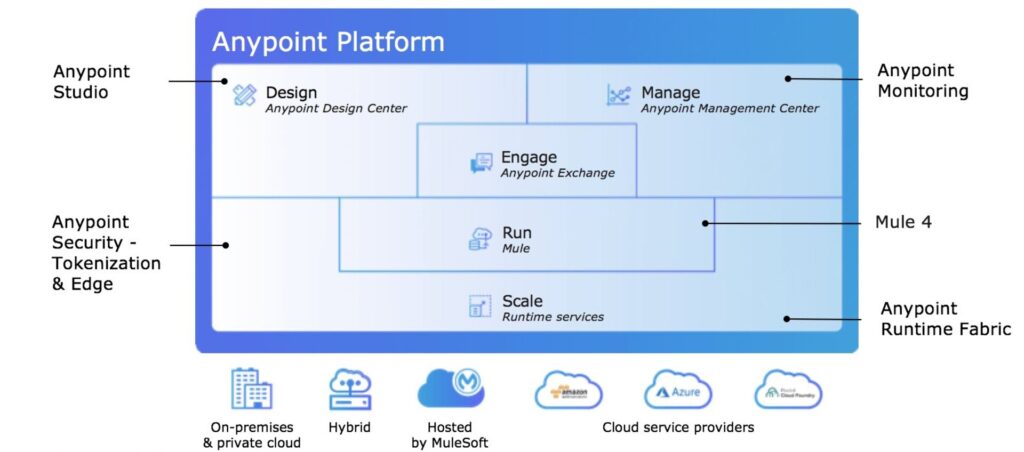
6. MuleSoft Anypoint Platform
MuleSoft Anypoint Platform is an integration platform as a service (iPaaS) that connects applications, APIs, and data sources across cloud, on-premises, and hybrid environments.
Its data mapping functionality is powered by DataWeave, a transformation language that enables developers to convert data between different structures and formats. This makes it particularly valuable for organizations managing complex API integrations and enterprise application ecosystems.
Key features:
- DataWeave transformation language: Defines complex transformations between JSON, XML, Java objects, and other supported data structures.
- Visual mapping interface: Allows developers to build mappings between source and target fields using Anypoint Studio.
- Automatic field mapping: Can automatically match straightforward fields with identical names, reducing manual configuration.
- API-led connectivity: Connects enterprise applications and data sources through reusable APIs.
- Prebuilt connectors: Provides connectors and reusable integration assets through Anypoint Exchange.
DataWeave supports both simple field transformations and more advanced data manipulation, making it suitable for complex integration scenarios.
Pros:
- Powerful transformation capabilities for complex API-based workflows.
- Supports cloud, on-premises, and hybrid integration environments.
- Reusable APIs and connectors reduce duplicated integration work.
Cons:
- DataWeave has a learning curve for developers unfamiliar with its syntax.
- Advanced integrations require technical development and maintenance.
- Enterprise licensing can be expensive for organizations with limited integration requirements.
Best for: Large enterprises, software engineering teams, and IT departments integrating multiple APIs, databases, and business applications.
7. Transcend
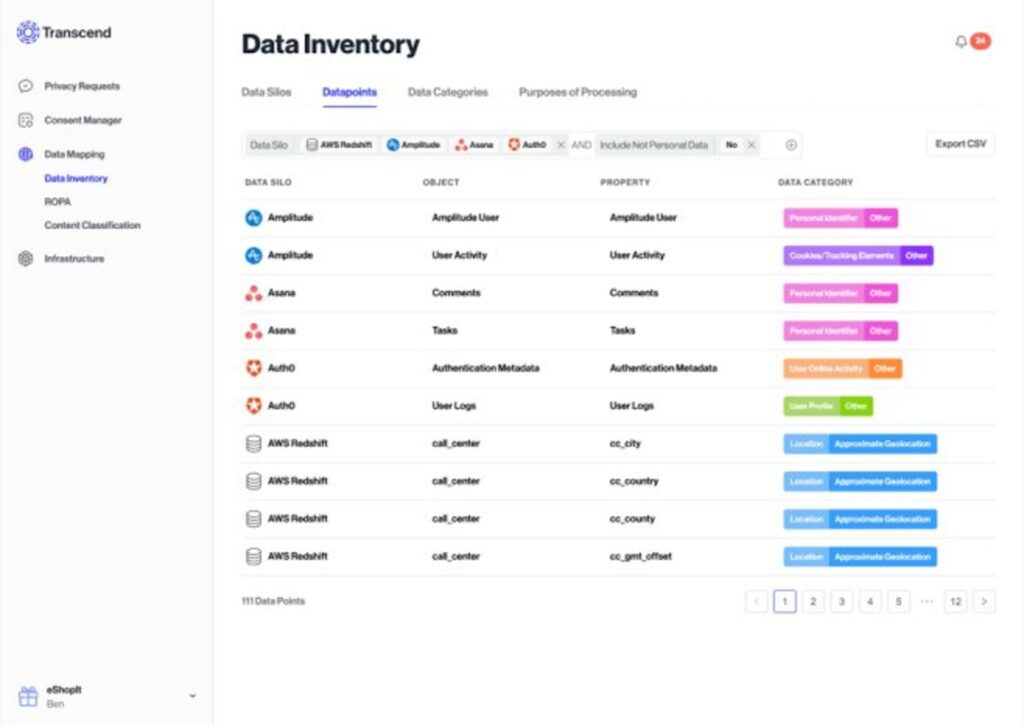
Transcend is a data privacy platform that helps organizations discover, classify, and manage personal information across their technology environments.
Unlike traditional ETL tools, Transcend focuses on understanding where personal data resides, how it is processed, and which systems or vendors have access to it. Its data inventory provides a centralized view of data systems, objects, properties, and processing-related metadata.
This makes it especially useful for privacy teams that need visibility into personal information to support regulatory compliance and data subject request workflows.
Key features:
- Automated data inventory: Maintains a live-updated catalog of data systems, databases, SaaS applications, and other data assets.
- Field-level data visibility: Identifies individual properties and fields that may contain personal information.
- Data classification: Organizes information based on data categories, processing purposes, and relevant privacy attributes.
- Privacy workflow integration: Uses data inventory information to support data subject requests and privacy operations.
- Data relationship visibility: Helps privacy teams understand where personal information is stored and how it relates to business systems.
Transcend’s Data Inventory is designed as a continuously updated record of systems, data objects, properties, and related metadata.
Pros:
- Provides visibility into personal data across multiple systems.
- Supports privacy management and regulatory compliance workflows.
- Helps reduce manual data discovery and inventory maintenance.
Cons:
- Focuses on privacy mapping rather than general-purpose ETL transformations.
- Requires appropriate system access and integration configuration.
- Pricing is not publicly standardized.
Best for: Privacy officers, legal teams, security professionals, and enterprises managing personal information across complex data environments.
>>> See more:
- Back Office Support Services: How To Reduce Workload And Scale Operations
- Accounts Payable Outsourcing: Pros, Cons, Costs And Top Providers
- Accounts Receivable Service | Invoicing, Billing & AR Management
8. Boomi
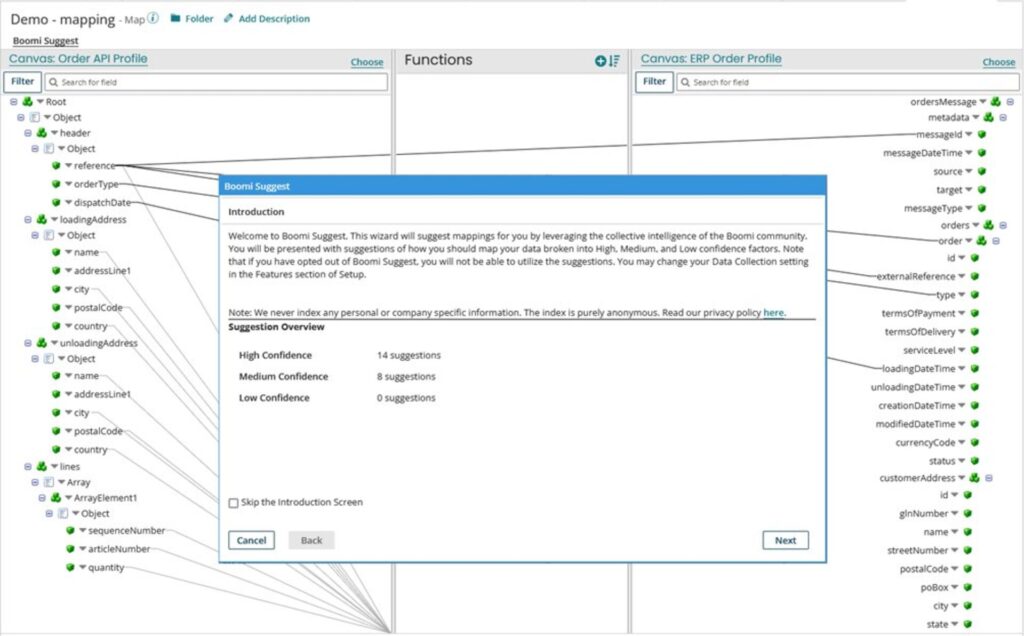
Boomi is a cloud-based integration platform that enables organizations to connect applications, databases, and business systems through configurable workflows.
Its visual mapping environment allows users to define relationships between source and destination fields, apply transformation rules, and automate data movement without extensive custom coding.
Boomi is particularly useful for businesses that need to synchronize information between enterprise applications while maintaining consistent data structures.
Key features:
- Visual drag-and-drop mapping: Connects source fields to target fields through a graphical interface.
- Reusable mapping functions: Applies standard and user-defined functions to transform individual field values, including string, date, and mathematical operations.
- AI-assisted mapping recommendations: Intelligent mapping capabilities help suggest field relationships and reduce manual configuration.
- Real-time and batch integration: Supports synchronous API-driven workflows and asynchronous data processing.
- Application connectivity: Connects cloud applications, databases, and on-premises systems through integration components.
Boomi’s mapping functions can be configured as reusable components, allowing teams to apply consistent transformation logic across multiple maps.
Pros:
- Low-code interface makes mapping more accessible to different technical skill levels.
- Reusable functions improve consistency across integration workflows.
- Supports multiple integration patterns and enterprise applications.
Cons:
- Advanced mapping and troubleshooting can require platform experience.
- Complex integrations may need custom configuration.
- Subscription and usage costs should be evaluated as data volumes increase.
Best for: Mid-sized and large businesses that need scalable application integration, automated data synchronization, and low-code transformation workflows.
9. Oracle Integration Cloud (OIC)
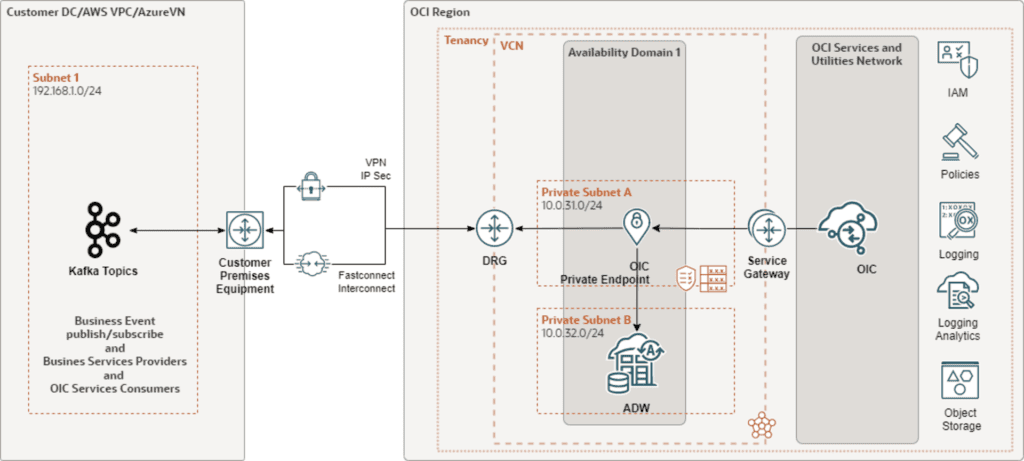
Oracle Integration Cloud (OIC) is an integration platform that connects applications, databases, and enterprise systems across cloud and on-premises environments.
Its visual mapper enables users to define relationships between source and target schemas while applying transformation rules to ensure that information meets the requirements of destination applications.
OIC is particularly relevant to organizations operating Oracle ERP, HCM, and other enterprise applications that require consistent data exchange.
Key features:
- Visual data mapper: Uses a graphical interface to connect source and target elements through drag-and-drop mapping.
- Advanced transformation functions: Supports XPath expressions, conditional logic, loops, and lookups to handle complex mapping requirements.
- Schema-based mapping: Defines relationships between different source and destination structures.
- Reusable mapping logic: Allows users to import and reuse XSL transformation logic across integration workflows.
- Enterprise connectivity: Integrates Oracle applications with third-party systems and cloud services.
These capabilities enable OIC to handle more than basic field matching, particularly when enterprise applications use different schemas and data structures.
Pros:
- Strong integration with Oracle’s enterprise application ecosystem.
- Supports advanced transformation logic and complex data structures.
- Visual mapping reduces the need to write every transformation manually.
Cons:
- Initial configuration can be complex for new users.
- Advanced transformations require knowledge of expressions and mapping logic.
- Processing resources and costs need to be considered for large integration workloads.
Best for: Enterprises using Oracle applications that need reliable integration across ERP, CRM, databases, and other business systems.
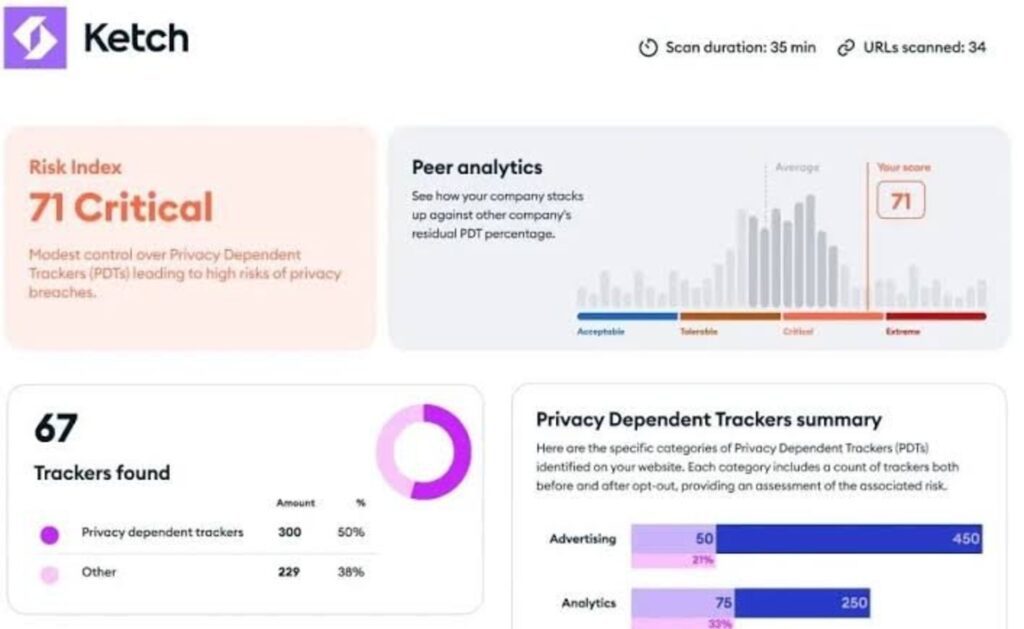
10. Ketch
Ketch is a privacy management platform that helps organizations discover, classify, and map personal data across their technology environments.
Its data mapping capabilities focus on building a centralized inventory of systems, data categories, processing activities, and privacy risks. This gives compliance and security teams a clearer understanding of where personal information resides without relying entirely on manual questionnaires or interviews.
Key features:
- Automated data discovery: Uses connectors and detection agents to discover information across enterprise systems.
- Field-level data classification: Identifies personal information at the attribute level, including identifiers and sensitive data categories.
- Centralized data inventory: Consolidates system information, processing activities, and data relationships into a unified map.
- Privacy reporting: Supports records of processing activities (ROPA), risk assessments, and compliance documentation.
- Automated privacy workflows: Uses mapped data to support data subject requests, risk management, and other privacy operations.
Ketch reports that its data discovery capabilities cover more than 400 platforms, helping organizations build a broader view of their data environments.
Pros:
- Automates data discovery across a broad range of enterprise systems.
- Provides detailed visibility into personal data and processing activities.
- Connects data mapping with downstream privacy management workflows.
Cons:
- Designed primarily for privacy and compliance rather than ETL data transformation.
- Initial configuration may require coordination between IT, security, and legal teams.
- Organizations with simpler privacy requirements may not need its full capabilities.
Best for: Enterprise privacy teams, compliance officers, and organizations managing personal information across multiple applications and vendors.
>>> See more:
- AI In BPO: Benefits, Applications, Challenges & Future Trends
- Top 12 IT Help Desk Outsourcing Companies In USA 2026
- Outsourcing Advantages & Disadvantages: What Businesses Should Know?
How To Choose The Right Data Mapping Tool For Your Business
Selecting the right data mapping tools requires more than comparing feature lists. A platform that works well for marketing data consolidation may not be suitable for enterprise database migration or privacy compliance.
Evaluate the following factors before making a decision.
1. Data Source And Format Compatibility
Start by identifying the systems and formats your organization needs to connect. These may include relational databases, cloud data warehouses, CRM platforms, APIs, XML, JSON, CSV, and EDI files.
A suitable tool should support your existing data sources and target environments without requiring extensive custom development.
What to check:
- Native connectors for your databases and business applications.
- Support for structured and semi-structured data.
- Compatibility with cloud, on-premises, and hybrid environments.
- Ability to handle schema changes without breaking existing integrations.
2. Mapping Automation And AI Capabilities
Manual field matching becomes increasingly difficult as the number of data sources and records grows. Automated mapping can identify potential relationships between source and target fields based on names, data types, metadata, and historical mapping patterns.
When evaluating AI data mapping tools, check whether they offer:
- Automatic schema detection and field matching.
- AI-generated mapping recommendations.
- Reusable mapping templates.
- Automated data classification and anomaly detection.
- Human review and approval before applying suggested mappings.
AI recommendations should remain configurable and verifiable. Similar field names do not necessarily indicate identical business meanings.
3. Data Transformation And Cleansing
Field mapping alone does not guarantee that data will work correctly in the destination system. Source values may use different formats, naming conventions, or data types.
For example, one system may store dates as MM/DD/YYYY, while another requires YYYY-MM-DD. A mapping solution should support the necessary conversion before transferring the data.
Look for:
- Data type conversion.
- String and date formatting.
- Conditional transformation rules.
- Duplicate detection and removal.
- Missing-value validation.
- Lookup and reference-table mapping.
4. Scalability And Processing Performance
A data mapping solution should accommodate increasing data volumes, additional applications, and more complex transformation workflows.
Consider whether the platform supports both batch and real-time processing, incremental data synchronization, and concurrent integration jobs.
For large enterprises, also evaluate processing limits, API throughput, execution frequency, and how the platform handles failed records during high-volume operations.
5. Data Security And Regulatory Compliance
Data mapping often involves sensitive business information, customer records, and personally identifiable information (PII). Security should therefore be part of the selection process rather than an afterthought.
Check for:
- Role-based access control (RBAC).
- Encryption at rest and in transit.
- Audit logs and activity tracking.
- Data masking and field-level protection.
- Support for relevant compliance requirements, such as GDPR and applicable US privacy regulations.
For organizations mapping personal information, privacy-focused platforms may offer more relevant discovery and classification capabilities than traditional ETL tools.
6. Ease Of Use And Technical Requirements
Consider who will create, manage, and maintain data mappings. Developer-focused platforms provide greater control over complex transformations but may require SQL, scripting, or API knowledge.
Low-code and no-code interfaces can make routine mapping more accessible to business users.
Evaluate:
- Drag-and-drop mapping functionality.
- Documentation and onboarding resources.
- Reusable workflows.
- Debugging and error-reporting tools.
- Collaboration and version-control capabilities.
7. Pricing And Total Cost Of Ownership
The lowest subscription price does not always represent the lowest implementation cost. Some platforms charge based on data volume, API calls, connectors, users, or processing capacity.
When comparing data mapping software, consider the following expenses:
- Initial licensing or subscription fees.
- Implementation and integration costs.
- Additional connector or API charges.
- Infrastructure and storage requirements.
- Ongoing maintenance and technical support.
For smaller teams, free data mapping tools or open-source alternatives may be sufficient. Enterprises should prioritize long-term scalability, governance, and operational costs.
Trends In Data Mapping Tools In 2026
Data mapping is evolving as organizations adopt cloud architectures, real-time analytics, and AI-driven data workflows. The following trends are influencing how businesses select and use modern data mapping software.
1. AI-Powered Automated Data Mapping
AI is increasingly being applied to automate repetitive mapping tasks, including schema recognition, field matching, and data classification.
Instead of manually connecting every source and target field, AI-assisted systems can analyze metadata and existing mapping patterns to recommend potential relationships.
For example, a system may recognize that customer_id in one database corresponds to client_identifier in another, even when the field names are different.
This capability can reduce manual configuration in large migration projects. However, human validation remains important when fields have similar names but different business meanings.
2. Real-Time Data Integration And Synchronization
Businesses increasingly need current information across operational systems rather than relying exclusively on scheduled batch transfers.
Modern data mapping tools are therefore supporting real-time integration, event-driven workflows, and change data capture (CDC).
These capabilities help organizations synchronize customer records, inventory updates, financial transactions, and other operational data with less delay.
3. Cloud-Native And Hybrid Data Mapping
As enterprises distribute their data across cloud platforms, on-premises databases, and SaaS applications, integration flexibility has become more important.
Cloud-native mapping solutions help teams manage distributed data workflows without maintaining all integration infrastructure themselves.
Hybrid deployment options remain relevant for organizations with legacy systems, internal security requirements, or data residency constraints.
4. Greater Focus On Data Lineage And Governance
Organizations need to understand not only where data is stored but also how it moves, changes, and is used across systems.
This is increasing demand for data lineage, metadata management, and centralized data catalogs.
Combining data mapping with governance capabilities helps businesses trace information back to its source, identify transformation dependencies, and investigate data quality issues more effectively.
5. Privacy-Aware Data Discovery And Classification
Privacy requirements are encouraging organizations to improve visibility into personal information across their technology environments.
Modern privacy-focused mapping platforms increasingly automate the discovery and classification of sensitive data, helping teams identify where information resides and which business processes use it.
These capabilities support privacy assessments, data subject requests, and records of processing activities.
6. Low-Code And Reusable Mapping Workflows
Low-code interfaces are making data mapping more accessible to teams beyond specialist data engineers.
Visual designers, reusable transformation components, and prebuilt connectors help reduce repetitive development work.
Organizations can standardize mapping logic across projects while allowing business and technical teams to collaborate more effectively.
>>> See more:
- Why Retail Outsourcing Is A Smart Strategy for Retail Businesses
- List Of 25 Data Management Outsourcing Companies In The USA
- Best 20 Email Support Outsourcing Companies In The USA 2026
FAQs About Data Mapping Tools
1. What Are Some Good Software Tools For Data Mapping?
Some good data mapping tools include Microsoft SSIS, Talend Data Mapper, MuleSoft Anypoint Platform, Boomi, Adverity, and Oracle Integration Cloud.
Each platform serves a different purpose:
| Tool | Recommended Use |
| Microsoft SSIS | SQL Server ETL and data transformation |
| Talend Data Mapper | Complex data structure mapping |
| MuleSoft Anypoint | API integration and transformation |
| Boomi | Low-code application integration |
| Adverity | Marketing data harmonization |
| Oracle Integration Cloud | Enterprise application integration |
The best option depends on your data formats, integration complexity, processing requirements, and technical resources.
2. What Are The Top 5 GIS Software?
GIS (Geographic Information System) software is designed to collect, manage, analyze, and visualize geographic and spatial data. It differs from traditional data mapping software, which primarily connects fields and structures across databases and applications.
Five widely used GIS software solutions include:
- ArcGIS Pro: A professional GIS application for spatial analysis, mapping, and geospatial data management.
- QGIS: A free, open-source GIS platform supporting spatial analysis, map creation, and multiple geographic data formats.
- GRASS GIS: An open-source platform for advanced geospatial analysis and raster and vector processing.
- MapInfo Pro: A GIS solution for location intelligence, spatial analysis, and business mapping.
- Global Mapper: A geospatial application for terrain analysis, 3D visualization, and geographic data processing.
These platforms are suitable for geographic data mapping rather than general-purpose database field mapping.
3. What Are Some Free Data Mapping Tools?
Several tools offer free plans, trials, or open-source options for businesses with different data integration requirements.
Some options worth considering include:
- Microsoft SSIS: Available through the SQL Server ecosystem, subject to applicable edition and licensing requirements.
- Boomi: Provides a 30-day free trial with access to data mapping and integration capabilities.
- Segment: Offers a free entry-level option with usage and feature limitations.
- Airbyte: Provides an open-source data replication platform with hundreds of connectors.
- QGIS: Completely free and open-source, but designed for geographic data mapping rather than database integration.
For businesses looking for free data mapping tools, Airbyte is worth considering for data movement, while SSIS may be suitable for organizations already using compatible SQL Server environments.
4. What Are The Tools Used For Mapping?
Data mapping tools are used to connect, transform, standardize, and synchronize information between different systems.
Common categories include:
- ETL tools: Extract, transform, and load information between databases and data warehouses.
- Data integration platforms: Connect applications, APIs, and enterprise systems.
- Data transformation tools: Convert data types, standardize fields, and apply business rules.
- Data visualization tools: Present data relationships and geographic information through interactive charts and maps.
- Data privacy mapping tools: Discover personal information and document how it is stored and processed.
For example, an ecommerce company may use data mapping to connect customer information from its CRM with order records in its ERP system. The mapping process ensures that fields such as customer_id, order_date, and total_amount are transferred into the correct destination fields.
Choosing the best data mapping tools depends on your data architecture, integration complexity, security requirements, and budget. Whether you need AI data mapping tools for automated field matching, open-source platforms for flexible integration, or free data mapping tools for smaller projects, prioritize solutions that support data accuracy, scalability, and reliable workflows. Use this data mapping tools list as a starting point to compare available options and identify the right data mapping software for your business needs.
DIGI-TEXX Contact Information:
🌐 Website: https://digi-texx.com/
📞 Hotline: +84 28 3715 5325
✉️ Email: [email protected]
🏢 Address:
- Headquarters: Anna Building, QTSC, Trung My Tay Ward
- Office 1: German House, 33 Le Duan, Saigon Ward
- Office 2: DIGI-TEXX Building, 477-479 An Duong Vuong, Binh Phu Ward
- Office 3: Innovation Solution Center, ISC Hau Giang, 198 19 Thang 8 street, Vi Tan Ward
Reference:
- Information Commissioner’s Office. (n.d.). Data mapping and recording. https://ico.org.uk/for-organisations/advice-and-services/audits/data-protection-audit-framework/toolkits/records-management/data-mapping-and-recording/
- Graham, R. (2026, September 15). Geographic information system (GIS). National Geographic Education. https://education.nationalgeographic.org/resource/geographic-information-system-gis/