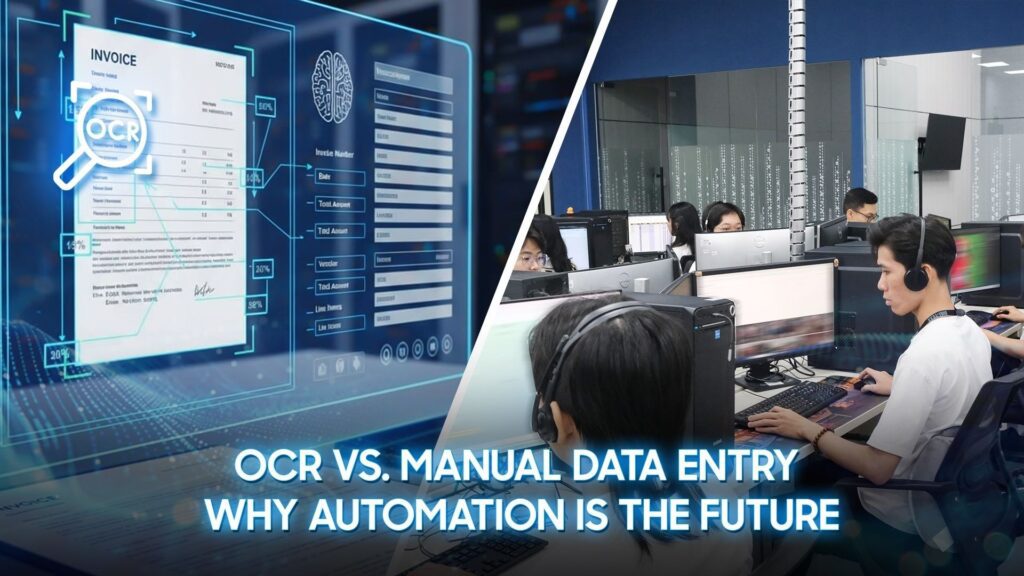
Every day, organizations process thousands of invoices, contracts, claims, and customer documents. As document volumes grow, manual data entry becomes increasingly difficult to sustain, slowing operations, increasing the risk of errors, and making it harder to scale efficiently.
To address these challenges, many businesses are adopting optical character recognition (OCR) to automate document processing. By converting paper-based and scanned documents into structured digital data, OCR reduces repetitive manual work while improving speed and consistency. However, as document workflows become more complex, OCR alone may not always meet evolving business needs.
In this article, we’ll compare OCR and manual data entry, examine the strengths and limitations of each approach, and explore how Intelligent Document Processing (IDP) extends OCR to support more advanced document automation.
What Is Manual Data Entry?
Manual data entry is the process of transferring information from physical or digital documents into business systems through human input. Employees manually extract data from invoices, application forms, contracts, emails, PDFs, or scanned files and enter it into platforms such as ERP, CRM, accounting software, or spreadsheets.
Even as document automation becomes more common, manual data entry remains a practical choice for many organizations. It requires minimal upfront investment and can accommodate virtually any document format without additional system configuration. For organizations with relatively low document volumes or processes that require human judgment, it can still be a practical and flexible solution.
However, as businesses process increasing volumes of documents, maintaining manual workflows becomes more challenging. Since every record must be reviewed and entered by employees, processing capacity is naturally tied to available resources. This is why many organizations are introducing OCR and document automation technologies to improve efficiency while continuing to support human oversight where needed.
What Is OCR?
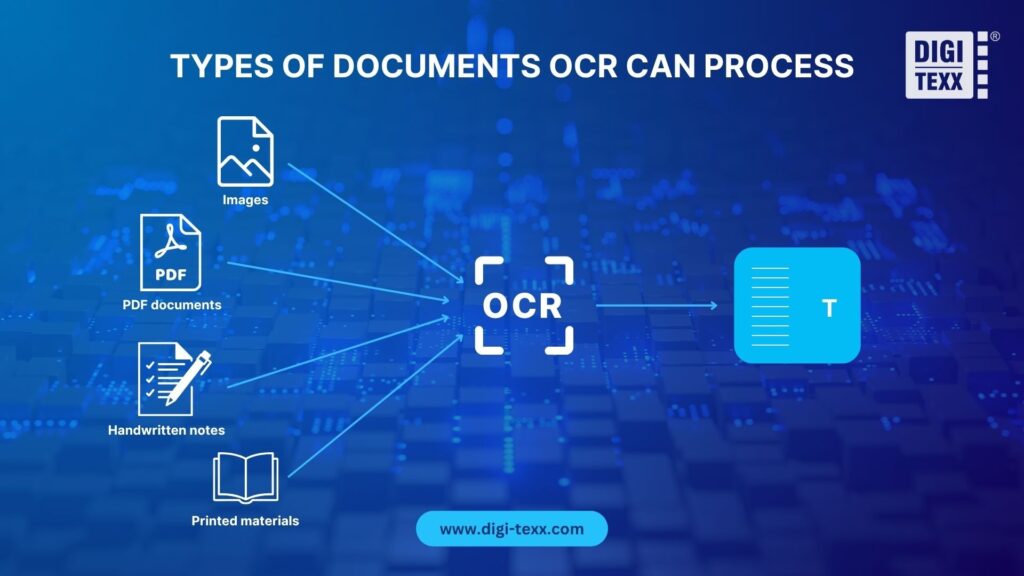
Optical Character Recognition (OCR) is a technology that recognizes printed or handwritten text in scanned documents, images, and PDFs, converting it into machine-readable digital data. Once extracted, the information can be searched, edited, and integrated into business systems such as ERP, CRM, accounting software, and document management platforms.
By eliminating the need to manually retype information, OCR helps organizations process documents faster, reduce repetitive workloads, and improve data accuracy. This allows employees to spend less time on routine administrative tasks and more time on higher-value activities that require human expertise.
As organizations continue to digitize their operations, OCR has become a foundational technology for streamlining document workflows and enabling broader automation initiatives.
Common OCR Applications
OCR has become embedded in the daily operations of several document-heavy industries:
- Banking: Digitizing checks, loan applications, KYC documents, and account-opening forms to accelerate processing and reduce branch-level paperwork.
- Insurance: Extracting data from claims forms, policy documents, and medical bills to speed up claims adjudication and reduce manual review backlogs.
- Logistics: Reading bills of lading, customs paperwork, and shipping manifests to keep freight moving without manual re-keying at every checkpoint.
- Healthcare: Converting patient intake forms, insurance cards, and lab reports into structured records that integrate with electronic health record (EHR) systems.
These applications help organizations reduce manual effort, improve data consistency, and accelerate business workflows across document-intensive operations.
OCR vs. Manual Data Entry: A Side-by-Side Comparison
Both manual data entry and OCR convert information from business documents into digital systems, but they differ significantly in efficiency, cost, and scalability. While manual data entry relies on human effort to capture information, OCR automates the extraction and digitization of document data. As document volumes continue to grow, choosing the right approach can have a significant impact on operational efficiency, customer experience, and long-term business costs.
OCR vs. Manual Data Entry: Comparison Summary
| Criteria | Manual Data Entry | OCR |
| Speed & Processing Time | Slow and dependent on human input | Fast, automated data extraction |
| Accuracy & Error Rates | Higher risk of human error | More consistent data capture |
| Cost & Resource Requirements | Labor costs increase with volume | Lower long-term operating costs |
| Scalability & Processing Capacity | Requires additional staff | Easily scales with business growth |
| Data Security & Compliance | Greater manual handling risks | Better control through digital workflows |
Speed and Processing Time
Processing speed directly affects how quickly businesses can respond to customers, approve transactions, and complete internal workflows. Manual data entry requires employees to review and enter information one document at a time, making throughput dependent on workforce capacity. As workloads increase, delays and processing backlogs become more common.
OCR automates data capture in seconds, allowing organizations to process high volumes of documents more efficiently. Faster processing shortens turnaround times, improves workflow efficiency, and helps businesses maintain consistent service levels during periods of high demand.
Accuracy and Error Rates
The quality of business decisions depends on the quality of the underlying data. Manual data entry is susceptible to typing errors, omitted information, duplicate records, and inconsistent formatting, particularly when employees perform repetitive tasks over long periods.
OCR improves data consistency by automating text extraction and reducing repetitive manual input. More accurate data minimizes rework, improves reporting quality, and helps organizations maintain reliable information across business systems.
Cost and Resource Requirements
Manual data entry may appear cost-effective initially, but expenses increase as document volumes grow. Organizations often need additional staff, ongoing training, and quality control processes to maintain productivity and accuracy, causing labor costs to scale with business growth.
OCR shifts document processing from a labor-intensive activity to an automated workflow. By reducing manual effort and increasing processing capacity, organizations can improve productivity while controlling long-term operational costs.
Scalability and Processing Capacity
Business growth often brings a corresponding increase in document volumes. Scaling manual data entry typically requires recruiting, training, and managing additional employees, making expansion both costly and time-consuming.
OCR enables organizations to process significantly larger workloads without proportional increases in staffing. This allows businesses to adapt more easily to growth, seasonal demand, and fluctuating workloads while maintaining consistent performance.
Data Security and Compliance
Organizations handling financial, healthcare, or customer information must ensure data is protected throughout the document processing lifecycle. Manual data entry involves multiple human touchpoints, increasing the risk of misplaced documents, unauthorized access, or inconsistent handling procedures.
OCR reduces manual document handling by digitizing information early in the workflow. When integrated with document management systems, it supports controlled access, audit trails, and standardized processes that strengthen data governance and help organizations meet regulatory compliance requirements.
Why OCR Is a Better Alternative to Manual Data Entry
As organizations continue to digitize their operations, manual data entry is becoming increasingly difficult to sustain. Beyond improving speed and accuracy, OCR enables businesses to optimize resources, scale operations more efficiently, and build digital workflows that support long-term growth. Rather than simply replacing manual tasks, OCR helps organizations create a more agile and resilient document processing operation.
Improve Operational Efficiency
Manual data entry requires employees to spend significant time on repetitive tasks such as extracting information from invoices, forms, and contracts. OCR automates these routine activities, reducing administrative workloads and allowing employees to focus on higher-value responsibilities such as customer service, exception handling, and business analysis. By streamlining document workflows, organizations can improve productivity, shorten processing cycles, and deliver faster responses to customers and stakeholders.
Support Business Growth
As document volumes increase, expanding manual data entry often means hiring and training additional staff, making growth more expensive and difficult to manage. OCR provides a more scalable approach by processing large volumes of documents without proportional increases in workforce. This enables organizations to adapt to business growth, seasonal demand, and fluctuating workloads while maintaining consistent operational performance and controlling costs.
Build a Foundation for Digital Transformation
Digital transformation depends on accurate, accessible, and structured data. OCR converts information trapped in paper documents, scanned files, and PDFs into digital data that can be integrated with ERP, CRM, document management systems, and other business applications. By digitizing document workflows, organizations establish a foundation for broader automation initiatives, improve data accessibility, and create more connected and efficient business processes.
The Limitations of OCR Alone
While OCR significantly reduces manual data entry and improves document processing efficiency, it is not a one-size-fits-all solution. Traditional OCR is designed to recognize and extract text, but its performance depends on document quality, layout consistency, and predefined extraction rules. As businesses process more diverse and complex documents, these limitations often require additional validation or human intervention to ensure data accuracy.
Document Quality Issues
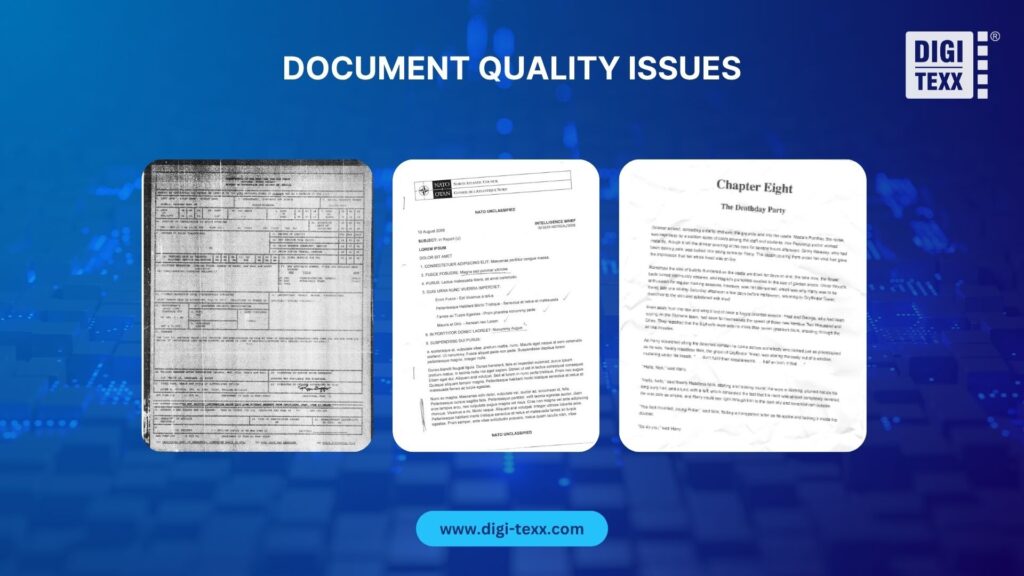
OCR accuracy is highly dependent on the quality of the source document. Blurry scans, low-resolution images, handwritten text, shadows, or skewed pages can make characters difficult to recognize, resulting in incomplete or inaccurate data extraction. Although image enhancement techniques can improve performance, poor document quality remains a common challenge in real-world business environments.
Layout and Structural Complications
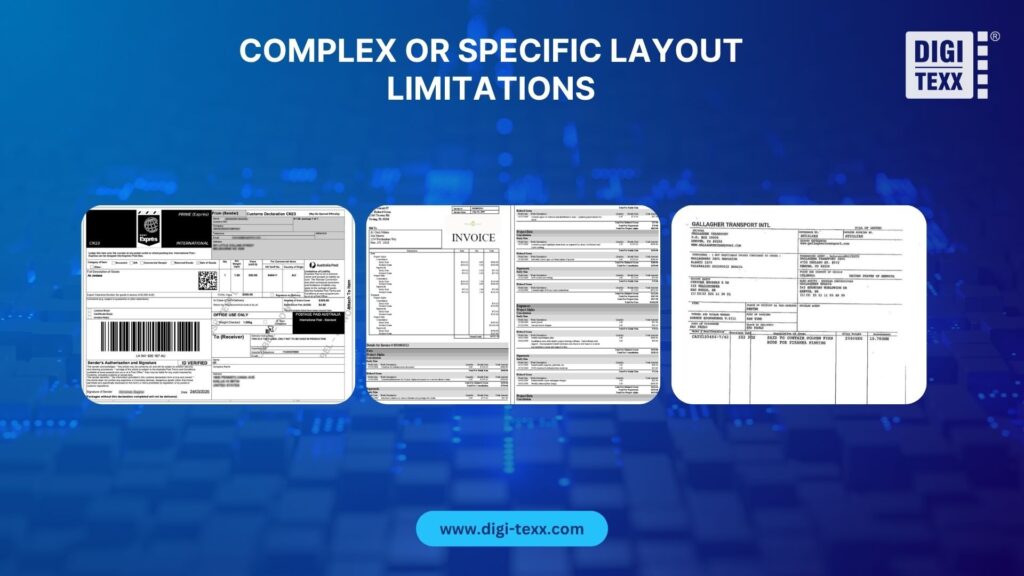
OCR performs best with standardized document formats, but many business documents vary in layout, language, or structure. Invoices from different vendors, multi-page contracts, or forms with complex tables can make it difficult for traditional OCR to correctly identify and organize information. As document diversity increases, extraction rules become more difficult to maintain and scale.
Lack of Human Context
OCR can recognize text, but it cannot fully understand the meaning or context behind the information it extracts. It may capture every field on a document but struggle to distinguish between similar data points or interpret business-specific rules without additional technologies. As a result, organizations often need human reviewers to validate extracted data, handle exceptions, and ensure accuracy before information is integrated into downstream systems.
Beyond OCR: The Shift Toward Intelligent Document Processing (IDP)
As organizations automate more document-intensive workflows, traditional OCR is often no longer enough. While OCR digitizes text efficiently, businesses increasingly need solutions that can understand document context, validate extracted data, and adapt to different document formats. This has led to the adoption of Intelligent Document Processing (IDP), a technology that combines OCR with AI to enable smarter, more end-to-end document automation.
What Makes IDP Different from Traditional OCR
Although OCR and IDP are both designed to automate document processing, they serve different purposes. OCR focuses on converting text into digital data, while IDP adds intelligence that enables documents to be understood, classified, and processed with minimal human intervention.
OCR vs. IDP at a Glance:
| Criteria | Traditional OCR | Intelligent Document Processing (IDP) |
| Primary Purpose | Converts printed or handwritten text into machine-readable data. | Automates the entire document processing workflow, from classification and extraction to validation and routing. |
| Document Understanding | Recognizes characters and words but has limited understanding of document context. | Understands document type, context, relationships between data fields, and business intent using AI. |
| Data Extraction | Extracts text based on predefined templates or recognition rules. | Identifies, extracts, validates, and organizes structured, semi-structured, and unstructured data. |
| Adaptability | Performs best with standardized document layouts and often requires rule updates for new formats. | Learns from different document layouts and continuously improves accuracy through machine learning. |
| Workflow Automation | Focuses on text recognition; downstream processing is largely manual or rule-based. | Integrates with business rules and enterprise systems to automate end-to-end document workflows. |
| Human Involvement | Human review is frequently required to classify documents, verify data, and resolve exceptions. | Human intervention is primarily reserved for low-confidence cases or business exceptions through a Human-in-the-Loop approach. |
| Best Fit | Organizations looking to digitize documents and reduce manual typing. | Organizations seeking scalable, intelligent automation for high-volume, document-intensive operations. |
Traditional OCR is designed to identify printed or handwritten characters and convert them into machine-readable text. While this significantly reduces manual typing, OCR treats documents primarily as collections of characters rather than meaningful business information.
IDP extends this capability by combining OCR with AI, machine learning, and natural language processing. Instead of simply extracting text, it identifies document types, understands relationships between data fields, validates information, and routes documents through predefined workflows. This enables organizations to automate more complex document processes with greater accuracy and consistency.
How OCR And IDP Process The Same Document
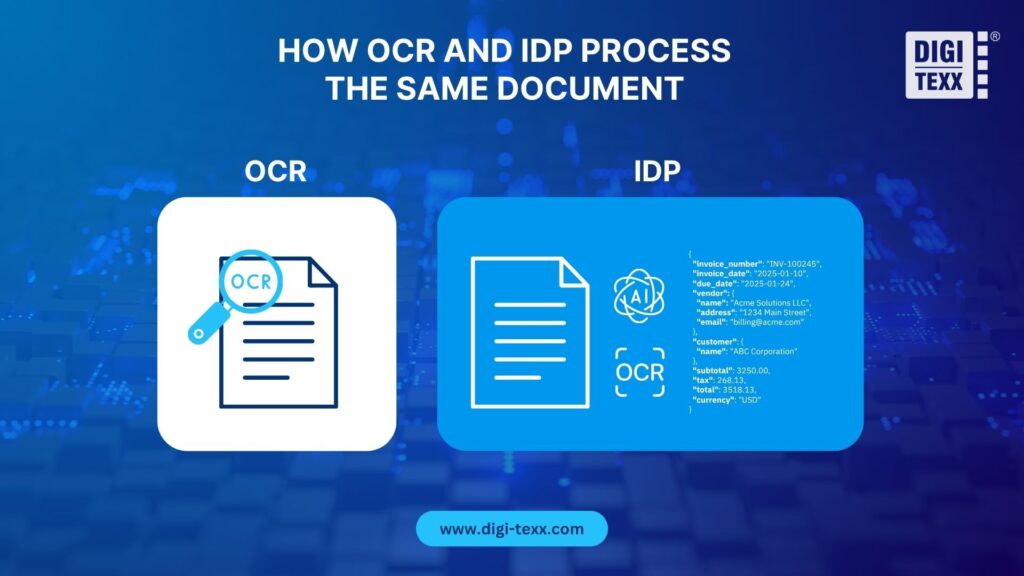
Consider an invoice received from different suppliers. Traditional OCR can recognize the visible characters and convert the invoice into digital text. However, when layouts vary, additional rules or manual review may still be needed to determine which values represent the invoice number, purchase order number, tax amount, or payment due date.
IDP goes beyond text recognition. It can classify the document as an invoice, identify relevant fields despite layout differences, validate the extracted information against business rules, and convert it into structured data. The information can then be routed to an approval workflow or integrated directly into an ERP or accounting system.
>>> Explore more: Document Processing Services That Automate Workflows & Improve Data Accuracy
Why Businesses Are Investing in Intelligent Automation
For many organizations, the challenge is no longer digitizing documents; it is turning document data into actionable business information. As enterprises process larger volumes of invoices, contracts, claims, and customer records, the ability to extract, validate, and route information efficiently has become a competitive advantage.
Intelligent Document Processing addresses this challenge by combining AI with workflow automation, enabling businesses to move beyond document digitization toward intelligent, end-to-end process automation. This shift allows organizations to improve operational efficiency today while building a foundation for future AI-driven initiatives.
Human-in-the-Loop: The Right Balance Between Automation and Accuracy
One of the primary goals of Intelligent Document Processing (IDP) is to maximize automation while maintaining data quality and business reliability. In many scenarios, documents can be processed automatically from classification and data extraction to validation and system integration with minimal human involvement.
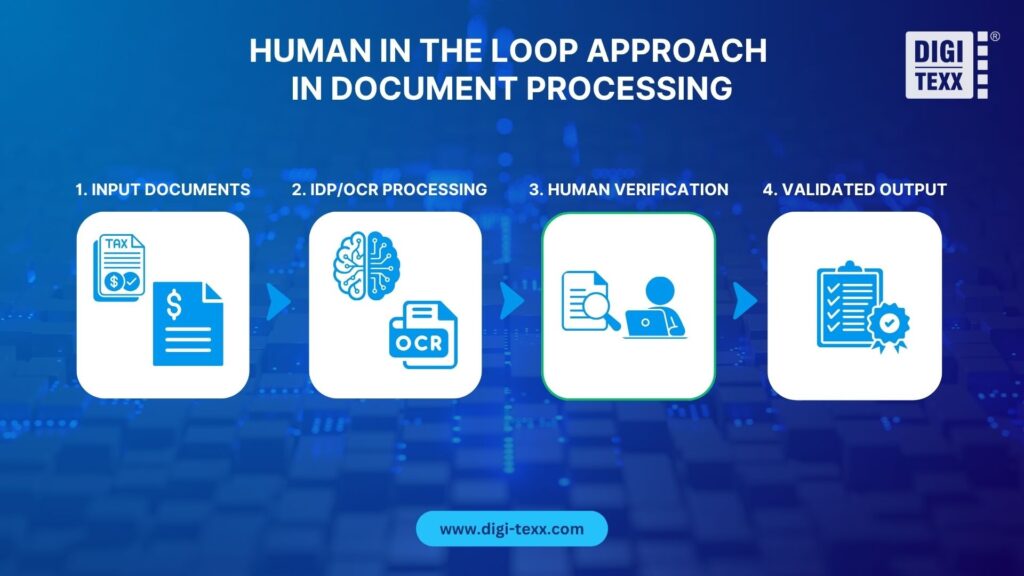
However, some documents may require additional verification due to low-confidence extraction results, inconsistent layouts, poor image quality, or business-specific validation requirements. Rather than interrupting the entire workflow, these exceptions can be routed to a human reviewer for validation and correction before the data is finalized.
This human-in-the-loop (HITL) approach combines the speed and scalability of AI with human judgment where it adds the most value. Routine, high-confidence documents continue through automated workflows, while only selected cases receive manual review.
By applying human oversight selectively instead of universally, organizations can achieve higher automation rates, maintain data accuracy, and build greater trust in AI-driven document processing.
>>> Explore more: What Is Human-In-The-Loop (HITL), HOTL, HOOTL and When To Use Each AI Model?
Which Approach Is Right for Your Business?
The right approach depends on your document volume, business requirements, and automation goals. While manual data entry remains suitable for low-volume workflows or processes requiring significant human judgment, OCR becomes increasingly valuable as organizations seek greater efficiency, consistency, and scalability.
| If your business needs to… | Manual Data Entry | OCR |
| Process a small number of documents | ✓ | |
| Handle documents requiring frequent human judgment | ✓ | |
| Minimize upfront technology investment | ✓ | |
| Reduce repetitive data entry tasks | ✓ | |
| Process high volumes of invoices, forms, or receipts | ✓ | |
| Improve processing speed and data consistency | ✓ | |
| Scale document processing without significantly increasing headcount | ✓ | |
| Support digital transformation initiatives | ✓ |
When to Move Beyond Traditional OCR
For many organizations, OCR is an important first step toward document automation. However, businesses with more complex document workflows often require capabilities beyond text recognition, such as document classification, data validation, exception handling, and workflow integration.
This is where DIGI-Xtract, DIGI-TEXX’s Intelligent Document Processing (IDP) solution, can help. Built on AI-powered OCR technology, DIGI-Xtract automates the entire document processing workflow from document classification and data extraction to validation and seamless integration with business systems.
By combining intelligent automation with optional human verification for selected cases, it enables organizations to improve efficiency while maintaining high levels of accuracy and data quality.
Finding the Right Fit for Your Business
Whether you’re beginning your digital transformation journey or looking to optimize existing document workflows, the key is choosing a solution that aligns with your operational needs. While manual data entry may still suit smaller-scale tasks, OCR offers a more scalable approach for growing businesses. For organizations seeking end-to-end document automation, solutions like DIGI-Xtract provide a practical path toward faster, more intelligent, and more efficient document processing.
Frequently Asked Questions
Is OCR 100% accurate?
No. OCR accuracy depends on factors such as document quality, layout consistency, and text clarity. Standardized, high-quality documents typically produce the best results, while handwritten text, poor scans, or complex layouts can reduce accuracy. For business-critical processes, many organizations combine OCR with validation rules or Intelligent Document Processing (IDP) to improve reliability.
Can OCR completely replace manual data entry?
Not in every situation. OCR can significantly reduce the need for manual data entry by automatically extracting information from documents. However, documents with low-confidence results, inconsistent formats, or complex content may still require human review. Many organizations therefore use a human-in-the-loop approach, where only selected cases are verified manually.
What types of documents can OCR process?
OCR can process a wide variety of document types, including invoices, receipts, contracts, application forms, ID documents, PDFs, and scanned paper records. It performs best on structured, printed documents with clear formatting, although modern OCR solutions continue to improve their ability to handle more complex layouts.
Can OCR read handwritten documents?
Yes, but with limitations. Some modern OCR solutions include Intelligent Character Recognition (ICR), which is designed to recognize handwritten text. While handwriting recognition has improved with AI and machine learning, it is generally less accurate than recognizing printed text. As a result, handwritten documents often require additional validation or human review.
What comes after OCR? Is IDP better than traditional OCR?
OCR is designed to convert images or scanned documents into machine-readable text. Intelligent Document Processing (IDP) builds on this capability by adding AI technologies that can classify documents, extract key information, validate data, and automate document workflows.
For organizations handling large volumes of diverse or unstructured documents, IDP offers a more comprehensive automation solution. However, for simpler, standardized document processing, traditional OCR often remains a practical and cost-effective choice.
>>> Explore Related Articles:
- Manual vs. Automated Data Entry: Which Is Better for Your Business?
- How Online OCR Image To Text Converters Improve Productivity (And How To Choose One)
- Challenges of Digitizing Handwritten Historical Documents in Multilingual Scripts
- Improving Accuracy in Invoice Data Extraction: Best Practices and Strategies
Reference:
- Intelligent document processing growth strategies for Tech CEOs. (2024a). Gartner. https://www.gartner.com/en/documents/5073331
- New AIIM report by Deep Analysis highlights the challenges and opportunities in AI adoption and unstructured data management. (2024b). Aiim.Org. https://info.aiim.org/new-aiim-report-by-deep-analysis-highlights-the-challenges-and-opportunities-in-ai-adoption-and-unstructured-data-management
- Barchard, K. A., & Pace, L. A. (2011). Preventing human error: The impact of data entry methods on data accuracy and statistical results. Computers in Human Behavior, 27(5), 1834–1839. Sciencedirect. https://doi.org/10.1016/j.chb.2011.04.004
- Edlich, A., Watson, A., & Whiteman, R. (2017, June 8). What does automation mean for G&a and the back office? McKinsey & Company. https://www.mckinsey.com.br/capabilities/operations/our-insights/what-does-automation-mean-for-ga-and-the-back-office