Accurate invoice processing helps businesses pay suppliers correctly and on time, maintain reliable financial records, and manage cash flow. As businesses automate this process, accuracy remains essential. Incorrect amounts, missing details, or mismatched purchase order numbers can still delay payments and create extra work for accounts payable (AP) teams.
To improve accuracy in automated invoice processing, businesses first need to understand how it is measured. An overall score can hide recurring errors in critical fields, making it difficult to identify where improvements are needed. This article explores how to measure accuracy, avoid misleading comparisons, and evaluate whether those improvements translate into less manual work.
How Accurate Is Automated Invoice Processing, Really?
Automated invoice processing can achieve high accuracy on clean, familiar documents, but no single rate applies to every AP environment.
A 2025 benchmark by Fraunhofer IAIS and the Lamarr Institute tested eight multimodal language models across three public invoice datasets.
The same top-performing model scored 96.50% on clean digital invoices, 92.71% on scanned invoices, and 87.46% on scanned receipts. The nine-point spread came from the document conditions, not a change in the model.
Invoice Extraction Accuracy by Document Type:
| Document type | Reported accuracy | What the result indicates |
| Clean digital invoices | 96.50% | Machine-readable inputs produced the strongest result. |
| Scanned invoices | 92.71% | Scanning introduced recognition and layout challenges. |
| Scanned receipts | 87.46% | More variable quality and structure reduced performance. |
The benchmark shows why every accuracy claim needs context. Results from clean PDFs should not be treated as the expected performance for a production queue containing scans, mobile photographs, receipts, multi-page tables, and unfamiliar supplier layouts.
Published ranges provide general reference points, while a controlled evaluation using the organization’s own invoice mix offers a more meaningful measure of expected production accuracy.
Why Accuracy Rates Can Mean Different Things
The word “accuracy” is used for several different outcomes:
- Characters recognized correctly by OCR
- Values extracted into the correct business fields
- Line items assigned to the correct rows and columns
- Invoices completed without human intervention
- Invoices successfully validated, matched, approved, and posted
These outcomes should not be combined into one percentage. A vendor may report character-level OCR performance while an AP team needs correct totals, tax values, purchase order numbers, line items, and supplier matching.
A useful accuracy claim identifies four elements: the unit of measurement, the matching rules, the test population, and the workflow endpoint.
The matching rules are particularly important. A strict comparison may treat 1,000.00 and 1000 as different, while a normalized comparison treats them as the same value. Dates, supplier names, decimal separators, currencies, and tax formats all require documented normalization rules. Without them, two evaluations can produce different accuracy rates from the same predictions.
Manual Vs. Automated Invoice Processing
Automation changes where work occurs. It reduces repetitive entry, but exceptions, business rules, and master-data problems can still require human action.
Invoice Processing Accuracy Across Manual, OCR, and AI Approaches:
| Approach | Reported performance | Primary strength | Primary limitation |
| Fully manual | Roughly 2% error rate | Handles unusual documents with human judgment | Slow, costly, and difficult to scale |
| Traditional OCR | Often reported at 85-95% field accuracy | Reliable on stable, repetitive layouts | Template changes can reduce performance |
| AI and ML extraction | 92.71-96.50% in the cited independent benchmark | Adapts better to layout variation | Still depends on document quality and validation |
These figures should not be used as a direct ranking because they use different measurement units and come from different studies. Manual processing is reported through invoice error rates, while OCR and AI systems are often measured at the field level.
The comparison still shows how the nature of the work changes. Manual processing relies on people to enter and verify data, traditional OCR reduces entry for predictable layouts, and AI-based extraction handles greater document variation.
However, higher extraction accuracy does not automatically lead to touchless processing. Even when data is extracted correctly, an invoice may still require human review to resolve missing purchase orders, discrepancies between invoice and purchase order details, or incomplete supplier records.
A practical comparison therefore needs to consider both extraction accuracy and the work required to complete processing, including data verification, exception resolution, and processing time.
What Actually Defines Accuracy In Automated Invoice Processing?
Accuracy in automated invoice processing should be measured at several levels. Each metric answers a different question.
Character Error Rate (CER)
CER counts the insertions, deletions, and substitutions needed to convert OCR output into the verified text. A lower CER means better text recognition.
CER helps compare scan quality, preprocessing, or OCR engines. It does not show whether recognized text was assigned to the correct field. The value 10,000.00 may be read perfectly and still be classified as a subtotal instead of the final amount.
Field-Level Accuracy
Field-level accuracy measures whether each invoice value is captured correctly and assigned to the right field. It is more relevant to AP workflows than character accuracy because validation, matching, and ERP posting depend on structured data.
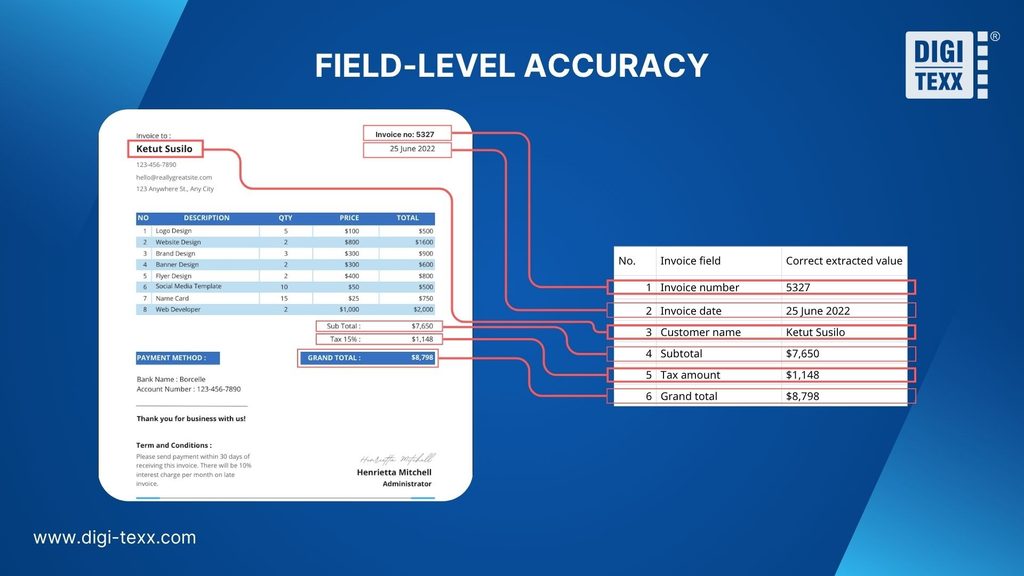
Each value is checked independently. The invoice number is correct only if the system captures the complete value and assigns it to the invoice-number field, not the PO-number field.
Formatting may be standardized during extraction. Converting “25 September 2026” to “2026-09-25” is not an error, provided the rule is defined before evaluation.
Not all fields carry equal weight. A wrong total, tax amount, or bank account number is far more costly than a wrong address line. Report accuracy for critical fields separately, or weight fields by business impact.
Line-Item And Table Accuracy
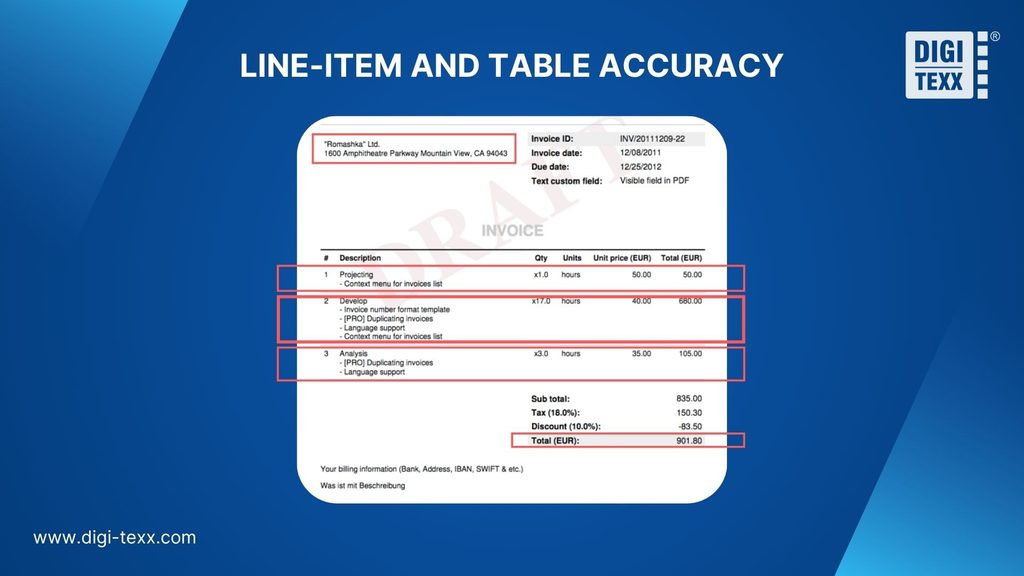
Line-item extraction is a structural problem as well as a recognition problem. The system must identify table boundaries, preserve row and column relationships, handle wrapped descriptions, and reconstruct tables across pages.
Evaluate row completeness, column assignment, quantity and unit-price accuracy, multi-page continuity, and reconciliation between line totals, subtotal, tax, and invoice total. Strong header accuracy does not prove strong line-item accuracy.
Table evaluation should also distinguish missing rows from misplaced values. A line item can be present but still unusable if its quantity is associated with the wrong description or its amount moves into the tax column. For AP teams, preserving relationships between values is as important as reading the values themselves.
Invoice Error Rate
Invoice error rate measures the share of invoices containing at least one defined error:
Invoice error rate = invoices containing errors / total invoices processed x 100
This metric shifts attention from isolated fields to usable documents. Teams still need a written policy defining which errors count, how formatting differences are normalized, and whether validation or matching failures are included.
Invoice-ready rate is a useful companion measure. It represents the share of invoices for which every required field and validation condition passes the defined handoff point. Reporting invoice error rate and invoice-ready rate together makes it easier to see whether strong field-level performance produces complete documents.
Accuracy In Automated Invoice Processing: Common Measurement Traps
An accuracy figure can be mathematically correct and still mislead. The problem often lies in the test set, the measurement unit, or the manual work that happens after extraction.
Benchmark-Set Bias
Accuracy results depend heavily on the documents used for testing. A benchmark built around clean invoices from recurring suppliers shows performance under familiar conditions, but not necessarily under real production conditions.
New suppliers, revised templates, poor scans, photographs, and unusual layouts can all change results. Even in the Fraunhofer benchmark, scores varied by nine points across datasets for the same top model, though for several reasons, as noted above.
A representative evaluation should cover:
- Recurring and newly onboarded suppliers
- Digital PDFs, scans, and photographed invoices
- Standard and complex layouts
- High-volume and long-tail document types
- Different languages, currencies, and tax structures
Header Accuracy Can Hide Line-Item Failures
Header fields are generally easier to extract than detailed invoice tables. Combining both into one accuracy rate can allow strong header performance to hide weaker line-item results.
For example, the system may capture the supplier, invoice number, and total correctly while dropping a row or assigning a quantity to the wrong column. The header appears accurate, but the invoice may still fail PO matching or require manual correction.
Report header and line-item accuracy separately. This matters most when invoices support line-level matching, GL coding, cost allocation, or spend analysis.
Manual Work Hidden By Extraction Accuracy
An invoice may be extracted correctly yet still need an employee to correct a GL code, assign a cost center, map a supplier record, or resolve a missing PO. That work consumes time but does not appear in the extraction error rate.
Ardent Partners’ 2025 report, based on 212 AP and finance leaders surveyed in 2024, found an average touchless rate of 32.6% and a best-in-class rate of 49.2%. The average invoice exception rate was 14%, against 9% for best-in-class teams. These are self-reported survey figures, and the report is distributed by AP vendors, so treat them as benchmarks rather than guarantees.
Extraction accuracy therefore cannot show whether automation is reducing work across the process or moving manual effort to a later stage.
What Affects Accuracy In Automated Invoice Processing?
Accuracy in automated invoice processing is shaped by four main factors: document quality, invoice complexity, supplier variation, and the quality of downstream business data.
These factors affect different stages of the workflow. Poor image quality may prevent correct text recognition, while incomplete purchase order or supplier data can stop an accurately extracted invoice from moving forward.
Key Factors Affecting Accuracy In Automated Invoice Processing:
| Factor | Common sources of error | What to evaluate |
| Document quality and input format | Blur, skew, compression, handwriting, stamps, and low contrast | Accuracy by input type and image quality |
| Layout and line-item complexity | Multi-page tables, merged cells, repeated headers, and wrapped descriptions | Header-field and line-item accuracy separately |
| Supplier and regional variation | New layouts, languages, currencies, date formats, and tax structures | Performance by supplier, language, country, and document type |
| Matching, master data, and validation | Missing POs, outdated supplier records, absent receipts, and incorrect rules | Exception rates and root causes by workflow stage |
Document Quality And Input Format
Blur, skew, shadows, compression, handwriting, and stamps can reduce recognition quality. Digital PDFs may contain readable text, while scans and image-only PDFs require OCR before extraction.
Measuring performance separately for digital PDFs, scans, and mobile photographs reveals how input quality affects accuracy. Strong results on clean files can otherwise mask recurring errors on lower-quality documents.
Invoice Layout And Line-Item Complexity
Suppliers place invoice numbers, dates, taxes, totals, and PO references in different locations. Multi-page tables, merged cells, repeated headers, discounts, and multiple tax rates make extraction more difficult.
A system may read the text correctly but assign a value to the wrong field or table column. Evaluating header fields and line items separately helps identify the distinct errors that occur in each.
Supplier And Regional Variations
Invoices vary by supplier, language, currency, date format, tax structure, and layout. Performance on a few recurring suppliers may not represent new or occasional vendors.
Results should be segmented by supplier group, language, country, and document type. This helps identify whether errors are widespread or concentrated in specific invoice categories.
Matching, Master Data, And Validation Failures
Correct extraction does not guarantee successful processing. An invoice may still enter an exception queue because of a missing PO, outdated supplier record, absent goods receipt, duplicate suspicion, or matching failure.
These issues should be separated from extraction errors. Classifying exceptions by root cause shows whether the problem lies in document capture, extraction, master data, business rules, matching, or system integration.
Without this distinction, teams may try to improve OCR when the actual bottleneck exists elsewhere in the AP workflow.
Operational Metrics That Matter Beyond Extraction Accuracy
Extraction quality is one input into AP performance, not the whole picture. Below are the metrics that show whether accurate data is actually translating into efficiency:
Key AP Performance Metrics:
| Metric | What it measures | Reported average |
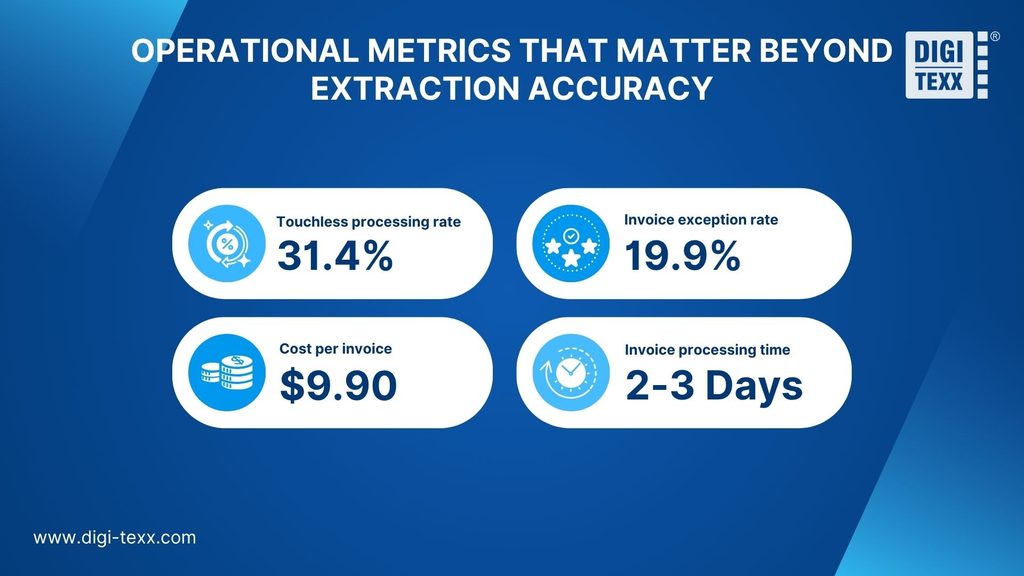
| Touchless processing rate | Invoices processed without human intervention | 31.4% |
| Invoice exception rate | Invoices requiring action outside the standard process | 19.9% |
| Cost per invoice | Total staff and operating cost of processing one invoice | $9.90 |
| Invoice processing time | Average time required to process one invoice ( fully automated or touchless) | Under 2-3 days |
Source: Ardent Partners, Accounts Payable Metrics That Matter in 2026
Touchless Processing Rate
The percentage of invoices that complete a defined workflow without human intervention. The reported 2026 average is 31.4%, equivalent to 314 out of every 1,000 invoices completing the workflow without review or correction. This metric reflects the performance of the overall workflow, including extraction, validation, matching, and routing.
Invoice Exception Rate
The percentage of invoices requiring action outside the standard process. At the reported 2026 average of 19.9%, approximately one in five invoices requires separate resolution. These exceptions can arise even when extraction is accurate, due to missing purchase orders, matching discrepancies, incomplete supplier records, or other processing issues.
Cost per Invoice
The reported 2026 average is $9.90 per invoice. This metric captures the cost of processing an invoice, with the exact components depending on the study’s methodology. For internal measurement, businesses can include labor, software, quality control, exception handling, and rework. Tracking these components helps reveal whether reduced data-entry effort translates into lower total processing costs.
Invoice Processing Time
Invoice processing time is the total elapsed time from invoice receipt to a defined endpoint, such as approval, ERP posting, or payment readiness. It includes both active handling and time spent waiting in routing, matching, or approval queues.
Typical Processing Times by Method:
| Processing method | Typical processing time | Where time is spent |
| Manual or paper-based | 10–20+ days | Manual entry, document routing, matching, corrections, and approval follow-ups |
| OCR-assisted or semi-automated | 5–8 days | Faster data capture, but verification, coding, matching, and routing may remain manual |
| Fully automated or touchless | 2–3 days or less | Integrated extraction, validation, matching, and approval routing reduce routine delays |
Actual processing time depends on invoice complexity, PO availability, approval rules, exception rates, and the endpoint being measured.
Processing time should also be separated from active handling time. An invoice may require only ten minutes of employee work but remain in an approval queue for three days. In this case, active handling time is ten minutes, while total processing time is three days.
The Right Way To Measure Accuracy In Automated Invoice Processing
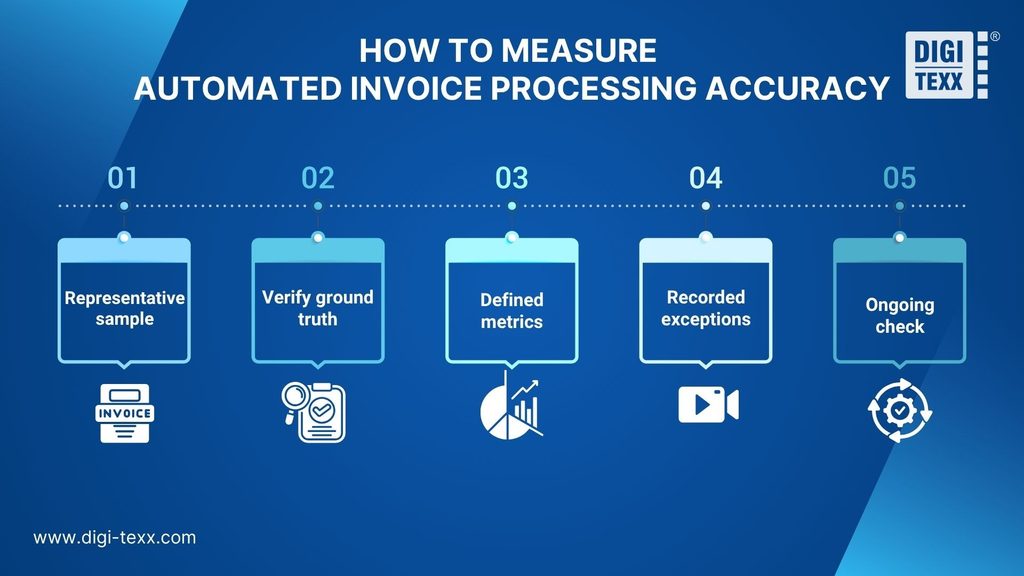
A reliable evaluation needs a representative sample, clearly defined metrics, and a documented view of the manual work that remains. The goal is a baseline you can repeat under comparable conditions.
1. Build A Representative Sample
Use recent invoices from your actual workflow, reflecting your mix of PO and non-PO invoices, digital PDFs, scans, supplier groups, languages, page counts, and layout complexity. Include difficult cases such as poor scans, credit notes, handwritten notes, unfamiliar vendors, unusual tax structures, and multi-page tables.
Sample size. As a rough guide, about 385 invoices gives a margin of error near ±5% at 95% confidence for an overall rate. Each segment you want to report on (for example, scans or a specific country) needs enough invoices of its own. Larger samples help only if they represent the range you process.
Report two views. Show results by segment, which reveals weak spots, and results weighted to your real production mix, which predicts overall performance. Over-sampling hard cases without reweighting will understate your everyday accuracy.
2. Establish Reliable Ground Truth
Accuracy is only as good as the answer key. Have verified correct values prepared by trained reviewers, ideally with a second reviewer checking a subset. Note that annotation errors exist even in published datasets. The Fraunhofer authors corrected inconsistent labels in one of theirs.
3. Define Accuracy And Workflow Metrics
Measure field-level accuracy for critical fields (supplier ID, invoice number, PO number, tax, currency, total), invoice-level accuracy, and the error rate among auto-accepted invoices. Review these alongside touchless rate, exception rate, manual-touch rate, and processing time. Every metric needs a stated endpoint and error definition.
4. Record Exceptions And Keep A Baseline
Record manual corrections, enrichment, re-keying, and exception resolution by cause. This separates extraction failures from missing POs, supplier-data problems, matching discrepancies, business rules, and integration errors. Track resolution time as well, because two error types with the same frequency can create very different workloads.
The baseline should cover a fixed evaluation period and retain the original values, extracted outputs, validation results, and manual changes needed to reproduce the calculation.
5. Keep Measuring After Go-Live
A fixed test set supports comparisons between system versions. Ongoing production sampling catches drift from new suppliers, revised templates, and changing document conditions. Re-check accuracy periodically rather than treating it as a one-time acceptance test.
FAQs
What Is A Good Accuracy Rate For Automated Invoice Processing?
There is no universal rate. On clean, machine-generated invoices from repeat suppliers, independent benchmarking shows top models reaching 96.5%+; across a realistic mixed set including scans and long-tail suppliers, expect several points lower. Ask for critical-field accuracy, invoice error rate, and operational outcomes (touchless rate, exception rate) rather than accepting one aggregate number.
Is OCR Accuracy The Same As Invoice Processing Accuracy?
No. OCR accuracy measures text recognition alone. Invoice processing accuracy also depends on field classification, normalization, validation, matching, exception handling, and reliable transfer into downstream systems.
Is A Confidence Score The Same As Accuracy?
No. Confidence is a model’s estimated certainty for a given prediction. Accuracy is determined by comparing outputs against verified correct results after the fact. Confidence has to be calibrated against real outcomes before it’s used to trigger automatic acceptance or route to review.
Can Automated Invoice Processing Achieve 100% Accuracy?
No system should be assumed perfect across every supplier, format, language, layout, and quality condition; the nine-point spread in the Fraunhofer benchmark, on the same model, is the clearest evidence of that. A controlled workflow delivers verified output by combining automation, validation, exception routing, and human review; that’s a materially different claim than “the model is always right.”
Explore related articles:
How to Reduce Manual Invoice Processing and Save Time
Automated Invoice Processing: How It Works, Benefits & Best Software
How invoice processing automation saves time, cost, and errors in 2026
References:
- Ardent Partners. (2026). Accounts payable metrics that matter in 2026. Ardent Partners. https://www.tungstenautomation.com/-/media/files/reports/en/ap-metrics-that-matter-2026.pdf
- Fraunhofer IAIS / Lamarr Institute. Multi-Modal Vision vs. Text-Based Parsing: Benchmarking LLM Strategies for Invoice Processing (2025). https://arxiv.org/abs/2509.04469
- Medius. Benchmarking AP Accuracy and Understanding Acceptable Invoice Error Rates. https://www.medius.com/blog/benchmarking-ap-accuracy-and-understanding-acceptable-invoice-error-rates/
- Gartner. Market Guide for Accounts Payable Invoice Automation Solutions (referenced range). https://info.openenvoy.com/gartner-market-guide-for-accounts-payable-invoice-automation-solutions
- IOFM (Institute of Finance & Management) manual-error and rework-cost figures, as compiled in Ascend Software, What “Good” Looks Like: AP Benchmarks Every Modern Team Should Know in 2025. https://www.ascendsoftware.com/blog/what-good-looks-like-ap-benchmarks-every-modern-team-should-know-in-2025