In the 2026 digital landscape, where visual integrity dictates consumer trust, DIGI-TEXX recognizes that professional clipping path services remain the gold standard for image precision. Whether you are scaling an e-commerce empire with high-volume ecommerce photo editing services or managing a high-end creative studio, partnering with a reliable clipping path service provider for precise image isolation is critical for maintaining brand authority and operational efficiency.
“According to a 2025 report by Adobe, 73% of consumers say product image quality strongly influences their purchasing decisions, reinforcing why precise clipping path techniques remain essential for eCommerce, advertising, and professional visual production.” — Adobe Digital Trends Report.
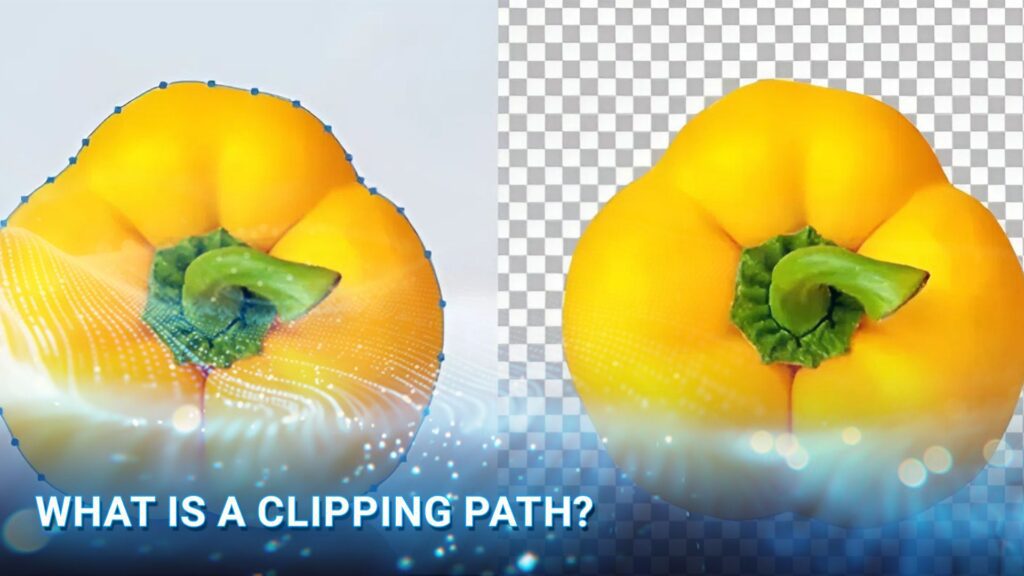
What Is A Clipping Path?
A clipping path (or deep etch) is a closed vector path created using the Pen Tool in Photoshop to isolate a subject from its background. By defining a precise mathematical boundary, it ensures sharp, pixel-perfect edges and professional uniformity, making it the industry standard for high-converting e-commerce product images and professional print media.
>>> See more:
- Image Processing Services for E-commerce Websites: Optimizing Product Images for Better Sales
- Professional E-commerce Data Entry Services by DIGI-TEXX
- Best Product Photo Editing Services For eCommerce: Top Providers Compared
How Does Photo Clipping Path Work?
At its core, a clipping path acts as a mathematical vector boundary designed to isolate specific visual elements. By defining what is visible and what is hidden, it serves as a critical tool for background removal, subject highlighting, and asset preparation.
The Mechanism of Isolation
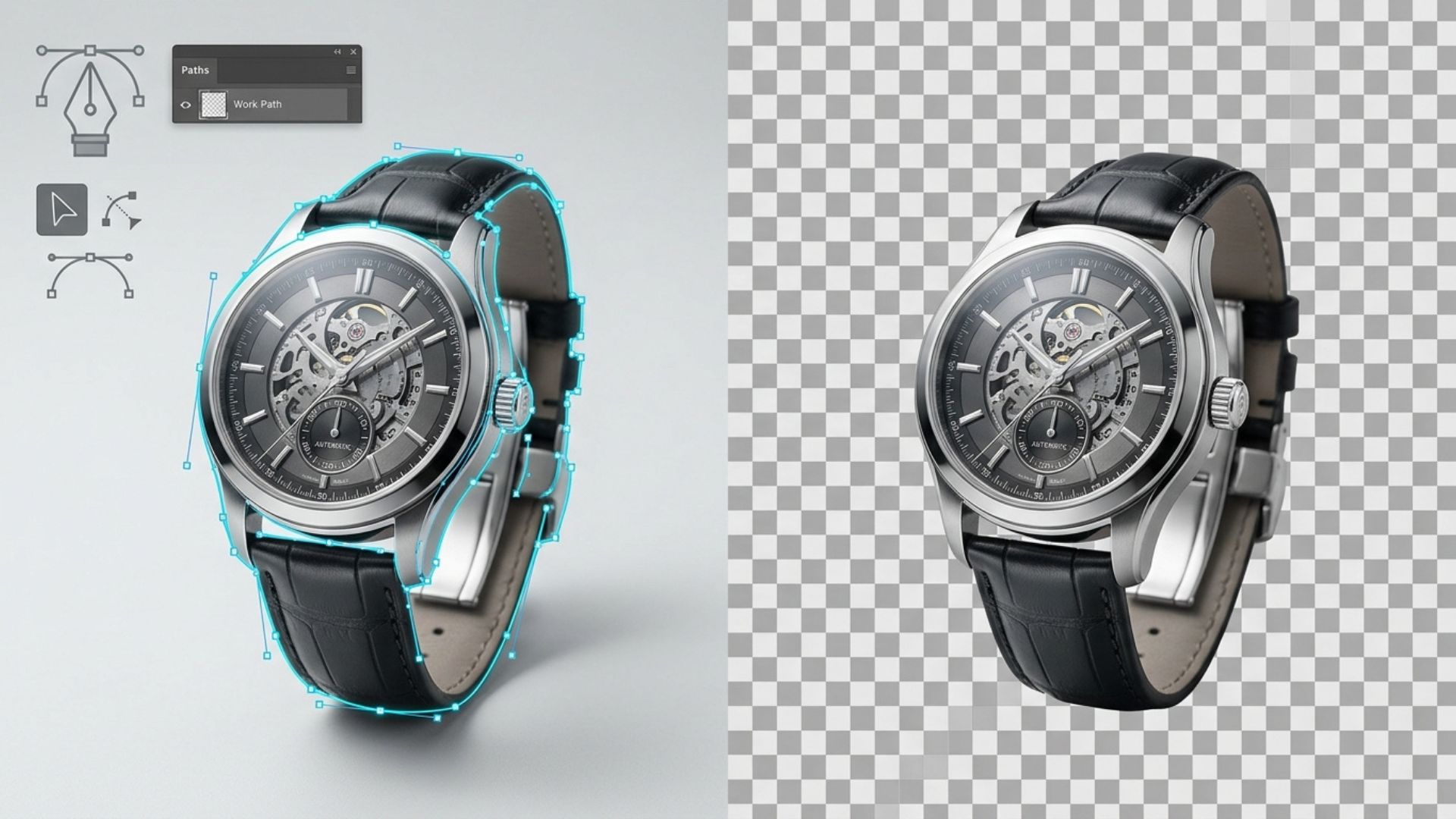
The process begins with the creation of a precise outline – often referred to as a deep etch – around the target object. This outline is composed of vector anchor points connected by Bézier curves. Once the path is closed:
- Inside the path: The subject remains fully visible and intact.
- Outside the path: The surrounding environment is rendered transparent or discarded.
Why Vector Accuracy Matters?
Because clipping paths are built on vector data rather than pixels, the resulting edges remain razor-sharp and infinitely scalable. This precision is particularly vital for products with clearly defined silhouettes, such as consumer electronics, apparel, or industrial equipment. It ensures a flawless cutout that can be seamlessly integrated into new compositions or varied background colors.
Scalability In Modern Media Pipelines
Beyond simple aesthetics, clipping paths are engineered for workflow automation:
- Consistency: Once a path is embedded, it can be reused across multiple transformations, including resizing, cropping, and format conversions.
- Efficiency: For developers and media managers, these paths facilitate a “create once, deliver everywhere” approach. Assets remain clean and focused, ready for high-volume delivery through modern media management systems, eCommerce production workflows, and advanced image processing for virtual try-on AI model pipelines.

Common Uses Of Clipping Paths
The clipping path is far more than a mere photo editing task; it is a critical component in the global digital supply chain. By providing surgical precision in object isolation, this technique delivers tangible value across various high-stakes sectors.
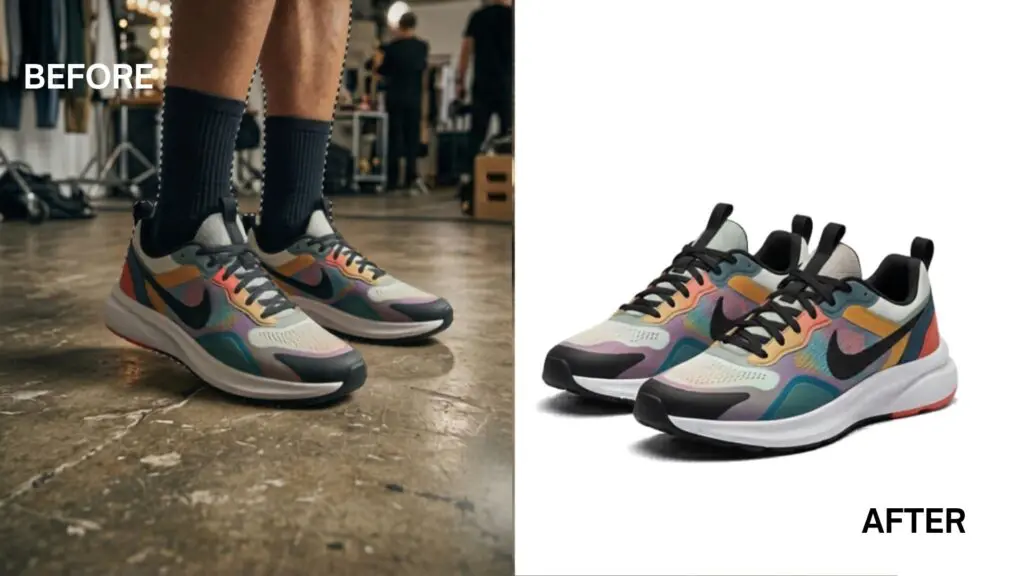
1. E-commerce & Digital Retail
In online retail, clipping paths are primarily used to isolate product images (such as shoes or electronics) so they can be placed on clean, uniform white backgrounds.
This surgical precision in object isolation acts as a critical driver for digital supply chains, allowing brands to:
- Meet Marketplace Standards: Easily comply with the strict image guidelines of Amazon, eBay, and Google Shopping by converting raw shots into clean “silos” (silhouettes).
- Enhance Visual Uniformity: Eliminate background clutter to ensure a distraction-free and professional browsing experience.
- Maximize Campaign ROI: Precision-etched imagery builds consumer trust, directly boosting Click-Through Rates (CTR) and reducing return rates.
2. Print & Layout
In the printing industry, clipping paths are used to trim product images for placement in magazine, brochure, or catalog layouts within Adobe InDesign. This technique helps layout designers achieve professional layouts through two core features:
- Preserving Transparency: When saving images in TIFF or EPS formats, the clipping path hides the original background completely. This allows product photos to seamlessly overlay colored backgrounds or complex patterns without boxy white borders.
- Advanced Text Wrapping: This technique forces body text to automatically flow and contour around the edges of the product, creating a clean, modern, and high-end aesthetic for fashion lookbooks and editorial magazines.

3. Graphic Design
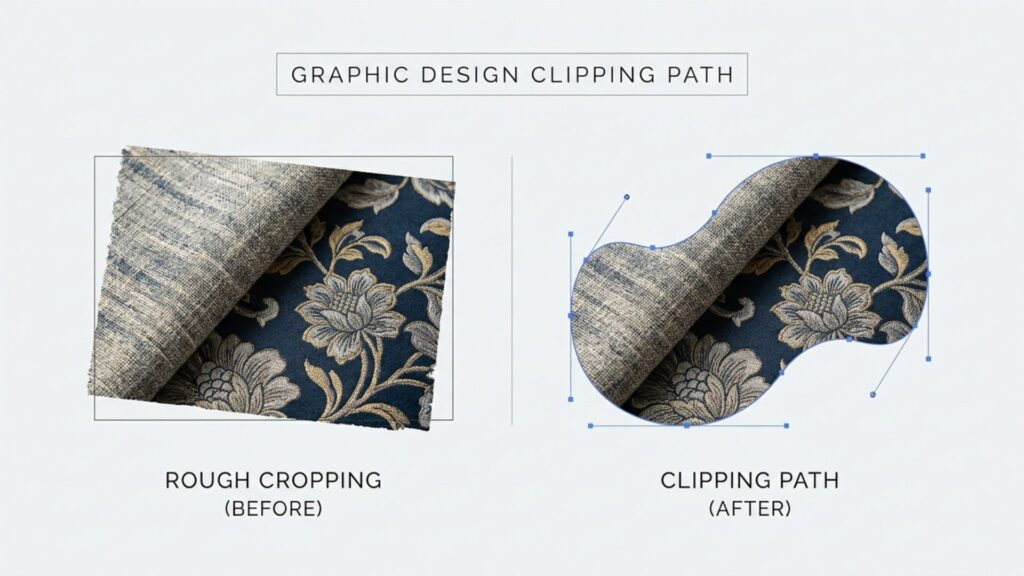
In graphic design, professionals execute a precise clipping path design to control layer visibility, forcing images or textures to conform exactly to the shape of a custom vector path.
- Masking Images into Shapes: Instead of permanently cropping an image, designers use vector boundaries to “clip” complex textures, gradients, or photos neatly inside logos, icons, or custom typography.
- Non-Destructive Workflow: Because the vector path only hides unwanted pixels without destroying the original data, you can easily use anchor point tools to adjust, reshape, or expand the edges at any stage of production without damaging the source file.
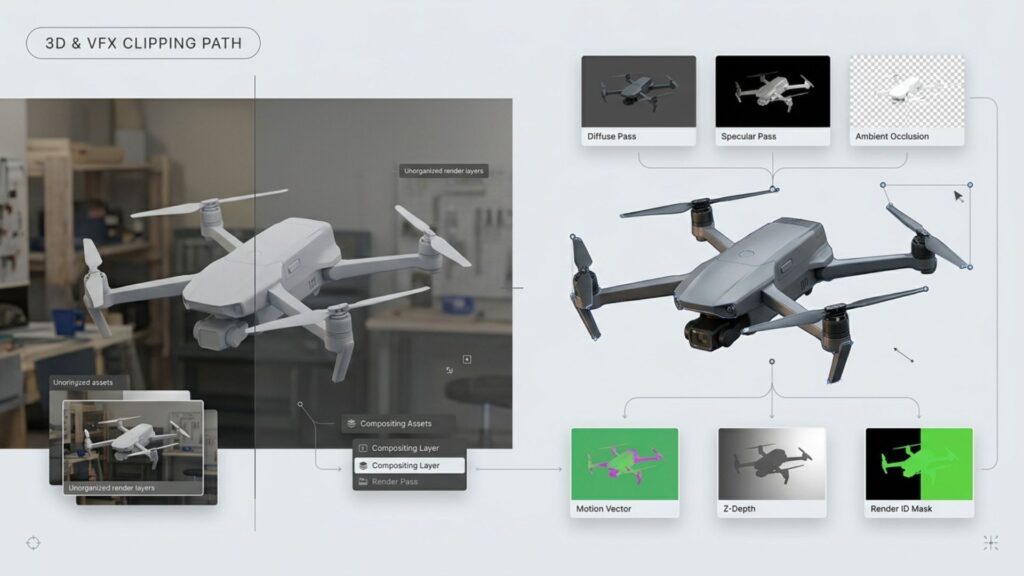
4. 3D Graphics & VFX
In 3D graphics and visual effects (VFX), clipping paths optimize post-production pipelines and rendering workflows through three core functions:
- Flawless Compositing: They generate exact vector boundaries around 3D renders, allowing visual effects artists to layer elements and replace backgrounds with zero edge “fringe” or pixel artifacts.
- Instant Matte Generation: Rendering engines output clipping paths as distinct ID mattes to separate foreground assets from backgrounds, eliminating the need to recalculate complex 3D geometry during edits.
- Automated Asset Delivery: Embedded vector paths automate media pipelines, allowing pre-isolated 3D assets to move through optimization and Web3D/AR delivery stages without manual editing.
>>> See more:
- Top Document Scanning Software for 2026: Features, Pros & Cons
- How AI Is Revolutionizing The Image Processing Service?
- AI Photo Retouch Tools: Best Picks & How to Use Them Easily
How To Use A Clipping Path?
Phase 1: Preparation & Starting
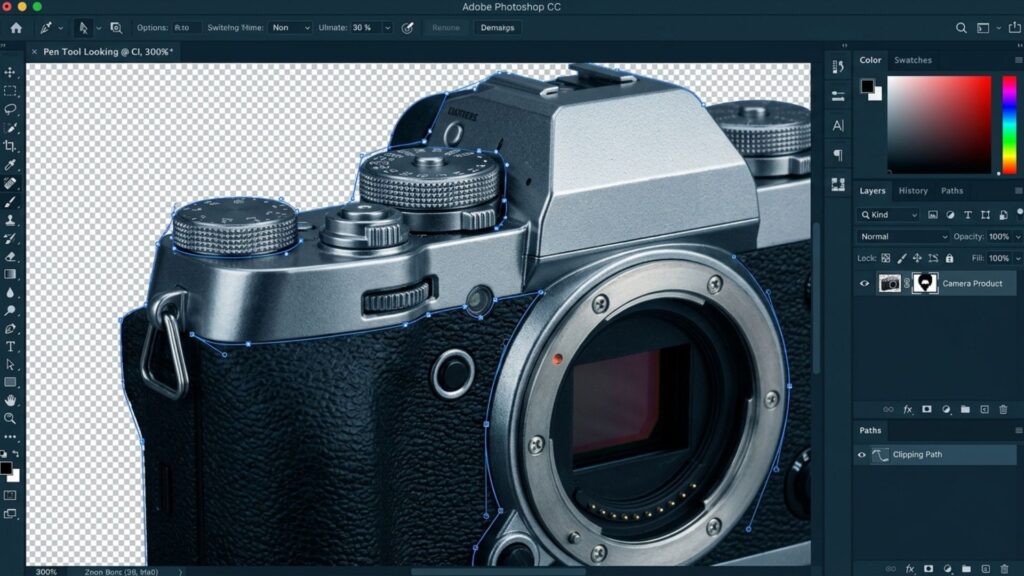
- Tool Selection: Press (P) to select the Pen Tool in Adobe Photoshop or Illustrator for the sharpest edge resolution.
- Setup & Execution: Zoom in to 200% – 300%. Place your anchor points 0.5 to 1 pixel inside the object’s actual edge to completely eliminate background bleeding.
- Handling Curves: Hold Alt (Windows) or Option (Mac) to break or redirect the Bézier handles when navigating sharp corners. Connect the final point to the starting point to complete the closed loop.
Phase 2: Activating The Clipping Path Attribute
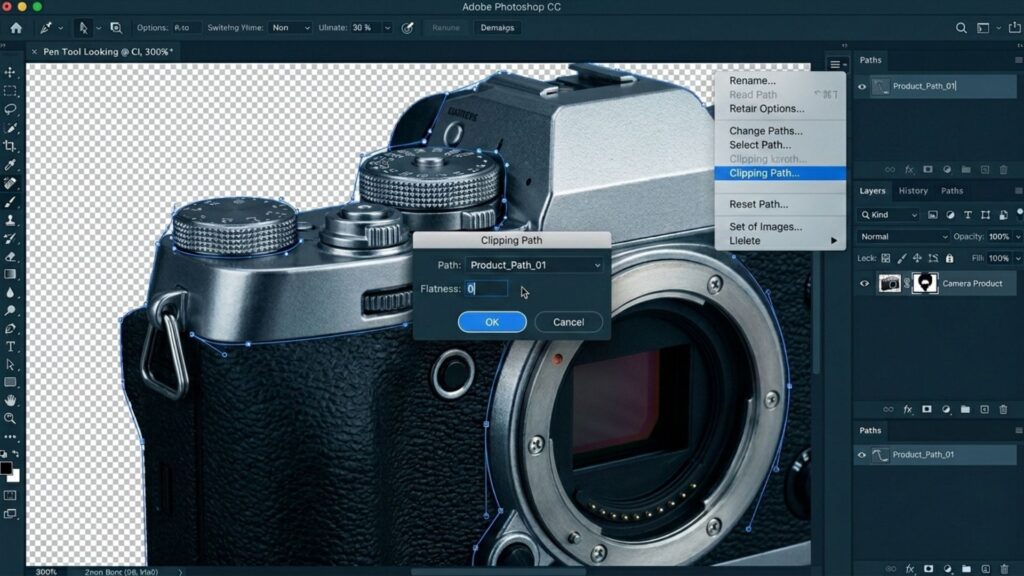
- Open the Paths Panel (Window > Paths) -> Double-click the newly drawn path and name it to save (Path 1).
- Click the panel menu icon in the upper-right corner -> Select Clipping Path…
- In the Flatness device box, leave it blank or enter 0 (this default setting ensures the smoothest curves during printing and high-res rendering). Click OK. The path name will now appear in bold.
Phase 3: Exporting And Syncing To Layout Software (InDesign/Illustrator)
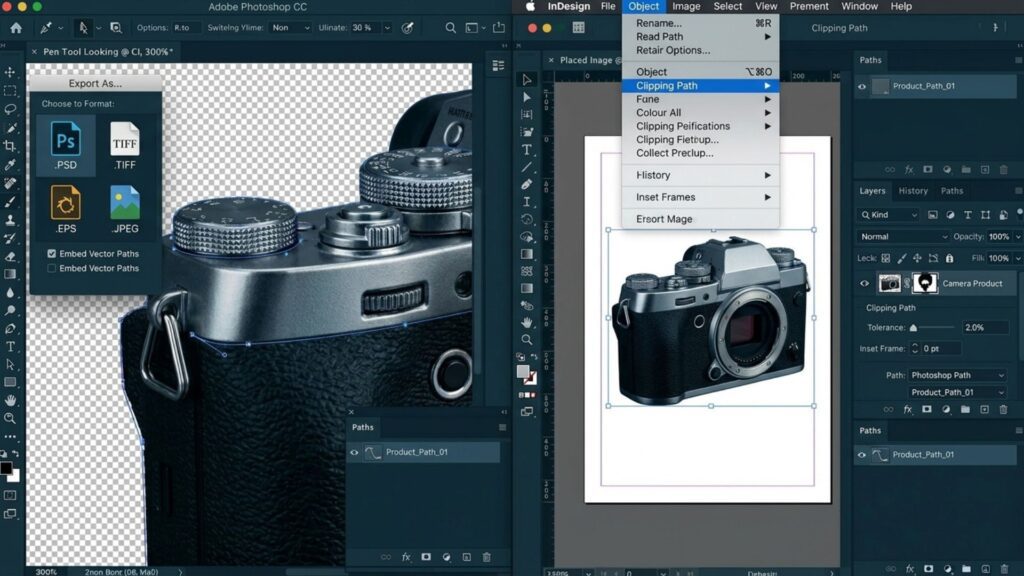
- Save your file in .PSD, .TIFF, or .EPS format to retain the embedded vector attributes.
- Post-Production Tip (InDesign): When placing the graphic into InDesign, go to Object > Clipping Path > Type: Photoshop Path to manage the edges.
- Advanced Optimization: If the edges show unwanted artifacts or stray pixels, increase the Tolerance value to smooth the path, or adjust the Inset Frame value to uniformly shrink the clipping shape inward.
>>> See more:
- How to Edit Street Style Photos Like a Pro
- Top Clipping Path Service Providers in 2025
Technical Settings: Mastering Clipping Path Precision
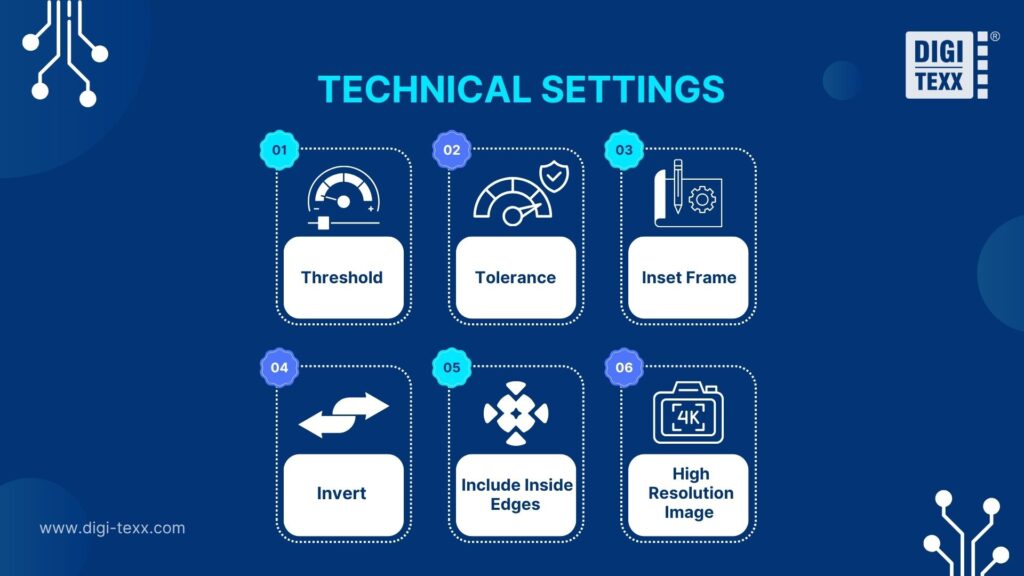
Threshold
Threshold defines the brightness limit used to generate a clipping path. By adjusting this value, you determine which light or dark pixels are omitted, making it a vital setting for isolating subjects from backgrounds with subtle shadows or highlights.
Tolerance
Tolerance controls the smoothness and complexity of the clipping path edge. High tolerance creates fluid, simplified paths with fewer anchor points, while lower values offer surgical precision for intricate silhouettes, ensuring the vector outline remains faithful to the object’s natural texture.
Inset Frame
Inset Frame uniformly shrinks the clipping path inward to eliminate “background bleeding.” By shifting the vector boundary by a few pixels, it ensures a crisp, professional finish that removes any lingering fringe or “halo” from the original background.
Invert
Invert allows you to instantly swap the visible and hidden regions of your clipping path. This function is essential for quickly correcting the transparency orientation, ensuring the intended subject is preserved while the unwanted environment is discarded.
Include Inside Edges
Include Inside Edges identifies and removes backgrounds from “holes” or hollow areas within a subject. This parameter is critical for complex clipping paths involving items like jewelry, eyewear, or furniture, where internal gaps must be transparent to achieve a realistic cutout.
High Resolution Image
This setting forces the software to calculate the clipping path using the file’s actual pixel data rather than the screen preview. It maximizes edge precision, ensuring that the final output remains sharp and professional for high-end print and high-definition eCommerce displays.
>>> See more:
- Wedding Photo Editing Service | Elevating Your Wedding Photos
- How to Edit Car Photos | Key Techniques of Car Photo Editing
- How to Retouch Photos on iPhone – Best Free Apps for iOS
Choosing The Best Clipping Path Services
When evaluating the best clipping path services, focusing solely on the per-image price is a strategic mistake. Instead, businesses should consider the Total Cost of Operation (TCO). A “race to the bottom” on pricing usually results in hidden costs, such as poor quality and missed deadlines, which can ultimately damage your ROI.
To successfully scale your eCommerce listings, your choice of a clipping company must be based on onboarding speed, professional management, and consistent turnaround times. Beware of cut-rate product photo editing services that offer unrealistically low prices but fail to deliver technical accuracy.
At DIGI-TEXX, we focus on delivering high-volume, precision-etched assets through a reliable production pipeline, ensuring your brand maintains its competitive edge without the risks of low-quality outsourcing.
FAQs About Clipping Path
1. What Does Clipping Path Mean?
A clipping path is a closed vector shape used to isolate an object from its background. It ensures that only the area inside the path remains visible, while the rest becomes transparent or is removed.
2. How Do I Add A Clipping Path?
To add a clipping path, use the Pen Tool to trace the object’s outline, save the path in the “Paths” panel, and then select “Clipping Path” from the panel menu to apply it.
3. What Is The Difference Between A Clipping Path And A Masking Path?
The main difference is the technology: Clipping paths use vector lines to create hard, crisp edges, whereas image masking uses pixels to handle complex or soft edges like hair, fur, or transparency.
4. Can A Jpeg Have A Clipping Path?
Yes. A JPEG file can store a clipping path if it is saved correctly in professional software like Photoshop. However, the path is typically only recognized and utilized by graphic design and layout applications.
DIGI-TEXX Contact Information:
🌐 Website: https://digi-texx.com/
📞 Hotline: +84 28 3715 5325
✉️ Email: [email protected]
🏢 Address:
- Headquarters: Anna Building, QTSC, Trung My Tay Ward
- Office 1: German House, 33 Le Duan, Saigon Ward
- Office 2: DIGI-TEXX Building, 477-479 An Duong Vuong, Binh Phu Ward
- Office 3: Innovation Solution Center, ISC Hau Giang, 198 19 Thang 8 street, Vi Tan Ward
Referrences:
- Adobe. (n.d.). Draw with Pen tools in Photoshop. Retrieved May 12, 2026, from https://helpx.adobe.com/photoshop/using/drawing-pen-tools.html
- W3C. (n.d.). Scalable Vector Graphics (SVG) 2 – Clipping, Masking and Compositing. Retrieved May 12, 2026, from https://www.w3.org/TR/SVG2/masking.html