Street style photo editing has become an essential part of modern visual storytelling, especially for fashion brands, photographers, and creative studios looking to elevate urban imagery. In today’s competitive digital landscape, high-quality visuals supported by AI photo retouching and professional image processing services play a crucial role in capturing audience attention and building a strong brand identity. From e-commerce photo editing services to free photo retouch tools, creators now have more flexibility than ever to refine their visuals across different styles of photo editing, whether it’s portraits photo editing, commercial visuals, or lifestyle content.
Beyond basic adjustments, techniques like clipping path service and clipping path illustrator workflows ensure precise background control, while advanced clipping path methods help achieve cleaner, more professional compositions. This guide by DIGI-TEXX brings together essential street style photo editing techniques that not only enhance image quality but also streamline post-production workflows, making it easier to produce consistent, high-impact visuals for both creative and commercial use.
>>> See more: Image processing for virtual try-on AI model
Street Style Photo Editing Techniques
Below is an overview of the necessary street style photo editing methods that can be applied to help change your urban fashion photos. Using these methods, you’re able to capture photo-level photographs that will make your work stand out in street fashion photography:
- Cropping: Crop the photo to get closer to the subject and eliminate anything that is not necessary as a distraction. This will enhance composition and emphasize the most important things.
- Fixes in Lens Distortion & Alignment: Eliminate any lens distortions, such as barrel or pincushion distortion. Straighten the verticals and horizontals to make it look professional.
- Dodging & Burning: Use dodging to lighten a section of the photo and burning to darken another, generating a perception of depth and drawing attention to significant details.
- Changing Saturation & Hues: Change the hues and saturation to enhance the mood of the photo. An increase in saturation can give colors a more vibrant appearance, while decreasing it can soften the photo, with an old-time look.
- Tone Curve Adjustments: Modify the tone curve to rebalance the contrast and brightness of shadows, midtones, and highlights. This puts the tone of the image into balance.
- Clarity & Sharpness Adjustments: Enhance clarity to reveal details in textures and sharpness to render the image crisper. Be careful not to overdo it, as it adds noise.
- Small Defect Removal: Remove any imperfections, dust specks, or other extraneous objects using editing tools. This cleans the picture and makes it look more refined.
- Color Grading: Use color grading tools to create a specific look on the image, like vintage or cinematic. This adds atmosphere and creates a unique appearance for the photo.
- Add Grain or Texture: Add grain or texture to the photo to give it a natural and vintage appearance. This can provide character and an air of authenticity to the photograph.
These street style photo editing techniques will allow you to create professional and compelling images, perfect for showcasing the best of urban fashion.
“Over 90% of a final image’s visual impact is influenced by post-processing adjustments such as exposure, color balance, and detail refinement.” – Scott Kelby
=> You might like: How to Edit Portrait Photos: Tips for Natural & Flawless Results
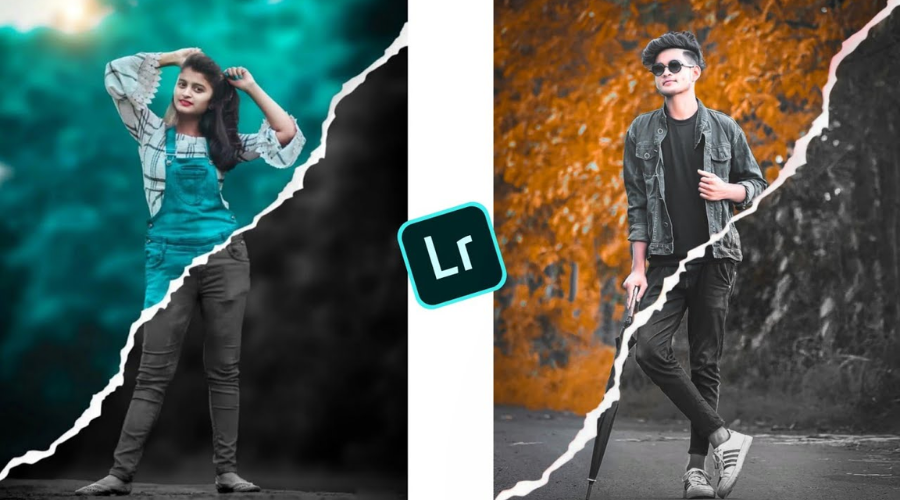
Overview of the necessary street style photo editing methods
How To Edit Street Photography Photos?
Step 1: Choose The Right Photos
Begin your street style photo editing workflow by choosing a group of images captured under similar lighting and themes. Photos taken in the same environment, weather, or time period usually deliver more consistent editing results.
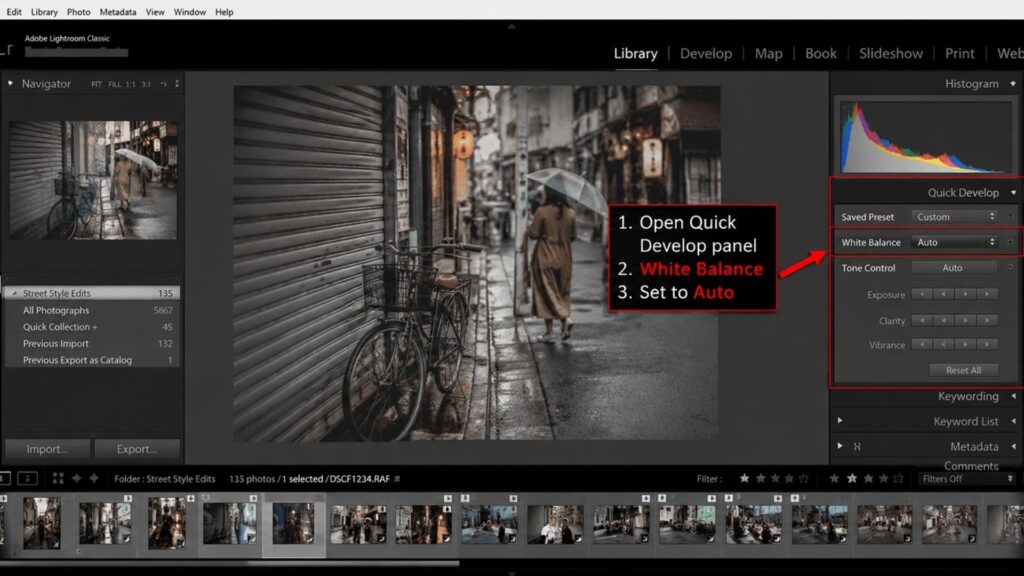
Step 2: Correct The White Balance
Open the Quick Develop panel in the Library Module and set White Balance to Auto. This intelligent feature uses advanced image processing algorithms to automatically balance color tones and remove unwanted color casts. It provides a fast and reliable starting point for street style photo editing, helping your photos look more natural and visually balanced before making finer adjustments.
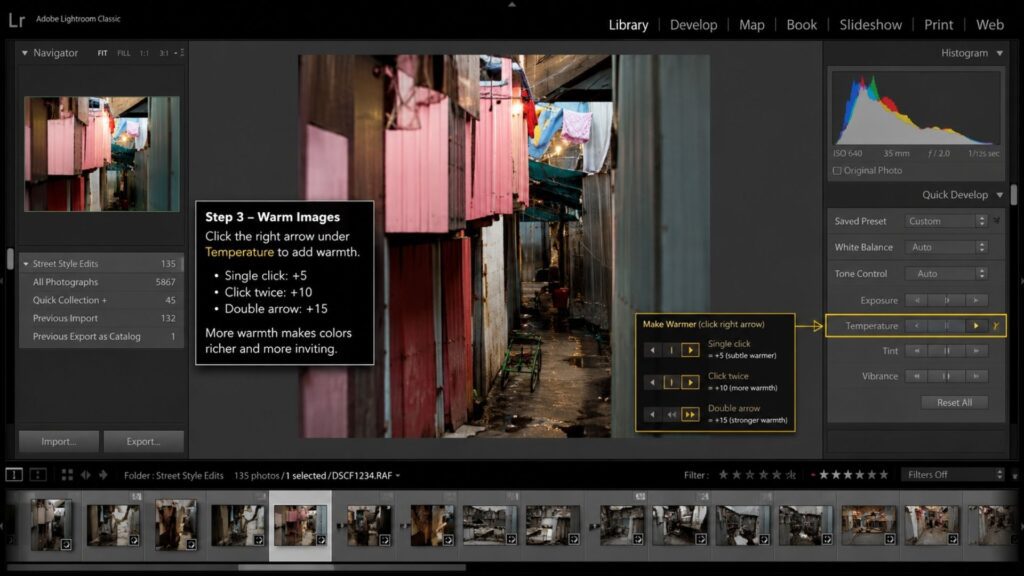
Step 3: Warm Up The Image
Under the Temperature setting, click the right arrow to slightly increase the warmth of your image. Each single click adds a subtle warm tone, while multiple clicks create a stronger effect. You can also use the double arrow for larger temperature adjustments in fewer steps. This simple tweak helps make your street style photo editing feel warmer, richer, and more visually engaging.
Step 4: Use Auto Tone As A Starting Point
Apply Auto Tone to automatically adjust exposure, highlights, shadows, whites, and blacks for each image individually. This creates a balanced base before making manual refinements.
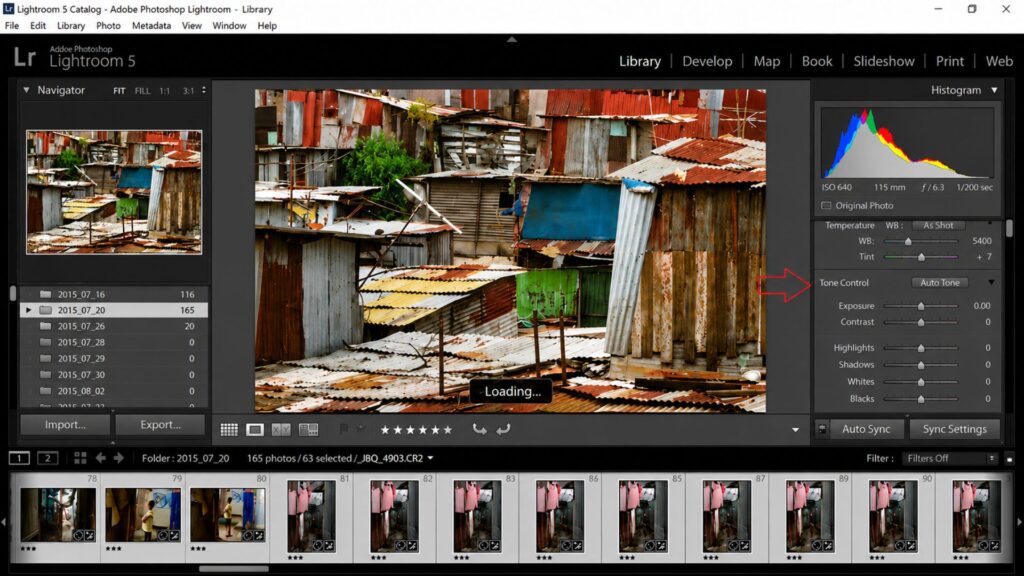
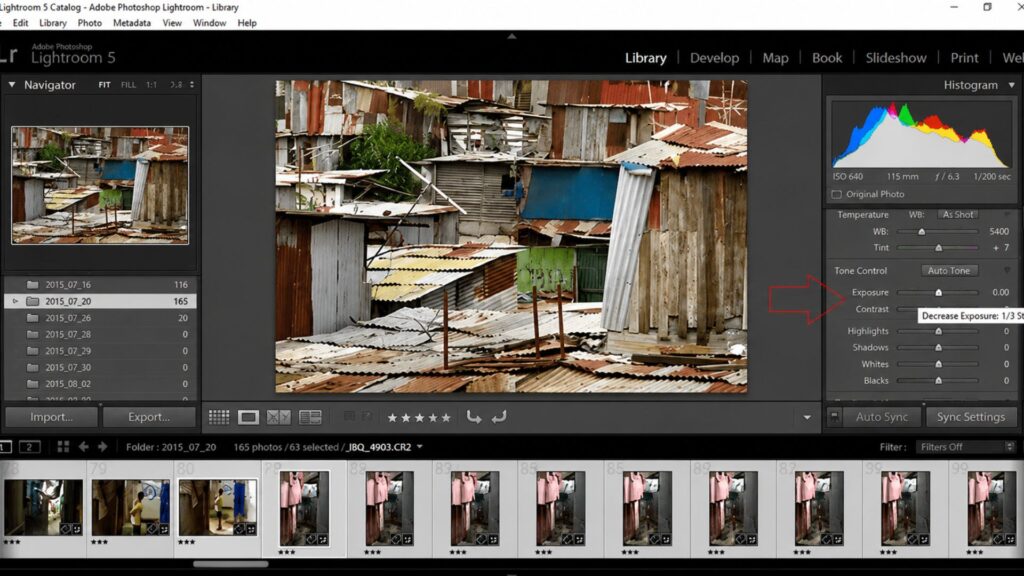
Step 5: Slightly Lower The Exposure
Click the left arrow once to slightly reduce the exposure (about 1/3 stop). This small adjustment helps preserve details in darker areas and prevents the image from looking overly bright. You can still fine-tune the exposure later for individual photos if needed.
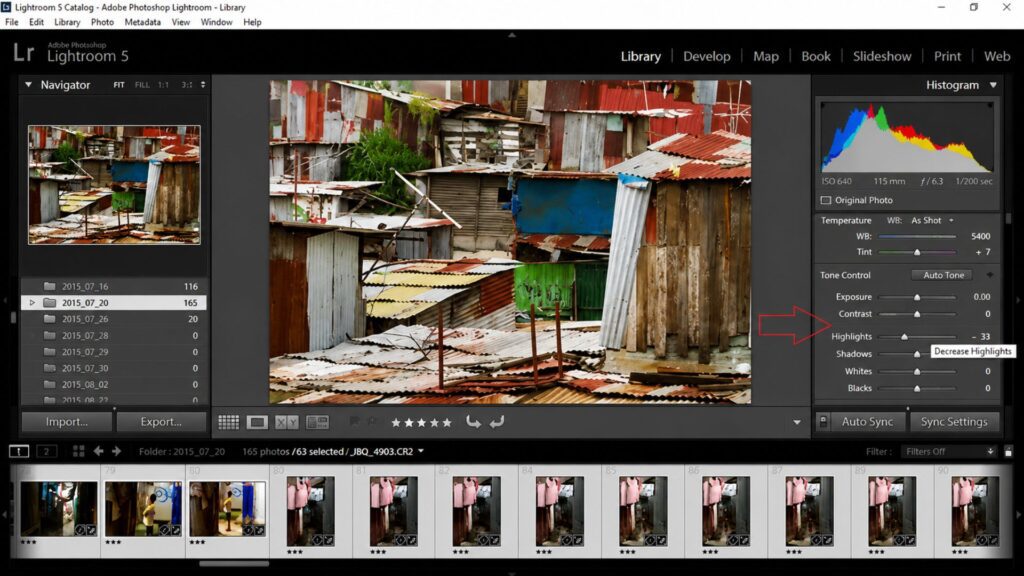
Step 6: Reduce Bright Highlights
Lower the highlights to recover details in brighter areas such as skies, reflections, or street lighting. This helps prevent overexposed sections from distracting viewers.
Step 7: Refine The Shadows
Adjust the shadows to bring out hidden details in darker areas while still keeping contrast and atmosphere intact.
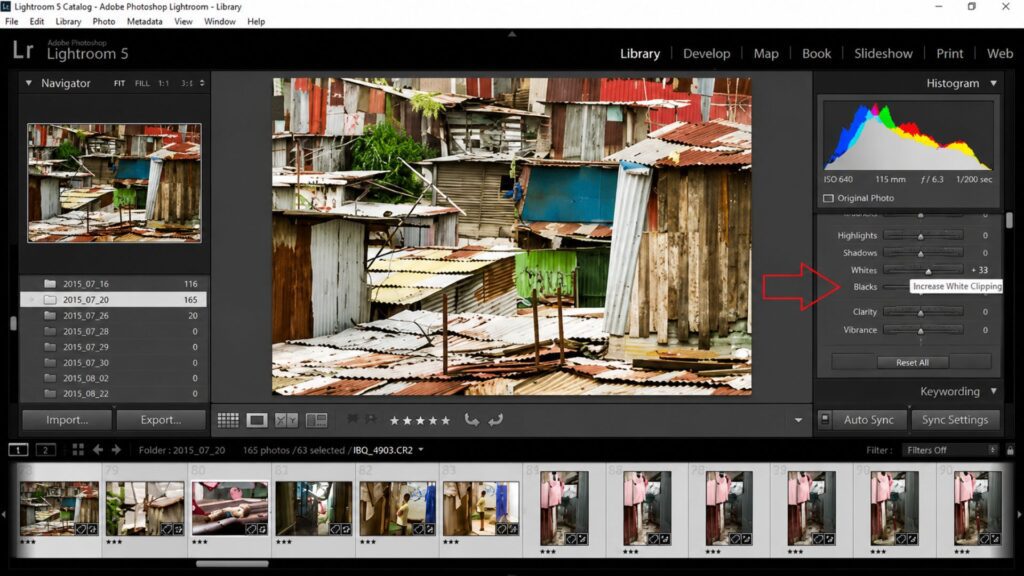
Step 8: Balance Whites And Blacks
Increase whites slightly to brighten clean areas while reducing blacks to deepen contrast. These small adjustments help make street style photo editing appear sharper and more dynamic.
Step 9: Enhance Clarity
Boost clarity to improve texture, edge definition, and fine details. This is especially effective for emphasizing urban elements, clothing, and street textures.
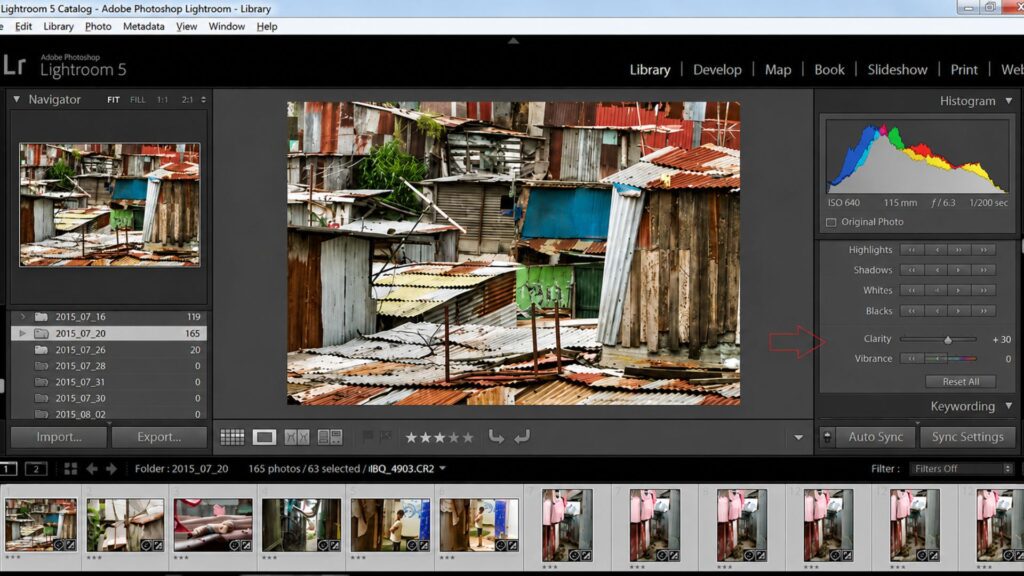
Step 10: Add Vibrance
Increase vibrance to make colors look richer without oversaturating skin tones. This keeps your street photos lively while maintaining a natural appearance.
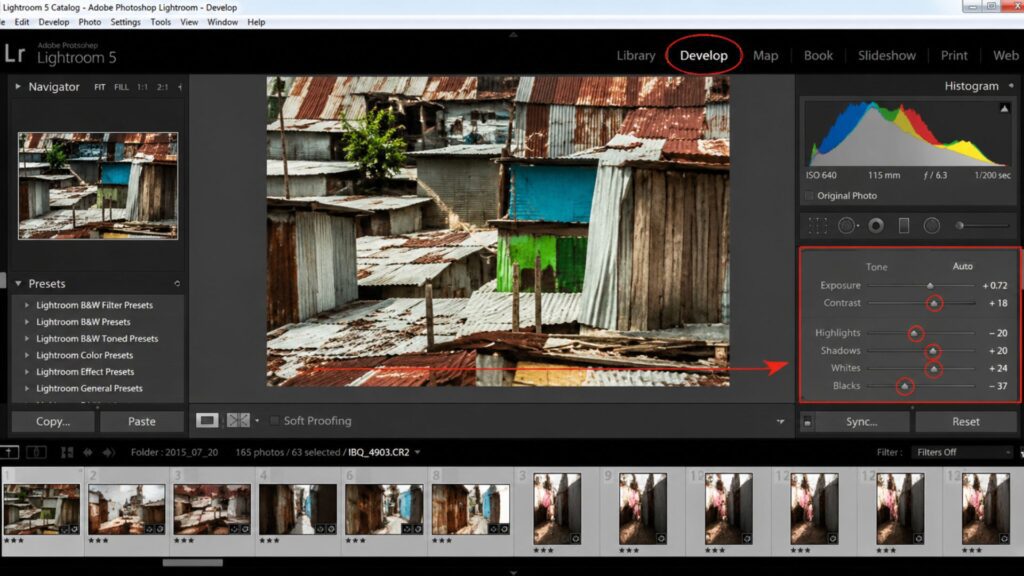
Step 11: Apply Lens Corrections
Enable Lens Profile Corrections and Remove Chromatic Aberration to automatically fix lens distortion, vignetting, and unwanted color fringing caused by the camera lens.
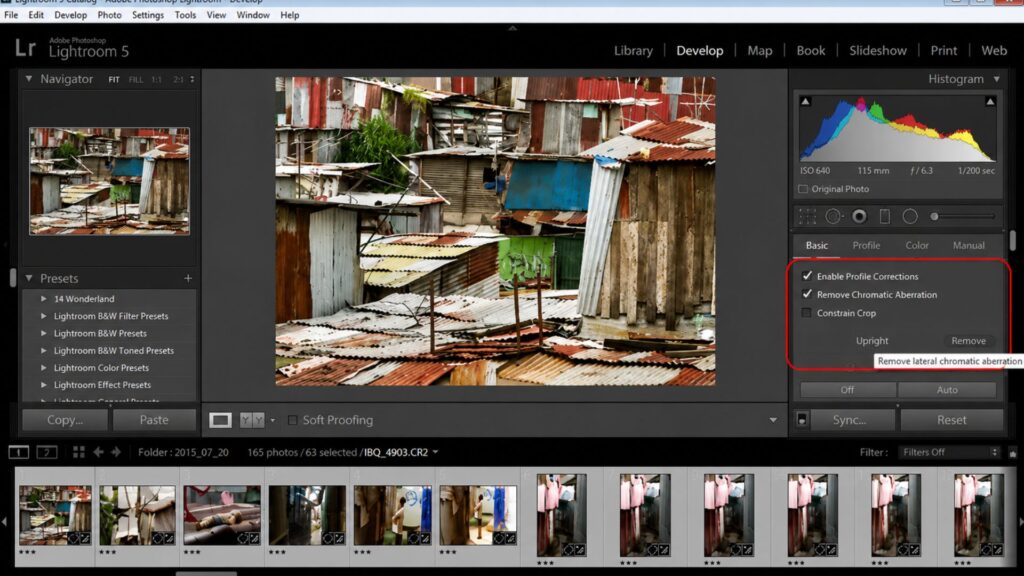
Step 12: Sharpen Details And Reduce Noise
Increase sharpening to enhance image details, then apply noise reduction when needed, especially for photos captured with higher ISO settings or in low light conditions.
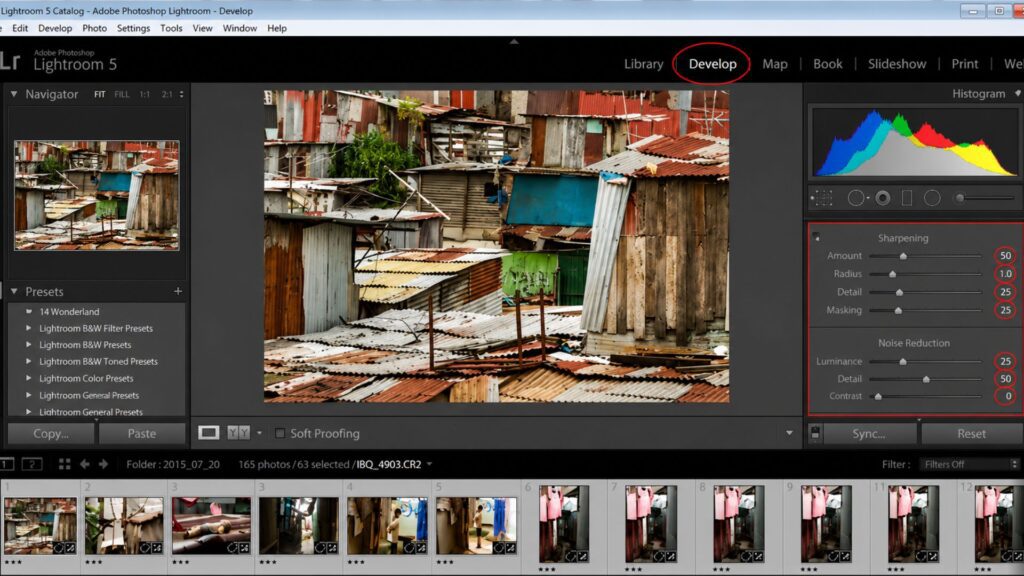
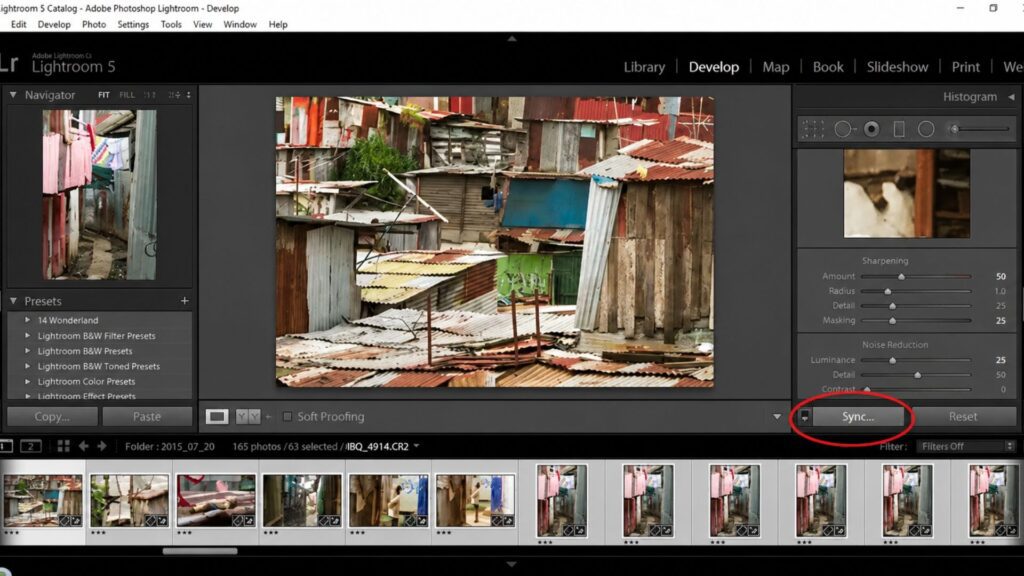
Step 13: Synchronize Your Editing Settings
Once your adjustments are complete, sync the selected settings across all images. This saves editing time while maintaining a consistent look throughout your street style photo editing collection.
FAQs About Street Style Photo Techniques
What Is Street Style Photography?
Street style photography is a form of photography that captures people’s fashion and style during their daily routine in the streets of urban cities. It uses a blend of candid street photography and fashion photography, sometimes highlighting spontaneous or unposed photographs that best capture what is popular, original, and the street fashion.
What Is The 80 20 Rule In Photography?
The 80/20 rule in photography, inspired by the Pareto Principle, suggests that 80% of a great photo comes from strong composition, lighting, timing, and creativity, while only 20% depends on camera gear or technical settings.
• 80%: Focus on storytelling, composition, lighting, emotion, and capturing the right moment.
• 20%: Use camera equipment, lenses, and technical adjustments to enhance the final image.
What Is The 20 60 20 Rule In Photography?
The 20/60/20 rule in photography is a creative shooting method introduced by Paul Nicklen that helps photographers balance technical accuracy and creativity.
• 20%: Capture safe, technically correct shots to ensure you already have usable images.
• 60%: Experiment with composition, lighting, angles, and storytelling techniques.
• 20%: Try bold, risky, or unconventional ideas that could create unique standout photos.
How To Take Street Style Photos?
Here are some practical tips to help you capture stunning street style photos:
• Keep your compositions clean and simple to make the subject stand out.
• Carry your camera with you whenever possible so you never miss spontaneous moments.
• Learn your camera settings well to quickly adapt to changing street conditions.
• Pay attention to natural light, reflections, and shadows to create mood and depth.
• Look for interesting shapes, colors, textures, and layers within the scene.
• Focus on personality, emotions, and authentic moments rather than perfect beauty.
• Take your time and observe the environment carefully instead of rushing shots.
• Stay alert and anticipate movements or interactions before they happen for more natural captures.
How To Take Streetwear Photos?
To capture great streetwear photos, choose interesting urban backgrounds, use natural light, and shoot from creative angles. Focus on both the overall outfit and unique details like sneakers or accessories. Encourage relaxed, natural poses or motion, shoot in RAW for better editing flexibility, and keep post-processing minimal to maintain authenticity.
Mastering street style photo editing is all about enhancing the authenticity, mood, and personality captured in each frame. From adjusting basic exposure to applying creative effects and maintaining a consistent visual style, each step plays a crucial role in refining your images while preserving their street-inspired edge. With the right editing approach, your photos won’t just look polished—they’ll tell a story.
At DIGI-TEXX, we understand the power of visual storytelling in the digital era. Whether you’re a fashion brand, photographer, or creative agency, our team offers tailored image editing and post-production services that align with your style and vision. Let us help you turn everyday street moments into standout visual assets that resonate with your audience.
=> Read more:
- Professional Photo Editing for E-commerce Businesses
- Top Happy Birthday Photo Editing Tools for Memorable Celebrations
- Cost-Effective Photo Editing Services for All Needs
- How Photo Editing Services for Photographers Can Save Time and Effort
DIGI-TEXX Contact Information:
🌐 Website: https://digi-texx.com/
📞 Hotline: +84 28 3715 5325
✉️ Email: [email protected]
🏢 Address:
- Headquarters: Anna Building, QTSC, Trung My Tay Ward
- Office 1: German House, 33 Le Duan, Saigon Ward
- Office 2: DIGI-TEXX Building, 477-479 An Duong Vuong, Binh Phu Ward
- Office 3: Innovation Solution Center, ISC Hau Giang, 198 19 Thang 8 street, Vi Tan Ward
Reference:
- Adobe Creative Cloud. (n.d.). Understanding lens profile corrections and chromatic aberration in post-production. https://helpx.adobe.com
- Kelby, S. (n.d.). The Adobe Photoshop Lightroom book for digital photographers. KelbyOne Training. https://kelbyone.com