Purchase order processing is a critical business process that helps organizations control spending, maintain procurement transparency, and ensure smooth operations. By integrating technologies such as optical character recognition (OCR), document management systems, and data integration tools, businesses can automate data processing, improve data quality management, and streamline workflows within broader business process management.
In this article, DIGI-TEXX provides a clear overview of the purchase order lifecycle, including key steps, major types, and best practices. With the support of document management software, document scanning software, and business process automation solutions, organizations can enhance efficiency, strengthen data integrity, and optimize back office support services in the BPO industry.
>>> See more:
- Top 10 Data Entry Outsourcing Companies to Hire in 2026
- Top 10 Outsourced AI Training Data Companies in 2026
- Top 10 Best Data Entry Outsourcing Companies in USA 2026
What Is Purchase Order Processing?
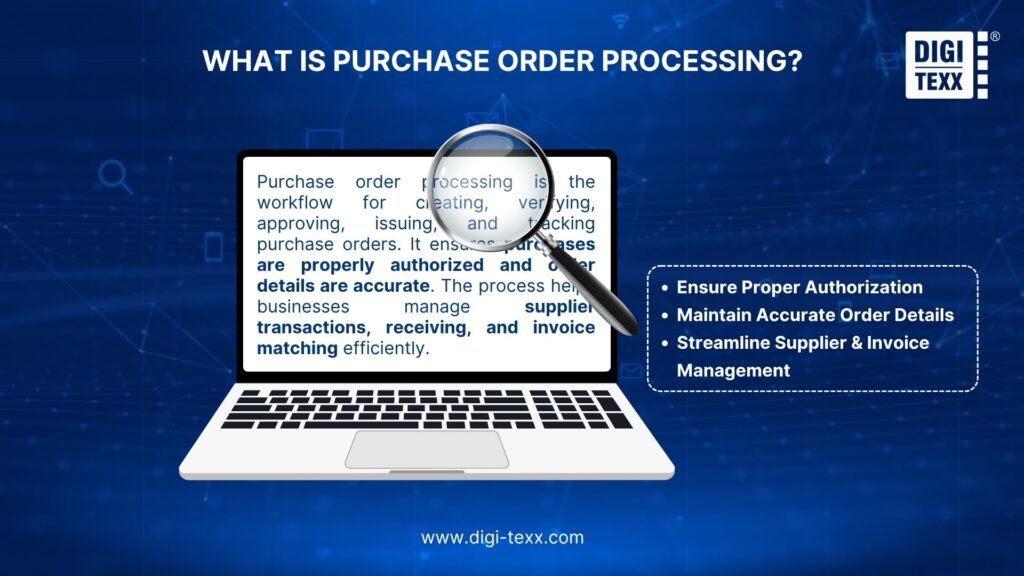
Purchase order processing is the workflow businesses use to create, verify, approve, issue, track, and close purchase orders (POs). It helps ensure that purchases are properly authorized, order details are accurate, suppliers receive clear instructions, and transactions can be matched with receiving and invoice records.
A typical purchase order processing workflow may involve procurement, finance, receiving, accounts payable, and the department requesting the purchase. Depending on the business, some steps may be completed manually, while others are handled through procurement software, ERP systems, OCR, or intelligent document processing.
The process generally includes:
- Creating the PO from an approved purchasing request
- Checking PO details, including supplier information, quantities, pricing, delivery dates, and payment terms
- Obtaining approval based on internal purchasing policies and spending limits
- Sending the PO to the supplier and recording confirmation or changes
- Tracking the order through fulfillment and delivery
- Matching the PO with receiving records and invoices to identify discrepancies
- Closing and archiving the PO once the order is fulfilled and properly recorded.
A purchase requisition (PR) is often the starting point of this workflow, but it is not the same as a purchase order. A purchase requisition is an internal request to buy goods or services, while a purchase order is the formal document issued to a supplier after the purchase has been authorized.
| Purchase Requisition | Purchase Order | |
| Purpose | Requests an internal purchase | Places an order with a supplier |
| Used by | Employees or departments | Procurement and suppliers |
| Sent to supplier | No | Yes |
| Role in processing | Starts the purchasing request | Formalizes the approved purchase |
How Do You Process Purchase Orders?
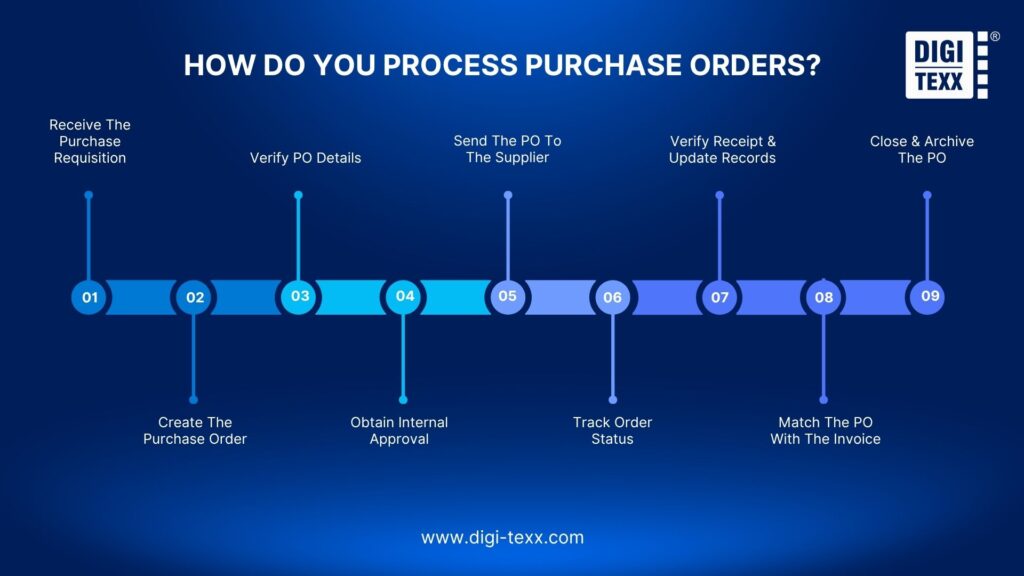
A typical PO processing workflow moves from an approved purchasing need to order fulfillment and financial reconciliation. The exact sequence can vary, but the following nine steps cover the core activities found in most structured environments.
1. Receive The Purchase Requisition
The process starts when an employee or department submits a purchase requisition for required goods or services. The requisition should contain enough information for the purchasing team to evaluate and process the request, such as:
- Item or service description
- Quantity
- Required delivery date
- Department or cost center
- Estimated cost
- Preferred supplier, where applicable
- Supporting documentation
Incomplete requisitions should be returned for clarification before a PO is created. Capturing accurate information at this stage prevents downstream corrections and approval delays.
2. Create The Purchase Order
Once the request is authorized, the purchasing team creates a purchase order using an ERP, procurement platform, or other purchasing system. The PO should reflect the approved requirements and include the correct supplier, item descriptions, quantities, prices, delivery information, payment terms, and applicable conditions.
For organizations processing large volumes of orders, standardized PO templates and predefined supplier information can reduce repetitive data entry and improve consistency.
3. Verify PO Details
Before approval or release, the PO should be checked against the original requisition and relevant purchasing policies. Key validation points include:
- Supplier identity and vendor information
- Item or service description
- Quantity and unit price
- Currency
- Delivery date and location
- Payment terms
- Tax and shipping charges
- Budget or cost-center information
- Contract or negotiated pricing
This validation step is particularly important when PO data has been entered manually or transferred from documents such as PDFs, emails, spreadsheets, or scanned forms.
>>> See more:
- Construction Invoice Reconciliation: Best Practices, Software & Outsourcing
- Best Real Estate Image Processing Services 2026: Top 15 Providers
- What are the 6 Steps of the Data Analysis Process?
- How to Automate Documentation in 2026: Step By Step Guide
4. Obtain Internal Approval
The PO is routed to the appropriate approver based on the organization’s purchasing rules. Approval workflows may depend on:
- Purchase amount
- Department
- Cost center
- Supplier
- Purchase category
- Contract status
- Budget availability
Electronic approval can reduce the need to manually chase signatures and provide a clearer audit trail. APQC identifies the percentage of purchase orders approved electronically as a procurement KPI, highlighting the role of electronic workflows in procurement performance measurement.
5. Send The PO To The Supplier
After approval, the purchase order is released to the supplier through an agreed communication channel, such as a procurement platform, supplier portal, EDI, or email. The supplier may acknowledge the order, confirm availability, propose changes, or reject it. Any changes to quantity, pricing, delivery dates, or other commercial terms should be reviewed and documented rather than handled informally.
6. Track Order Status
Once the PO has been issued, the purchasing team monitors its progress until the goods or services are delivered. Typical status information includes:
- PO issued
- Supplier confirmed
- In production or preparation
- Partially fulfilled
- Shipped
- Delivered
- Delayed
- Cancelled
- Closed
Tracking is important because a PO is not complete simply because it has been approved. Delayed supplier confirmation or fulfillment can affect inventory, production schedules, project timelines, and customer commitments.
7. Verify Receipt And Update Records
When goods or services are delivered, the receiving team verifies what was actually received against the PO. The check may include:
- Quantity received
- Product or service specification
- Condition
- Delivery date
- Packaging or shipment information
- Partial or outstanding quantities
The receiving record should then be updated in the procurement or ERP system. Accurate receiving records become especially important when the organization uses three-way matching to validate supplier invoices.
8. Match The PO With The Invoice
When the supplier submits an invoice, accounts payable compares it with purchasing and receiving information. In a three-way matching process, the organization compares:
- Purchase order
- Goods or product receipt
- Supplier invoice
Microsoft describes three-way matching as comparing invoice price information with the PO and invoice quantities with product receipt quantities. Oracle similarly defines three-way matching as matching the PO, receipt, and invoice within specified tolerances before payment.
If the information matches within the organization’s tolerance rules, the invoice can proceed for payment. If not, the discrepancy is routed for review.
9. Close And Archive The PO
After fulfillment, reconciliation, and any required payment activities are complete, the PO can be closed. Closing the order helps prevent further unauthorized transactions against the PO and keeps procurement records accurate.
Organizations should retain the PO, approvals, receipts, invoices, amendments, and relevant correspondence according to their document-retention and compliance requirements.
>>> See more:
- Accounts Receivable Service | Invoicing, Billing & AR Management
- Ecommerce Back Office Support Services For Fast Growth
- Define Business Process Outsourcing (BPO): Meaning, Examples & Benefits 2026
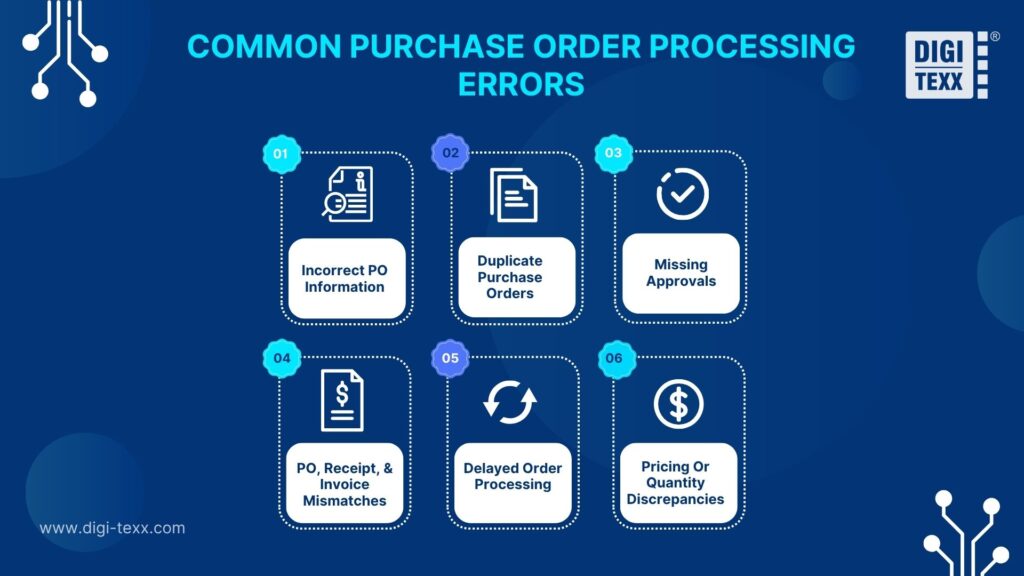
What Are The Common Purchase Order Processing Errors?
Manual or poorly standardized workflows can create errors that affect purchasing costs, supplier relationships, and financial reporting.
Incorrect PO Information
Incorrect supplier details, quantities, prices, delivery dates, or item descriptions can result in incorrect orders and require amendments. A validation step before approval can catch many of these issues before the PO reaches the supplier.
Duplicate Purchase Orders
Duplicate POs may occur when employees submit similar requests or when manual systems make it difficult to determine whether an order has already been created. Duplicate detection based on supplier, requester, item, amount, date, and PO number can reduce this risk.
Missing Approvals
A PO released without the required authorization can create budget-control and compliance problems. Approval rules should therefore be clearly defined and automatically enforced where possible.
Pricing Or Quantity Discrepancies
Differences between the approved requisition, PO, supplier confirmation, receipt, and invoice can create disputes and payment delays. Automated validation can flag differences before they move further through the workflow.
PO, Receipt, And Invoice Mismatches
A mismatch may occur when:
- The supplier invoices for more units than were received.
- The invoice price differs from the PO.
- The PO was changed but the supplier used an earlier version.
- Goods were partially delivered.
- The receipt was not recorded correctly.
Three-way matching systems can automatically identify these variances and route exceptions for review.
Delayed Order Processing
POs can sit in inboxes or approval queues when ownership is unclear or workflows depend heavily on manual follow-up. APQC specifically recommends monitoring PO cycle time as part of procurement benchmarking. Its procurement benchmarks also include PO productivity and electronic approval rates.
>>> See more:
- Outsourced Order Processing Services – Fast & Accurate
- Healthcare BPO Services – Cost Optimization & Improve Care 2026
- Vehicle Annotation To Enhance Traffic Monitoring And AI-Powered Security System
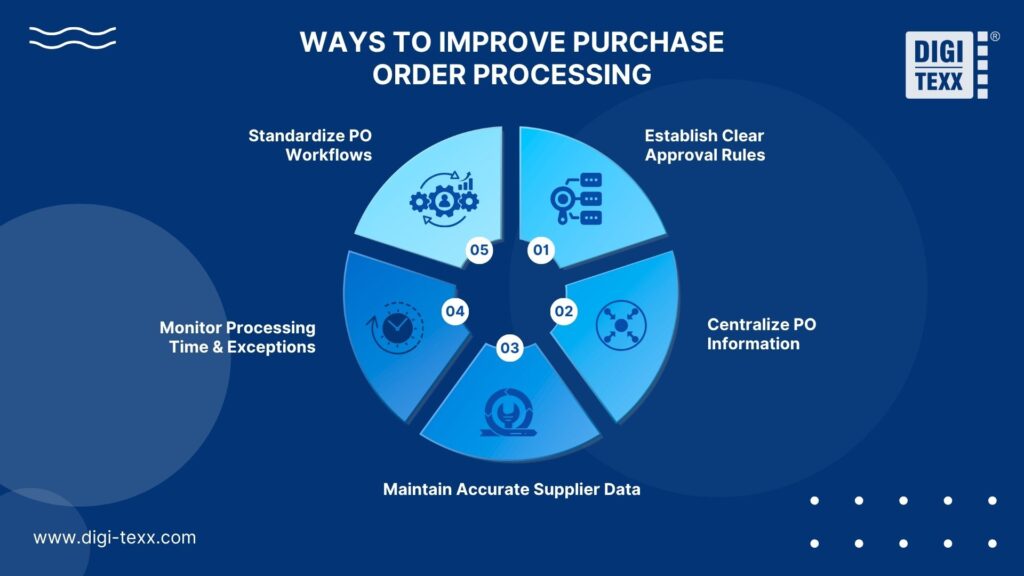
How Can Businesses Improve Purchase Order Processing?
Improving PO processing is not simply about processing orders faster. The goal is to reduce unnecessary manual work without weakening purchasing controls.
Standardize PO Workflows
Define a consistent workflow for creating, validating, approving, issuing, tracking, and closing POs. Standardization should cover:
- Required PO fields
- Approval thresholds
- Supplier information
- Exception rules
- Change procedures
- Closing requirements
Standard workflows make performance easier to measure and reduce variations between departments.
Establish Clear Approval Rules
Approval requirements should be based on factors such as spending thresholds, departments, purchasing categories, and organizational policies. Automated routing can send each PO to the appropriate approver without relying on manual forwarding.
Centralize PO Information
Keeping PO records in a centralized procurement or ERP system gives procurement, finance, receiving, and other authorized teams access to the same information. Centralization improves visibility into:
- Open orders
- Approval status
- Supplier confirmations
- Delivery status
- Outstanding quantities
- Invoice discrepancies
It also reduces the risk of teams working from outdated spreadsheets or email attachments.
Maintain Accurate Supplier Data
Supplier master data directly affects PO accuracy. Organizations should maintain current records for:
- Legal supplier name
- Address
- Tax information
- Payment terms
- Currency
- Banking information
- Contract status
- Approved products or services
Poor supplier data can create errors even when the PO workflow itself is well designed.
Monitor Processing Time And Exceptions
Businesses should track where POs spend the most time. For example, if the average processing time is high but the actual data-entry work takes only a few minutes, the bottleneck may be approval queues, incomplete requests, supplier confirmation, or exception handling.
APQC defines procurement cycle time as the elapsed time between the start and end of a process, including waiting time. This distinction is useful because delays often occur between process steps rather than during the actual data-processing activity.
>>> See more:
- Top 10 Data Cleansing Companies for Businesses in 2026
- Top 10 Best Big Data Processing Tool for Business 2026
- Top 10 Data Processing Software For Business 2026 – Best Tool Reviewed
- Best Insurance Claims Processing Outsourcing BPO in the US 2026
What KPIs Should You Track For Purchase Order Processing?
The right KPIs help procurement teams determine whether PO processing is becoming faster, more accurate, and easier to control.
| KPI | What it measures | Why it matters |
| PO processing time | Time from request or requisition to PO release | Identifies workflow delays |
| Approval cycle time | Time required for PO approval | Reveals approval bottlenecks |
| PO accuracy rate | Percentage of POs processed without correction | Measures data quality |
| Exception rate | Percentage of POs requiring manual intervention | Shows process complexity |
| Electronic approval rate | Share of POs approved digitally | Measures workflow automation |
| PO processing volume per FTE | Number of POs handled per employee | Measures staff productivity |
| First-pass match rate | Percentage of invoices matched without correction | Indicates downstream accuracy |
| Cost per PO | Average cost of processing each PO | Supports cost optimization |
APQC explicitly identifies PO cycle time, electronic approval rate, and POs processed per procurement employee among procurement measures used for benchmarking.
For example, APQC’s current benchmark data shows a 2.0-day median for the cycle time from purchase requisition received to PO release in its cross-industry data. However, this should be treated as a benchmark rather than a universal target because processing requirements vary by organization and purchase type.
>>> See more:
- Accounts Payable Outsourcing: How It Works, Benefits & Top Providers
- Outsourcing Advantages & Disadvantages: What Businesses Should Know?
- 5 Advantages Of Data Annotation Outsourcing Services for AI Projects
When Should You Outsource Purchase Order Processing?
Purchase order processing outsourcing can make sense when the work is high-volume, repetitive, document-intensive, or creating a persistent workload for internal procurement and finance teams.
High PO Volumes
When teams process hundreds or thousands of POs, manual data entry and validation can consume significant staff capacity. Outsourcing can provide additional processing capacity without requiring the company to build a larger internal team for routine transactions.
Manual Processing Creates Errors
If employees spend substantial time copying information between emails, PDFs, spreadsheets, procurement platforms, and ERP systems, the process may be a candidate for external support.
Outsourcing can combine standardized procedures, quality control, and document-processing capabilities to reduce repetitive workload.
Internal Teams Face Processing Backlogs
A backlog can delay approvals, supplier communication, order fulfillment, and invoice matching. An external processing team can absorb defined parts of the workflow while internal employees retain responsibility for procurement decisions, approvals, and exceptions.
Businesses Need Scalable Processing Capacity
PO volume can fluctuate because of seasonal demand, business expansion, new suppliers, acquisitions, or changes in purchasing activity. Outsourcing can provide additional processing capacity without requiring permanent increases in internal headcount.
Commonly outsourced activities may include:
- PO data entry
- PO creation and updates
- Data validation
- Supplier information maintenance
- Order status tracking
- Document processing
- Invoice and PO reconciliation
- Exception identification
- Quality control
- Reporting
The appropriate scope should be defined by process requirements, systems, security controls, service levels, and approval authority rather than assuming every part of procurement should be outsourced.
Why Choose DIGI-TEXX For Purchase Order Processing?
DIGI-TEXX supports document and data-intensive business processes, making its capabilities relevant to organizations that need additional capacity for structured purchase order workflows.
Potential applications include:
- PO data processing: Capture and organize information from purchase-related documents.
- Document data extraction: Extract relevant information from structured and unstructured documents.
- Validation and quality control: Apply defined rules and review procedures to improve data accuracy.
- Invoice and PO reconciliation: Support document comparison and discrepancy identification.
- High-volume processing: Provide scalable processing capacity when transaction volumes fluctuate.
- Human-in-the-loop processing: Route exceptions or complex cases for specialist review rather than forcing full automation.
For organizations considering outsourcing, the scope should be defined in the service agreement, including supported document types, systems, turnaround times, quality targets, escalation procedures, security requirements, and the level of decision-making authority assigned to the provider.
The objective is not simply to move PO data entry outside the organization. A well-designed outsourcing model should reduce repetitive workload while maintaining process visibility, data quality, and financial controls.

FAQs About Purchase Orders Processing
How Long Do Purchase Orders Take To Process?
A purchase order typically takes a few hours to several business days to create, review, and approve. Automated workflows may reduce processing to 1 – 3 business days, while complex purchases requiring multiple approvals can take longer. Supplier fulfillment and payment are separate stages and may add several weeks to the overall purchasing cycle.
What Are The Four Types Of PO?
The four main types of purchase orders are Standard, Planned, Blanket, and Contract POs. Each serves a different purchasing need:
- Standard PO: Used for one-time purchases when the product, quantity, price, and delivery details are already defined.
- Planned PO: Specifies the items, quantities, and pricing but leaves the delivery schedule open for future release.
- Blanket PO: Designed for recurring purchases from the same supplier over a set period, often with a predefined spending or quantity limit.
- Contract PO: Establishes general purchasing terms, pricing, and conditions for future orders without specifying individual items or delivery dates upfront.
How Do You Process Purchase Orders?
A typical purchase order process follows nine key steps, from submitting a purchase requisition to closing the completed order:
- Submit a purchase requisition: Document the goods or services needed, quantities, estimated costs, delivery requirements, and other relevant details.
- Create the purchase order: Convert the approved request into a PO with supplier, item, pricing, quantity, delivery, and payment information.
- Verify PO details: Check the PO against the requisition, purchasing policies, budget, supplier information, and applicable contract terms.
- Obtain internal approval: Route the PO to the appropriate approver based on spending limits, department, budget, and other organizational rules.
- Send the PO to the supplier: Release the approved PO through an agreed channel and obtain supplier confirmation or document any requested changes.
- Track order status: Monitor the PO from supplier confirmation through fulfillment, shipment, delivery, or any delays or cancellations.
- Verify receipt: Compare the goods or services received with the PO and update the receiving records.
- Match the PO with the invoice: Compare the PO, receiving record, and supplier invoice to identify discrepancies before payment.
- Close and archive the PO: Close the completed order after fulfillment and reconciliation, then retain relevant records for reporting and audit purposes.
PO processing often involves repetitive, detail-oriented tasks such as data entry, PO issuance, order tracking, and invoice reconciliation. When managed manually, these activities can consume valuable time and increase the likelihood of errors. Outsourcing helps streamline these workflows, improve accuracy, and ensure smoother day-to-day operations.
With DIGI-TEXX’s Document & Data Processing Services, businesses can rely on our experienced team to handle PO data processing, validation, and reconciliation with care and consistency. This helps maintain accurate records, support financial transparency, and reduce the workload on internal teams.
DIGI-TEXX Contact Information:
🌐 Website: https://digi-texx.com/
📞 Hotline: +84 28 3715 5325
✉️ Email: [email protected]
🏢 Address:
- Headquarters: Anna Building, QTSC, Trung My Tay Ward
- Office 1: German House, 33 Le Duan, Saigon Ward
- Office 2: DIGI-TEXX Building, 477-479 An Duong Vuong, Binh Phu Ward
- Office 3: Innovation Solution Center, ISC Hau Giang, 198 19 Thang 8 street, Vi Tan Ward
References:
- Federal Acquisition Regulation. (n.d.). 13.302-1 General. Acquisition.gov.
- Rochester Institute of Technology. (2026). Procurement services office manual.