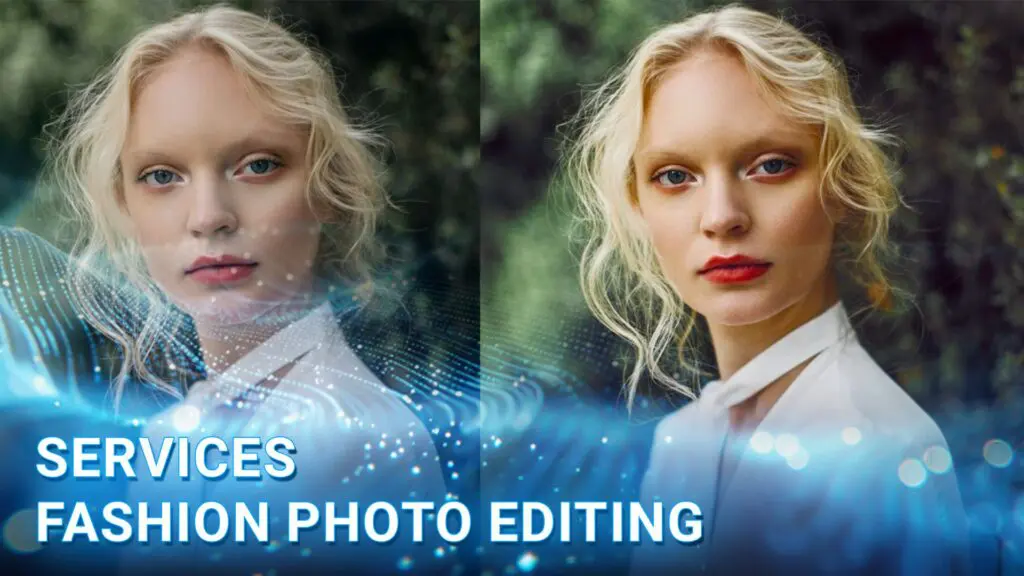
Fashion photo editing services at DIGI-TEXX help fashion brands, photographers, and online retailers transform raw images into visually compelling assets that capture attention and strengthen brand identity. Combining expert retouching techniques, advanced AI photo retouching, precise color correction, and professional clipping path solutions, our team delivers high-quality visuals tailored for marketing campaigns, catalogs, and eCommerce photo editing services.
From editorial shoots and street style photo editing to product catalogs, lookbooks, and portraits photo editing, DIGI-TEXX ensures every image reflects a consistent, premium aesthetic. Leveraging modern AI image processing technologies and scalable photo editing services online, we help businesses create polished fashion imagery that enhances customer engagement, supports conversion growth, and stands out across digital channels.
What Are Fashion Photo Editing Services?
Fashion photo editing services are professional post-production services used to enhance and prepare fashion photographs for commercial, editorial, ecommerce, advertising, and other visual content needs.
The work takes place after photography and can range from straightforward adjustments to detailed image manipulation. The objective is not simply to make a photograph look better. Editing should support the intended creative direction while preserving important visual information, particularly the appearance of garments, materials, skin tones, and product details.
The level of work depends on several factors, including:
- Type of photography
- Intended use of the images
- Brand guidelines
- Image volume
- Desired visual style
- Technical delivery requirements
For example, a retailer producing product images for an ecommerce catalog may require a highly standardized workflow, while an editorial campaign may allow more creative treatment.
A professional fashion photo editing service therefore acts as part of the image-production workflow rather than as a final cosmetic step. The editor works from the photographer’s source files and the client’s specifications to produce images that are visually consistent and technically ready for their intended channel.
>>> See more:
- 7+ Best Photo Editing Apps For Android And iPhone (2026 Guide)
- Top 10 Free Photo Retouch Tools Online In 2026
- Birthday Editing Online Free: Tools, Frames & Creative Ideas
Why Are Fashion Photo Editing Services Important?
Professional fashion photo editing services help brands turn raw photography into consistent, market-ready images. Beyond improving individual photos, a structured editing workflow can strengthen brand presentation, support ecommerce performance, and reduce post-production workload.
Improves Image Quality
Professional fashion photo editing corrects common issues such as uneven exposure, color casts, distracting elements, and inconsistent lighting. The result is cleaner, more polished imagery while preserving realistic skin tones, garment details, and fabric appearance.
Builds Brand Consistency
When images come from different photographers, locations, or collections, their visual styles can vary. A standardized fashion photo editing service applies consistent rules for color, skin tones, backgrounds, cropping, and shadows, helping brands maintain a recognizable visual identity across catalogs, campaigns, and digital channels.
Enhances Visual Storytelling
Editing can reinforce the creative direction of a campaign by refining color, contrast, lighting, and retouching. Editorial fashion images may require a more distinctive treatment, while commercial photography often benefits from a cleaner and more natural finish.
Creates Ecommerce-Ready Images
For fashion ecommerce, image quality must go together with product accuracy. Photo editing fashion workflows can standardize backgrounds, product positioning, colors, dimensions, and garment details so customers can evaluate products more consistently online.
For fashion ecommerce, strong product imagery is particularly important because shoppers rely heavily on visuals to evaluate products online. Baymard Institute found that 56% of users’ first actions on a product page were to explore product images, while 25% of ecommerce sites failed to provide sufficient image resolution or zoom. These findings highlight why image quality, detail, and consistency are important parts of an ecommerce-ready fashion photo editing workflow.
Supports Faster Content Production
Large fashion collections can generate hundreds or thousands of images. Working with a professional fashion photo editing service company can help businesses process high image volumes without placing the entire post-production workload on photographers or internal creative teams. This is especially useful for seasonal launches and frequent product updates.
Essential Fashion Photo Editing Techniques
Different fashion images require different levels of editing. A product photograph for an online store should not necessarily receive the same treatment as a high-fashion editorial image.
Color Correction
Color correction establishes accurate and consistent color across the image.
Editors may adjust:
- White balance
- Exposure
- Temperature
- Tint
- Saturation
- Hue
- Highlights
- Shadows
- Contrast
Color accuracy is particularly important for clothing because color influences how customers perceive the product. Professional workflows should distinguish between correction and creative grading. Correction aims to produce a technically and visually accurate image, while grading intentionally creates a particular mood or style.
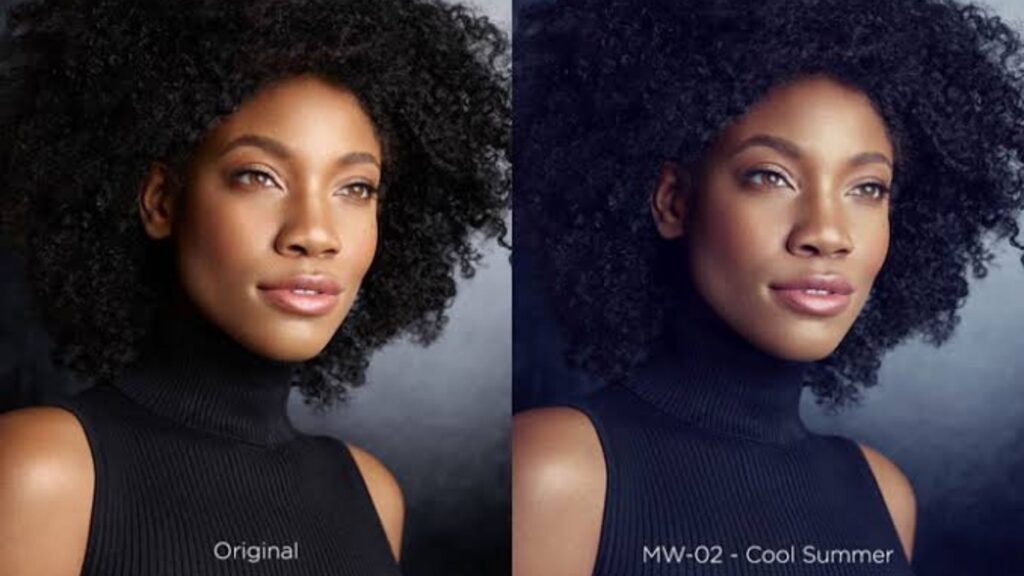
Skin Retouching
Skin retouching improves temporary imperfections while preserving natural skin texture.
Common adjustments include:
- Removing temporary blemishes
- Reducing distracting redness
- Balancing uneven skin tones
- Refining under-eye areas
- Controlling excessive shine
- Maintaining natural texture
Over-retouching can make skin appear artificial. For commercial fashion photography, the appropriate level depends on the brand and creative direction.
Makeup Enhancement
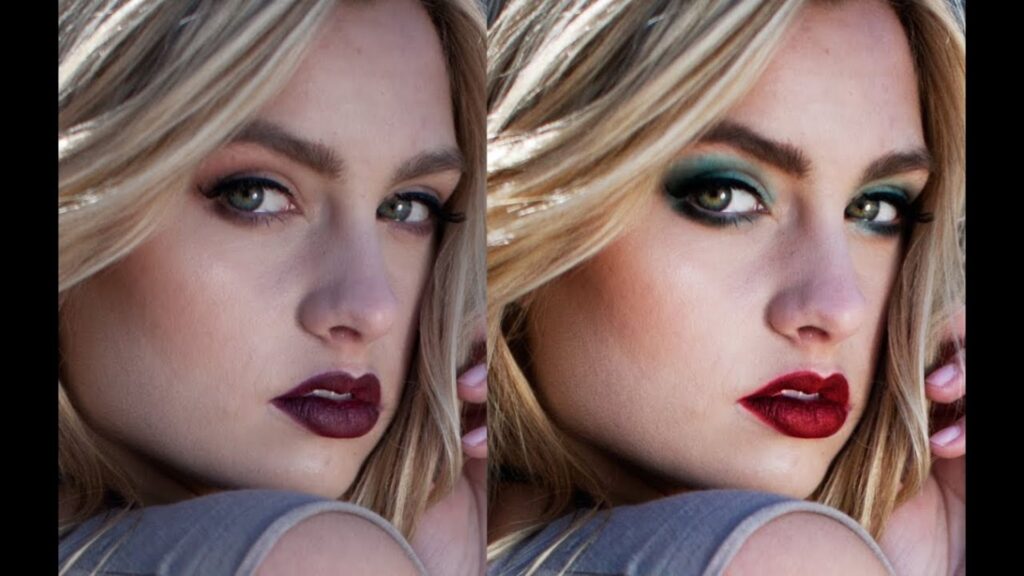
Makeup may appear differently under studio lights, natural light, or post-production color grading. Editors can refine makeup details to maintain the intended look.
Typical adjustments include:
- Lip color refinement
- Eye makeup enhancement
- Brow cleanup
- Lash enhancement
- Skin-tone balancing
- Highlight and contour refinement
These edits should complement the original makeup rather than substantially changing the model’s appearance unless the project specifically calls for creative manipulation.
>>> See more:
- How To Make A Clipping Path In Illustrator (Step-By-Step)?
- 25 Popular Photo Editing Styles In Photography For Stunning Images
- Photo Editing and Retouching: Benefits, Techniques, and Best Services
Background Editing
Background editing can remove distractions, simplify a composition, or prepare an image for a specific publishing environment. For ecommerce, a clean or neutral background may be appropriate. For campaigns, the background may be adjusted for mood, composition, or brand identity. Background removal can also be performed with AI-assisted tools. For example, Luminar Neo provides AI-based background removal and refinement controls, while Lightroom supports selective masking for targeted adjustments.
Garment Retouching
Garment retouching focuses on the clothing itself rather than the model.
Editors may correct:
- Temporary wrinkles
- Dust or lint
- Minor stains
- Uneven edges
- Distracting folds
- Small visual imperfections
- Inconsistent garment presentation
Care is required because aggressive editing can alter the structure or material appearance of the garment. For ecommerce, garment retouching should improve presentation without misrepresenting the actual product.
Fabric Texture Enhancement
Fabric texture helps communicate material quality. Cotton, denim, leather, silk, wool, and synthetic materials all have different visual characteristics. Editing can enhance clarity, contrast, and local detail so the material remains visible without creating an exaggerated appearance. The objective is usually controlled detail, not maximum sharpness.
Digital Airbrushing
Digital airbrushing is used to smooth or refine selected areas of an image.
It can help with:
- Skin tone transitions
- Minor color inconsistencies
- Background gradients
- Makeup transitions
- Local lighting adjustments
Modern workflows often combine airbrushing with masking and other selective editing methods rather than applying a broad effect over the entire photograph.
Body & Shape Retouching
Body retouching can correct temporary visual distortions caused by posing, clothing, perspective, or camera angle.
Depending on the brief, editors may make subtle adjustments to:
- Garment fit
- Clothing edges
- Posture
- Silhouette
- Minor shape inconsistencies
This technique requires restraint. Excessive reshaping can make the image unrealistic and may misrepresent the model or garment.
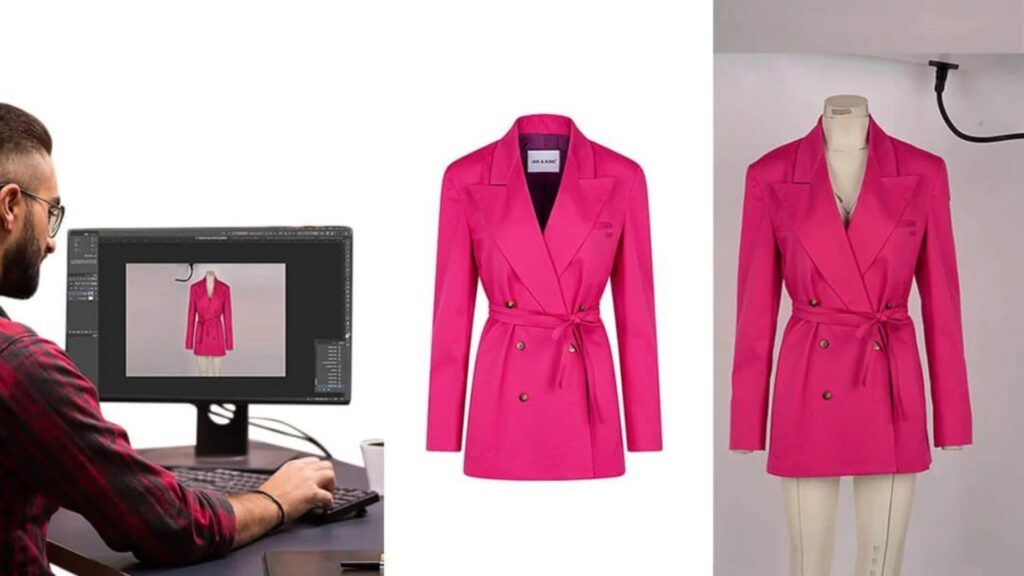
Ghost Mannequin & Clothing Editing
Ghost mannequin editing combines photographs of clothing photographed on a model or mannequin to create a three-dimensional product presentation without showing the model or mannequin. This technique is particularly useful for ecommerce catalogs because it can show how a garment is structured while maintaining a clean product-focused presentation. The workflow commonly involves masking, alignment, and compositing multiple images into one final photograph.
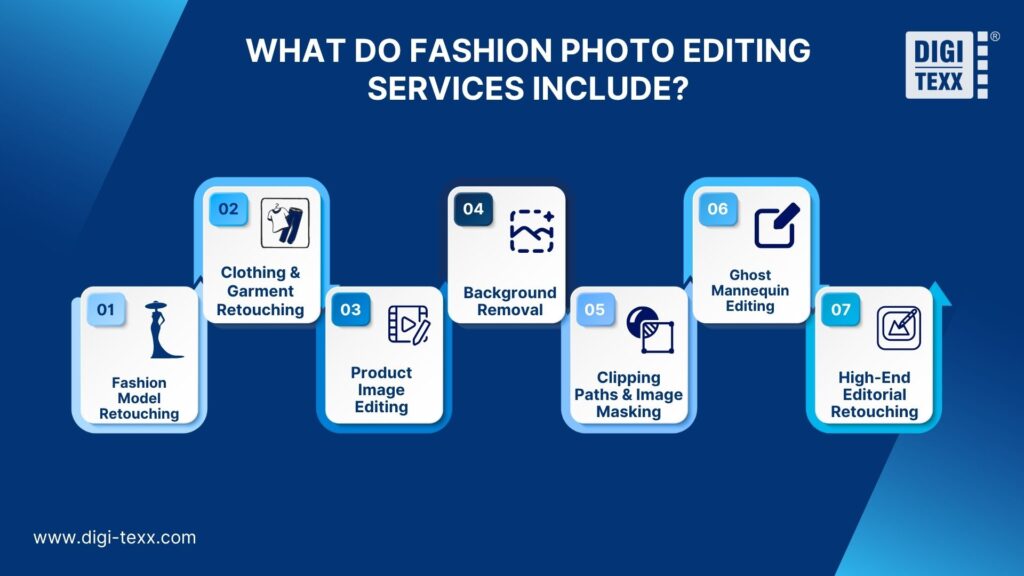
What Do Fashion Photo Editing Services Include?
The exact scope depends on the provider and project. A full-service workflow can combine several editing disciplines rather than treating every image as a standalone retouching task.
Fashion Model Retouching
Model retouching focuses on skin, hair, makeup, facial details, and other elements that influence the appearance of the subject. The level of retouching should be defined before production. Editorial campaigns may require detailed high-end retouching, while ecommerce images may need a lighter treatment.
Clothing & Garment Retouching
Garment editing focuses on making clothing look clean and consistent while retaining important product characteristics. This can include wrinkle reduction, lint removal, edge cleanup, color correction, and minor visual corrections.
Product Image Editing
Product image editing is designed around commercial presentation rather than editorial storytelling.
Fashion retailers may use it for:
- Apparel
- Shoes
- Bags
- Accessories
- Jewelry
- Lifestyle products
The workflow often emphasizes consistency across a large catalog.
Background Removal
Background removal separates the subject or product from its original environment. For simple images, automated tools can accelerate the process. Complex photographs involving hair, transparent materials, fine edges, or overlapping garments may still require manual refinement.
Clipping Paths & Image Masking
Clipping paths and masking isolate specific parts of an image so editors can modify or manipulate them independently.
They are useful when precise control is required for:
- Garments
- Accessories
- Hair
- Backgrounds
- Product edges
- Color adjustments
Adobe Lightroom, for example, supports selective masking that can target subjects, skies, color ranges, luminance ranges, and manually brushed areas.
Ghost Mannequin Editing
Ghost mannequin editing creates a hollow or invisible mannequin effect by combining multiple views of a garment. It is commonly used for apparel ecommerce because the finished image emphasizes garment structure without showing the person or mannequin used during photography.
High-End Editorial Retouching
High-end editorial retouching typically involves more detailed and controlled adjustments than standard ecommerce editing.
The workflow may involve:
- Detailed skin work
- Hair refinement
- Garment cleanup
- Precise color grading
- Lighting refinement
- Background manipulation
- Detailed compositing
The purpose is to meet a specific creative direction while maintaining visual realism.
>>> See more:
- How To Make Photos Look Like Film: A Complete Beginner’s Guide
- How To Retouch Photos On iPhone – Best Free Apps For iOS
- Best Jewelry Photo Editing Service Provider For E-Commerce Businesses
Best Tools For Fashion Photo Editing
No single application is ideal for every fashion editing workflow. The best choice depends on whether the priority is detailed retouching, RAW processing, color control, AI-assisted editing, or high-volume production.
| Tool | Key strength | Best suited for | Limitation to consider |
| Adobe Photoshop | Detailed retouching and compositing | High-end retouching, garment editing, complex image manipulation | More manual and skill-intensive |
| Lightroom | RAW processing and batch-oriented adjustments | Color correction, exposure, image organization, large shoots | Less suitable than Photoshop for complex compositing |
| Capture One | Color control and tethered workflows | Fashion shoots, studio photography, color-critical work | More specialized workflow |
| Skylum Luminar Neo | AI-assisted editing and masking | Fast creative adjustments and background work | May not replace a full professional retouching workflow |
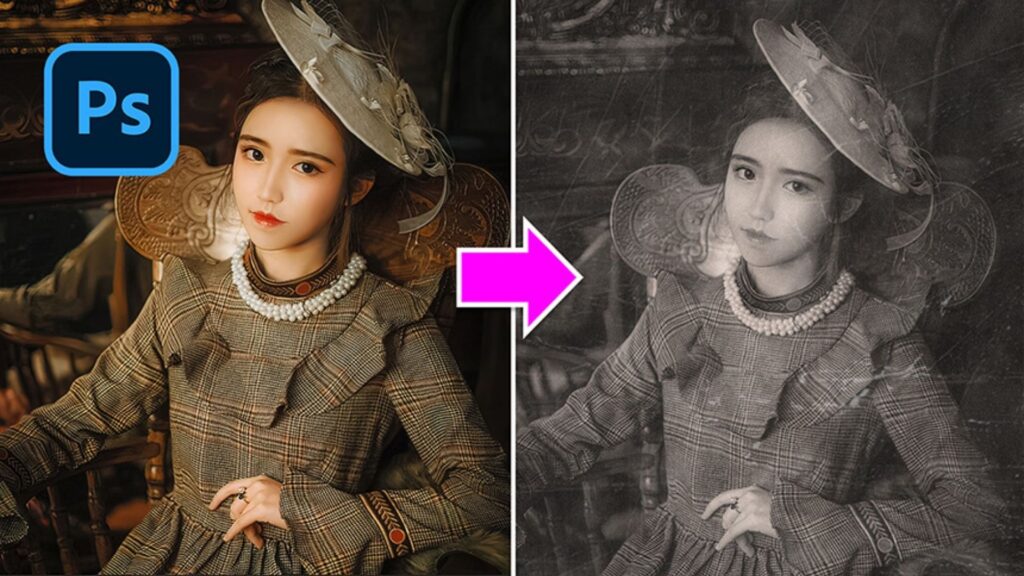
Adobe Photoshop
Photoshop is particularly useful when an image requires detailed retouching, compositing, object removal, or precise manipulation.
Its tools can be used for tasks such as garment cleanup, background changes, detailed retouching, and removing distracting objects. Adobe’s current Photoshop workflow includes Generative Fill, while Content-Aware Fill can replace selected objects with surrounding image content.
Best for: high-end fashion retouching, complex garment edits, compositing, and final image refinement.
Lightroom
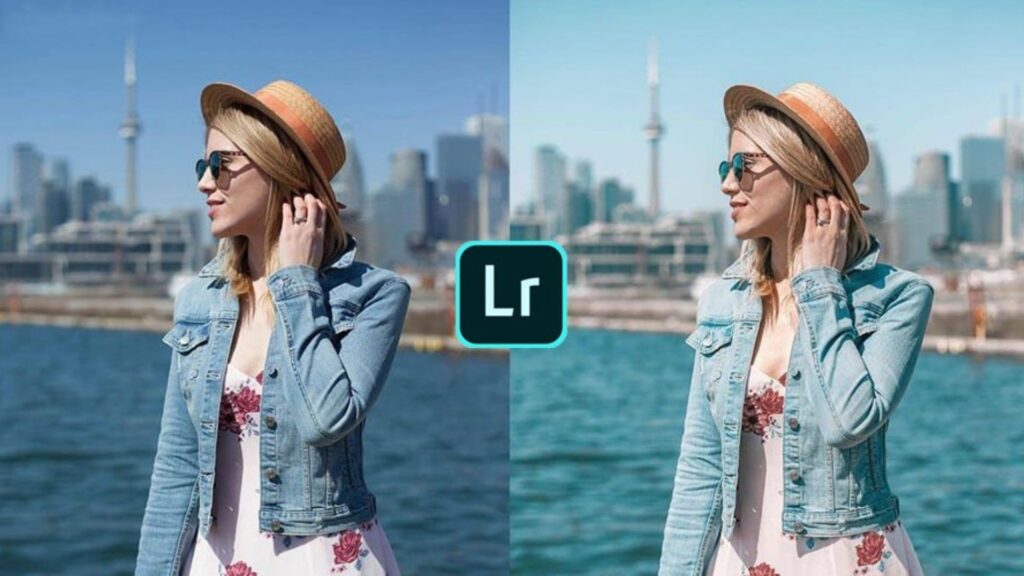
Lightroom is well suited to processing and organizing large collections of photographs. It can handle RAW adjustments, color grading, exposure correction, presets, and selective edits. Its masking tools allow editors to apply changes to specific areas rather than the entire image, including subject, sky, color, and luminance selections. Adobe’s current Lightroom workflow also combines RAW editing with AI-assisted adjustments and tools for cleaning up images.
Best for: RAW processing, color correction, batch adjustments, and preparing large image sets before detailed retouching.
Capture One
Capture One is particularly relevant to professional studio and fashion photography. Its current feature set emphasizes precise color control, RAW processing, tethering, image organization, and collaboration. Capture One specifically positions its workflow for fashion and beauty photography, including skin retouching, color control, batch processing, and high-volume shoots.
Its recent updates also include AI-assisted people masking and tools for matching the look of a reference image across photographs.
Best for: studio fashion shoots, color-critical workflows, tethered capture, and consistent processing across large sets.
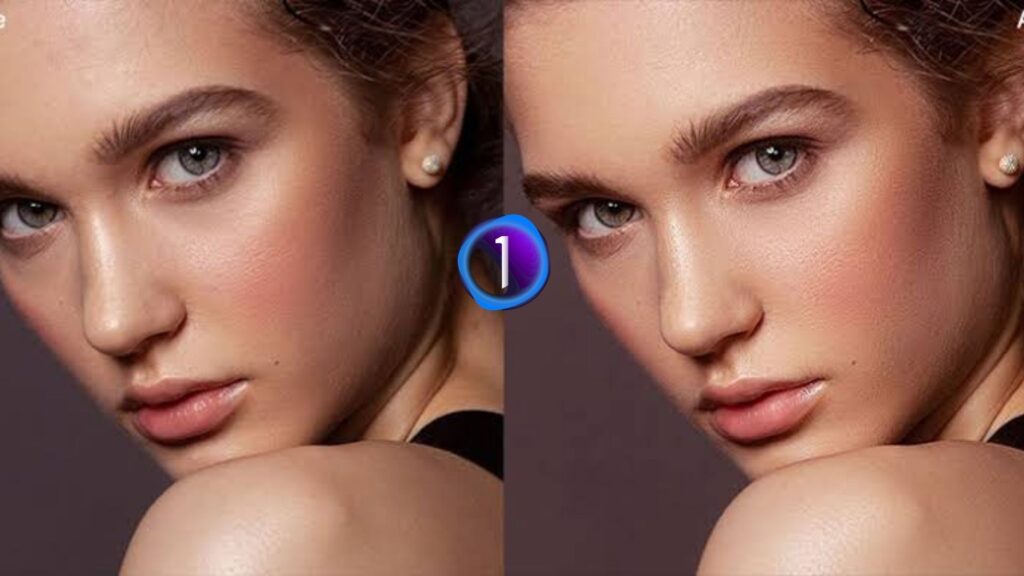
Skylum Luminar
The outline specifies Skylum Luminar, but the current product is Luminar Neo rather than the older Luminar AI branding. Luminar Neo provides layers, masking, AI-based object selection, background removal, and other automated editing capabilities. Its Background Removal AI can identify the main subject and provide refinement tools for cleaning up the selection.
Best for: photographers who want AI-assisted editing, quick background work, masking, and creative adjustments.
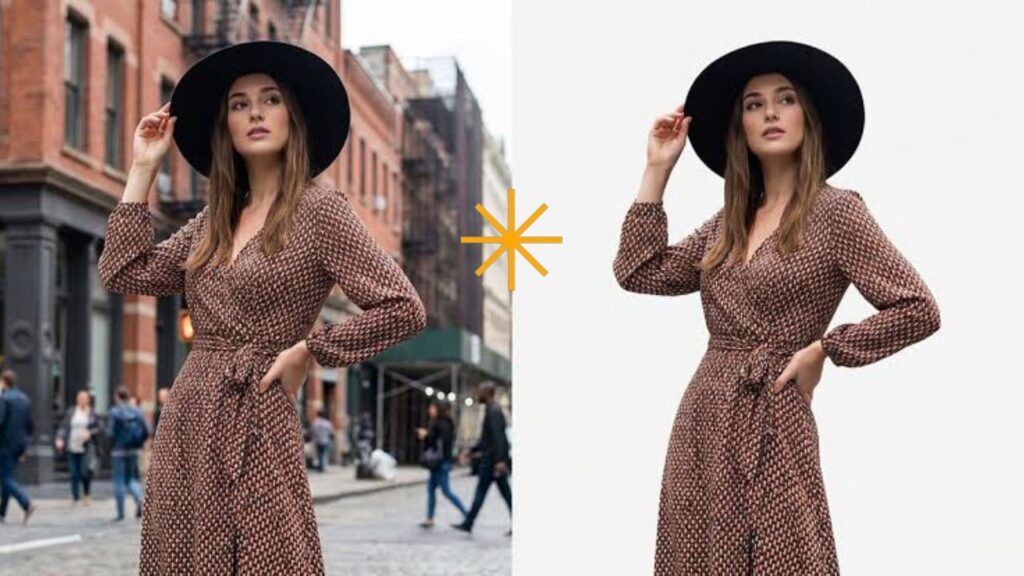
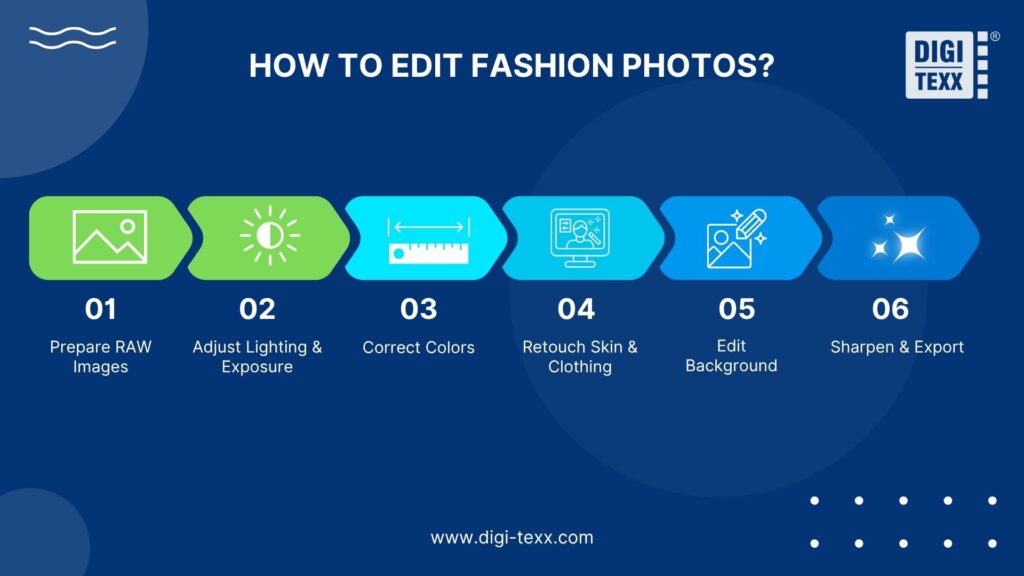
How to Edit Fashion Photos: Step-by-Step Guide
A consistent workflow reduces unnecessary revisions and makes it easier to process images at scale.
Step 1. Prepare RAW Images
Start with the highest-quality source files available, preferably RAW files from the camera.
Review the images and remove technically unsuitable shots before detailed editing. Check focus, exposure, composition, closed eyes, unwanted motion blur, and other issues that may make an image unsuitable for final delivery. This prevents time being spent retouching photographs that will not be used.
Step 2. Adjust Lighting And Exposure
Correct the overall exposure before making detailed adjustments.
Review:
- Highlights
- Shadows
- Contrast
- White balance
- Exposure
- Dynamic range
The goal is to establish a stable tonal foundation before moving to color and retouching.
Step 3. Correct Colors
Next, establish accurate and consistent colors. For fashion photography, compare clothing colors against the photographer’s reference, product information, or approved creative direction where available.
Avoid correcting one image in isolation when the project contains a series. Compare multiple images together to ensure that garments, skin tones, and backgrounds remain consistent.
Step 4. Retouch Skin And Clothing
Move from global adjustments to localized retouching. Start with obvious distractions and temporary imperfections, then refine the skin, makeup, hair, garment, and accessories as required.
Use masks or selections when an adjustment should affect only a specific area. Lightroom’s masking workflow, for example, allows editors to isolate subjects or selected color and luminance ranges.
Step 5. Edit Background
Clean up or replace the background according to the intended use. For ecommerce, the priority may be a clean and consistent background. For editorial work, the background may be part of the creative composition. Check edges carefully after background removal, particularly around hair, hands, transparent materials, and clothing details.
Step 6. Sharpen And Export
Apply final sharpening based on the output format and intended viewing environment.
Then export according to the destination requirements:
- Ecommerce
- Website
- Social media
- Digital advertising
- Lookbooks
- Print catalogs
Before delivery, verify image dimensions, file format, color profile, naming conventions, and compression settings.
>>> See more:
- Photo Editing Price Guide 2026: Rates, Costs & Examples
- How To Make A Clipping Path In Illustrator (Step-By-Step)?
- Birthday Editing Online Free: Tools, Frames & Creative Ideas
DIY & Professional Fashion Photo Editing Services
DIY editing can work well when the image volume is small and the required edits are relatively simple. Professional services become more attractive when editing is repetitive, specialized, or difficult to manage internally.
When DIY Editing Makes Sense?
In-house editing may be appropriate when:
- The business produces a small number of images
- The editing style changes frequently
- The team already has experienced editors
- Images require frequent creative direction changes
- Fast feedback between photographer and editor is important
For photographers, keeping editing in-house can also provide greater creative control over the final look.
When to Hire Professional Editors?
Professional fashion photo editing services become more practical when the business needs to process large volumes consistently.
Common situations include:
- Large ecommerce catalogs
- Seasonal fashion collections
- Frequent product launches
- Multiple photography studios
- Repetitive background removal
- High-volume garment retouching
- Specialized editorial retouching
- Limited internal editing capacity
The decision should be based on workflow requirements rather than simply comparing the hourly cost of an internal employee with an outsourcing fee.
DIY & Professional Editing: Key Differences
| Factor | DIY Editing | Professional Service |
| Control | High internal control | Managed through agreed specifications |
| Volume | Usually limited by team capacity | Can support larger production volumes |
| Expertise | Depends on internal skills | Access to specialized editors |
| Consistency | Requires internal processes | Can follow standardized editing guidelines |
| Scalability | Requires additional internal resources | Easier to scale with project demand |
| Management | Handled internally | Requires vendor coordination |
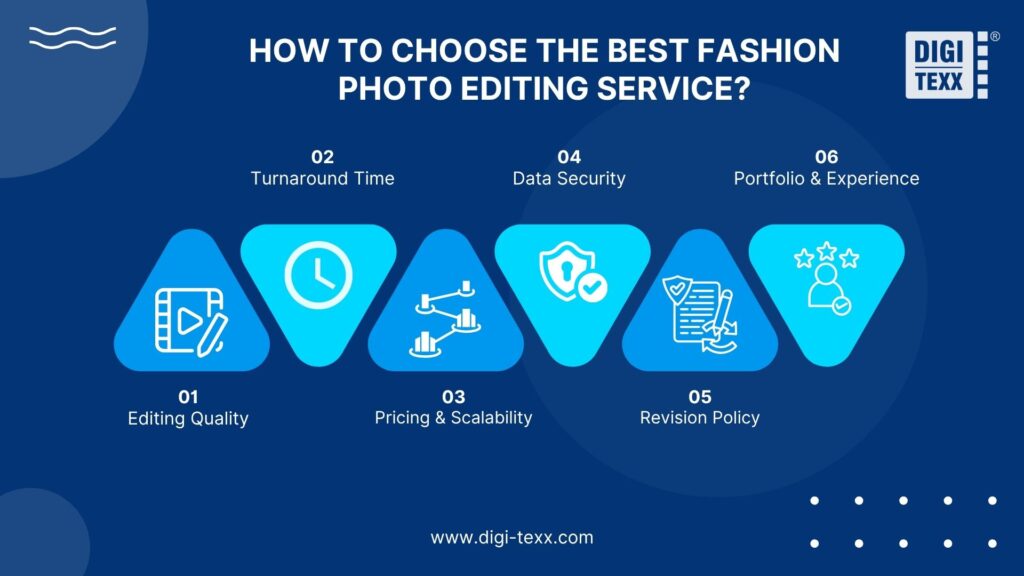
How To Choose The Best Fashion Photo Editing Service?
Choosing a provider requires more than reviewing a portfolio. Fashion businesses should assess whether the service can consistently meet their technical, creative, operational, and security requirements.
Editing Quality
Request representative samples that resemble the actual project. For example, if the project involves ecommerce apparel, review garment retouching, color accuracy, background removal, and edge quality rather than relying only on editorial portraits.
Turnaround Time
Ask how turnaround time is calculated and whether the provider can support peak workloads. A provider that handles normal volumes well may still struggle when a seasonal collection generates a much larger batch.
Define:
- Standard turnaround
- Rush processing
- Batch delivery
- Revision time
- Quality-control time
Pricing And Scalability
Pricing structures vary by editing complexity, volume, and required turnaround. Some providers charge per image, while others use project-based or volume-based models. When comparing providers, ensure that the quoted price covers the actual required work. A low per-image price may not be comparable if complex retouching, revisions, masking, or color correction are charged separately.
Data Security
Businesses should understand how image files are transferred, stored, accessed, and deleted.
Questions to ask include:
- How are files transferred?
- Who can access project files?
- How long are files retained?
- Are files encrypted during transfer and storage?
- What controls govern employee access?
- How are completed files and temporary copies handled?
This becomes particularly relevant for commercial campaigns that contain unreleased products or confidential creative assets.
Revision Policy
A clear revision process reduces friction between the brand and editing team.
Before starting production, establish:
- What counts as a revision
- How revision requests are submitted
- How many revision rounds are included
- Who approves the final images
- How changes to the editing brief affect pricing or turnaround
Portfolio And Experience
A portfolio should demonstrate experience with the type of images the business actually produces.
Look for examples involving:
- Apparel
- Models
- Ecommerce catalogs
- Editorial campaigns
- Accessories
- Beauty photography
- Ghost mannequin images
- High-volume commercial photography
The most relevant portfolio is more valuable than a large portfolio with unrelated work.
>>> See more:
- Wedding Photography Retouching: Professional Techniques & Services
- Architectural Photo Editing Service in the US | Top 5 Providers
- Car Photo Editing: Complete Guide To Professional Vehicle Photos
Why Choose DIGI-TEXX For Fashion Photo Editing Services?
For businesses evaluating an external provider, the focus should be on workflow fit rather than simply the number of editing techniques offered.
DIGI-TEXX can position its fashion photo editing offering around the operational requirements of businesses that need consistent image processing, scalable production, and structured quality control.
Relevant considerations for evaluating the service include:
- Ability to support recurring image-processing workloads
- Defined quality-control processes
- Standardized production workflows
- Support for different image-editing requirements
- Capacity to handle changing project volumes
- Secure handling of client files
- Clear communication and revision procedures
For enterprise buyers, these operational factors can matter as much as the visual editing capability itself. A provider may produce excellent individual images but still be unsuitable if it cannot maintain quality, turnaround, and file-handling standards across a large production workflow.
DIGI-TEXX should therefore substantiate any specific claims about editing capacity, certifications, turnaround times, security controls, team size, or client results with current company documentation before publication. This is particularly important for an EEAT-focused B2B article because unsupported service claims can weaken trust.
Fashion Photo Editing Trends In 2026
Fashion image post-production is increasingly combining traditional retouching with AI-assisted tools. The practical change is not that AI eliminates professional editing, but that selected repetitive tasks can be completed faster while editors retain control over the final result.
AI-Assisted Masking And Selection
AI-assisted masking can speed up the isolation of people, garments, backgrounds, and other image elements. Capture One, for example, currently offers people masking designed to identify skin, hair, eyes, and facial features, including batch workflows. Luminar Neo also provides AI-based masking and background removal capabilities.
Automated Background Editing
Background removal and replacement are increasingly suitable for automation when image conditions are predictable. However, automated selections still need review for difficult edges and complex compositions. Human quality control remains useful where accuracy matters.
Greater Use Of Reference-Based Editing
Maintaining a consistent visual style across a campaign is becoming easier with tools that can apply or match an established look. Capture One’s Match Look feature, for example, can transfer a style or edit from a reference image to other photographs as a starting point for color grading.
More Structured High-Volume Workflows
Fashion businesses increasingly need post-production workflows that connect photography, editing, review, collaboration, and delivery. Capture One’s current studio workflow includes features for high-volume shoots, collaboration, sessions, metadata, selections, and export recipes. For businesses outsourcing editing, the same principle applies: the provider should be evaluated as part of the broader content-production workflow, not simply as an image editor.
AI As An Editing Assistant, Not A Quality Guarantee
AI can accelerate repetitive tasks, but automated output is not automatically correct. Fashion images can contain complex hair, fabric, jewelry, transparent materials, shadows, and fine garment details. These elements can require human review even when AI performs the initial selection or adjustment. The practical advantage comes from combining automation with clear specifications and quality control.
FAQs About Fashion Photo Editing Services
What Is The 80 20 Rule In Photography?
The 80/20 rule in photography is based on the Pareto Principle, which suggests that 80% of results often come from just 20% of efforts. In photography, this means that a small number of key factors, such as composition, lighting, editing techniques, and subject placement, can have the greatest impact on the overall quality of an image. By focusing on these high-value elements, photographers can improve their results more efficiently while saving time and resources.
What Is The Best App For Editing Clothing Photos?
The best app for editing clothing photos depends on the type of edit needed. Canva and Picsart are strong choices for AI-powered clothing edits, while Whering and Acloset are better for organizing outfits and creating digital wardrobe layouts.
How Much Do Fashion Photo Editing Services Cost?
Fashion photo editing service costs vary based on image complexity, editing requirements, turnaround time, and order volume. Most providers offer customized quotes tailored to each project’s needs. For accurate pricing and expert consultation, contact DIGI-TEXX at +84 28 3715 5325.
What Is Included In Fashion Photo Retouching Services?
Fashion photo retouching services typically include skin retouching, color correction, background editing, garment enhancement, makeup refinement, wrinkle removal, and image cleanup. Advanced services may also include ghost mannequin effects, hair retouching, and detailed image manipulation to create polished, professional-quality fashion images.
Fashion photo editing services are no longer just about improving images—they are a strategic investment in brand perception and sales performance. With the right editing partner, businesses can achieve consistent quality, faster turnaround times, and visually compelling content that stands out in a highly competitive fashion market. By choosing a professional provider like DIGI-TEXX, brands can confidently elevate their visuals, optimize production costs, and deliver impactful fashion imagery across eCommerce, marketing, and digital platforms.
DIGI-TEXX Contact Information:
🌐 Website: https://digi-texx.com/
📞 Hotline: +84 28 3715 5325
✉️ Email: [email protected]
🏢 Address:
- Headquarters: Anna Building, QTSC, Trung My Tay Ward
- Office 1: German House, 33 Le Duan, Saigon Ward
- Office 2: DIGI-TEXX Building, 477-479 An Duong Vuong, Binh Phu Ward
- Office 3: Innovation Solution Center, ISC Hau Giang, 198 19 Thang 8 street, Vi Tan Ward
Reference:
- GS1. (2025). GS1 product image specification standard. https://www.gs1.org/standards/gs1-product-image-specification-standard/current-standard
- GS1. (n.d.). Product image standards and guidelines. https://www.gs1.org/standards/product-image-standards-and-guidelines